Cutetalk
Designing real-time AI support for new mothers navigating the most vulnerable season of life
My role
Product Designer (Founding Team)
Led end-to-end UX design (research → IA → interaction → usability testing)
Partnered closely with engineers and computer vision scientist
Overview
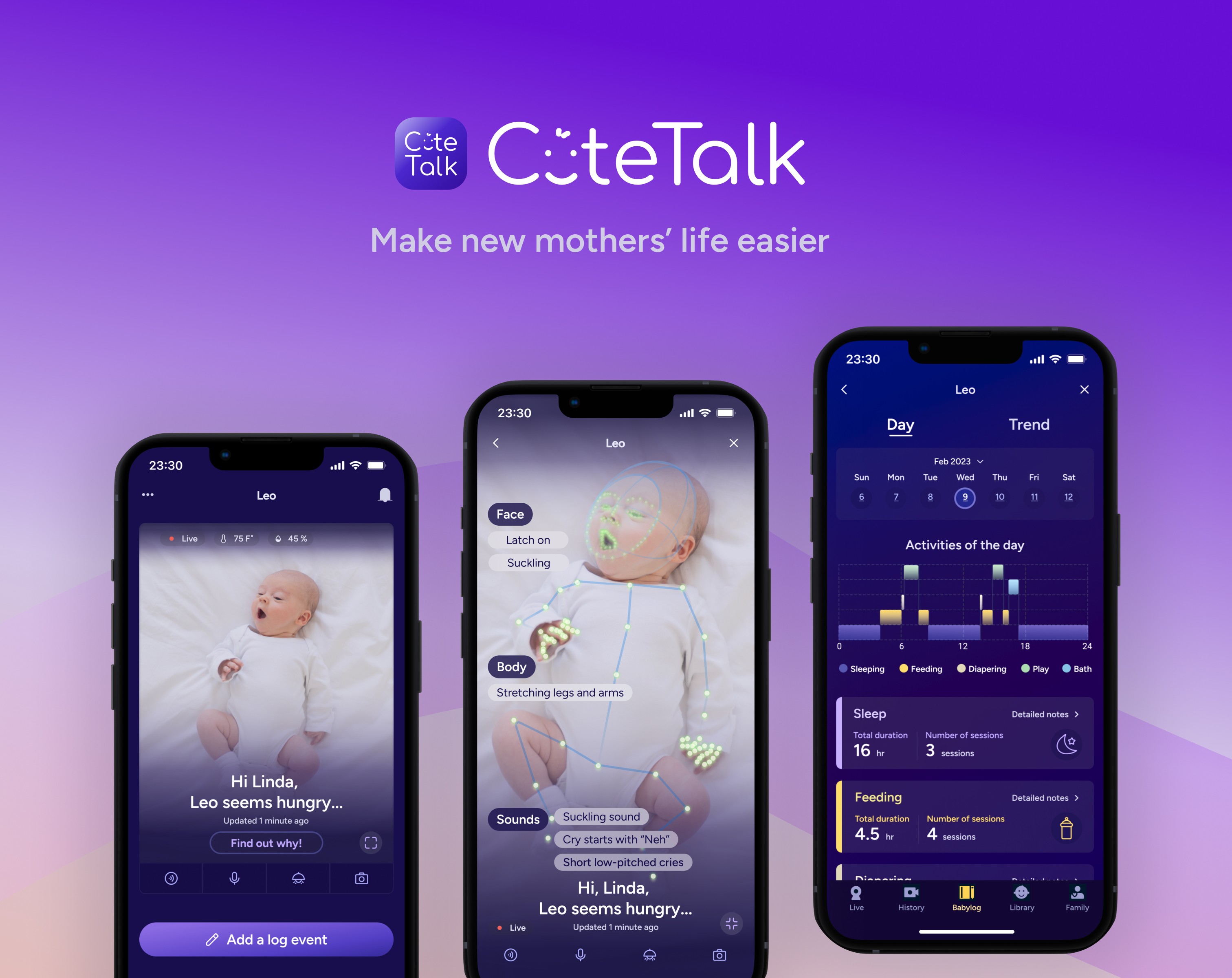
CuteTalk is an AI-driven mobile app that uses live video data to analyze a baby’s facial expressions, body movements, and sounds, providing real-time guidance to help new mothers soothe their baby with confidence.
This project started with a deeply human question:
What if we could turn uncertainty into clarity — in the exact moment a mother needs it most?
As the design lead, I drove the end-to-end product process — from research and problem framing to MVP definition, interaction design, prototyping, and usability testing.
Results
Led the design of a real-time baby insight system improving user satisfaction (8/10)
Increased trust in AI-driven insights by +30% (4.5/10 → 7.5/10)
Reduced maternal loneliness scores by over 60% during stressful caregiving moments
Transformed AI feedback into emotionally supportive, confidence-building experiences
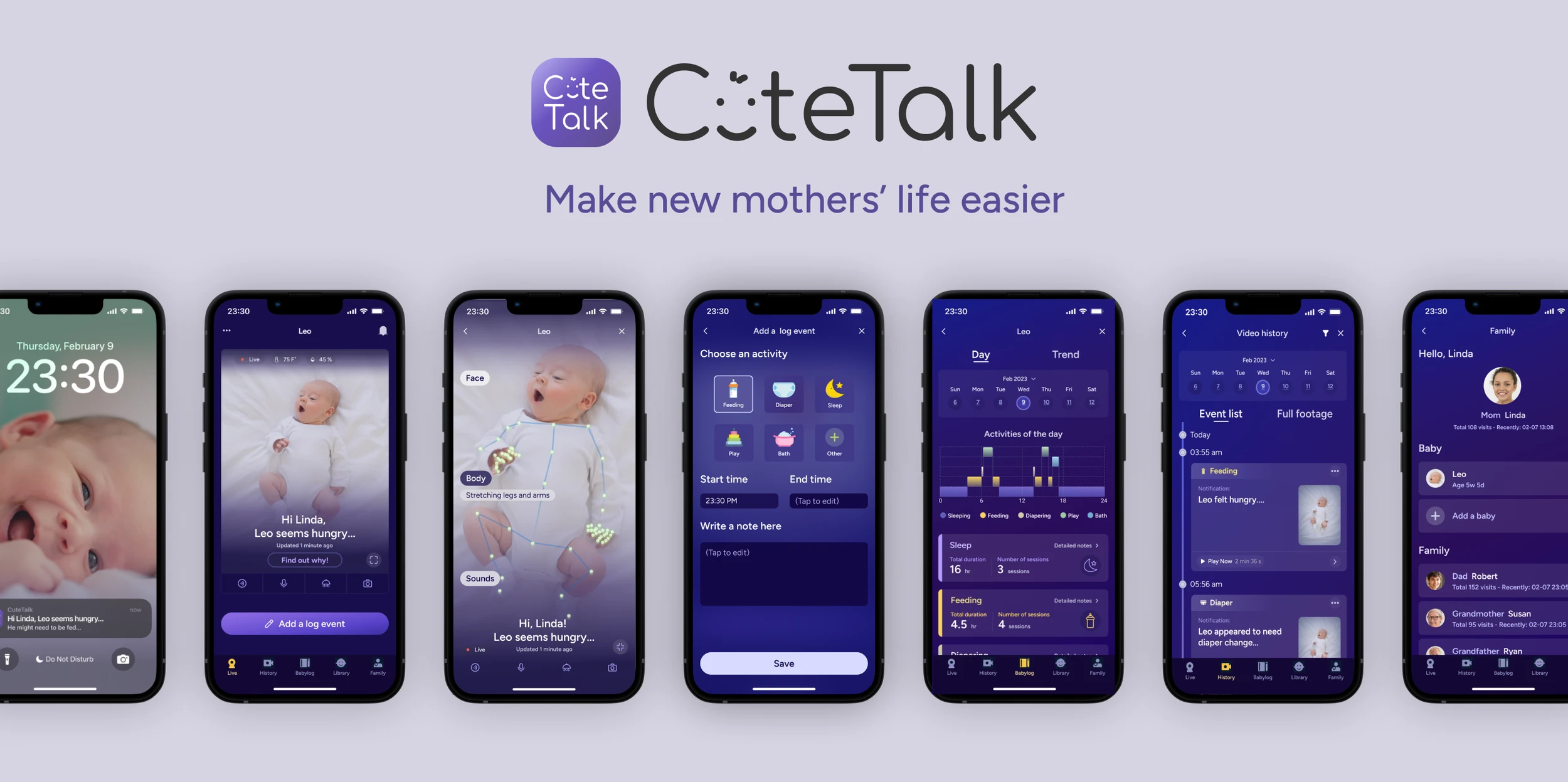
Real-time baby state detection
Live video stream: Real-time viewing of the baby.
Baby states: Algorithms analyze camera data to show users their baby's possible status, needs, and thoughts.
Find out why: Click to know how the system identifies the baby's facial expressions, body movements, and sounds on an immersive screen.
This immersive transparency layer increased user trust in AI from 6.5/10 to 7.5/10.
We didn’t just show results. We showed reasoning.
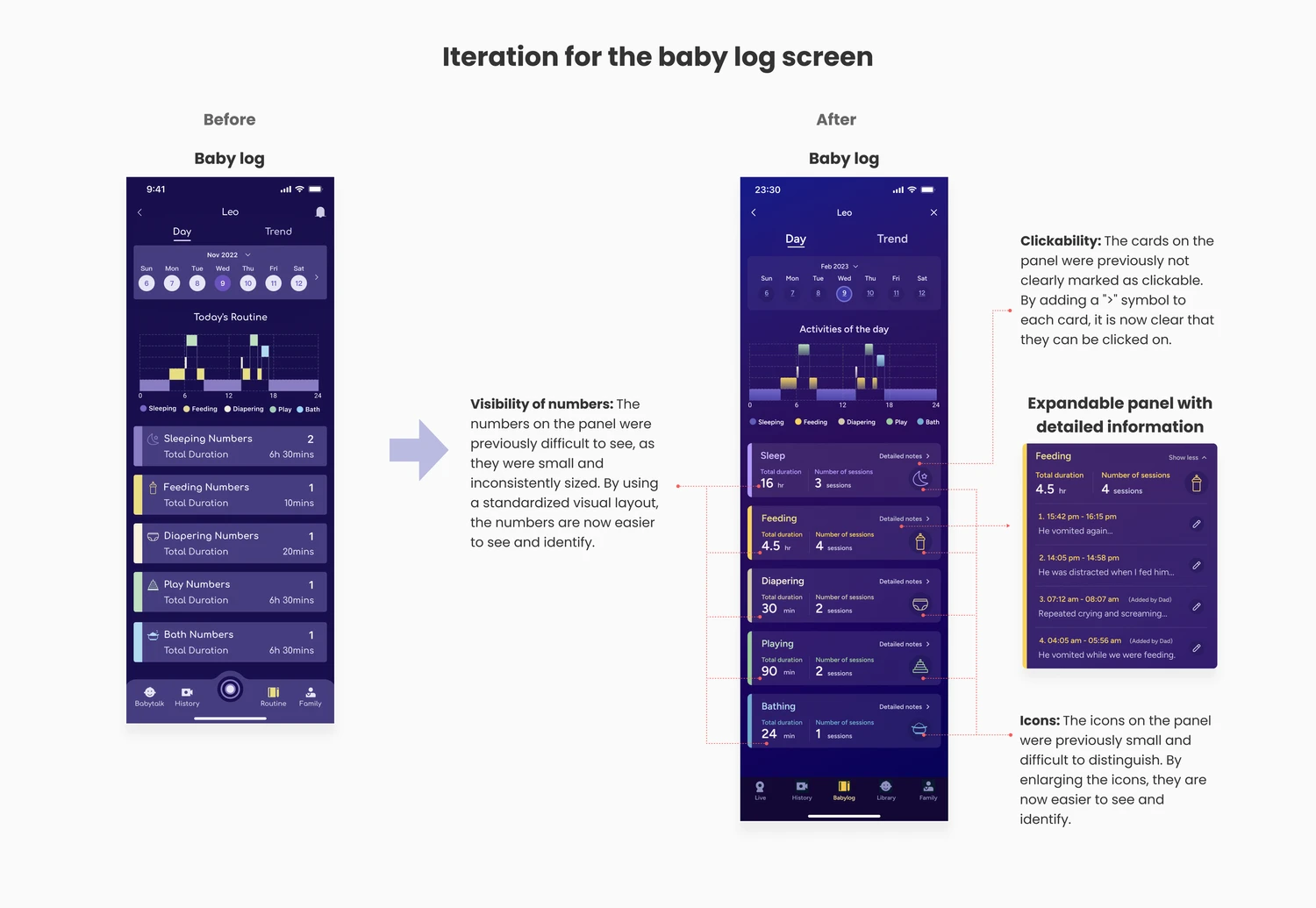
Baby log & pattern visualization
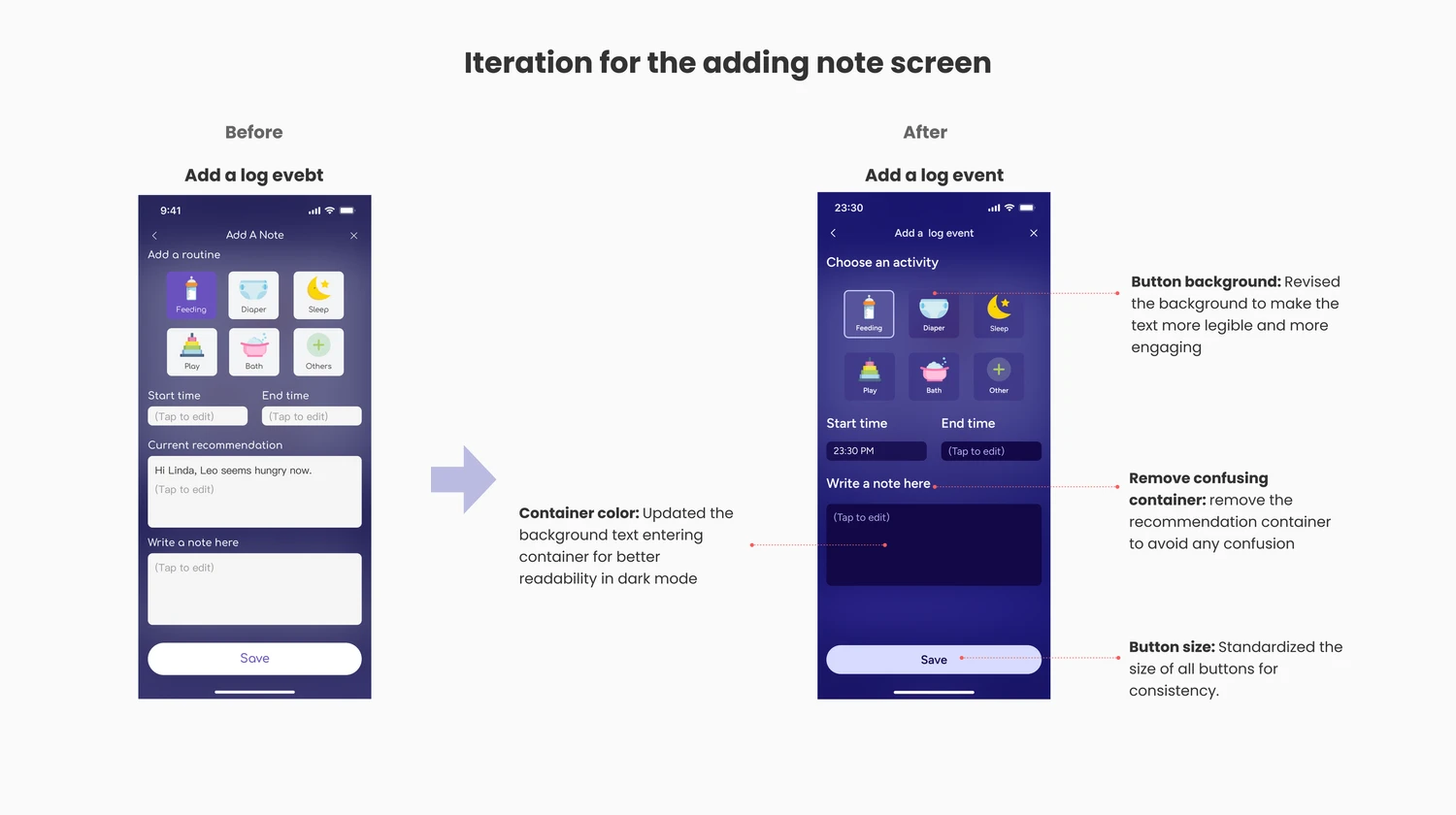
Baby log: Users can add events to the baby log, such as feedings, diaper changes, etc.
Auto-generated diagrams: The system generates a comprehensive baby log with diagrams, helping users understand the baby's living patterns.
Minimizing user friction: Segregate user-entered data from system-generated content for better transparency
Instead of a chaotic stream of notes, we created calm, digestible insights.
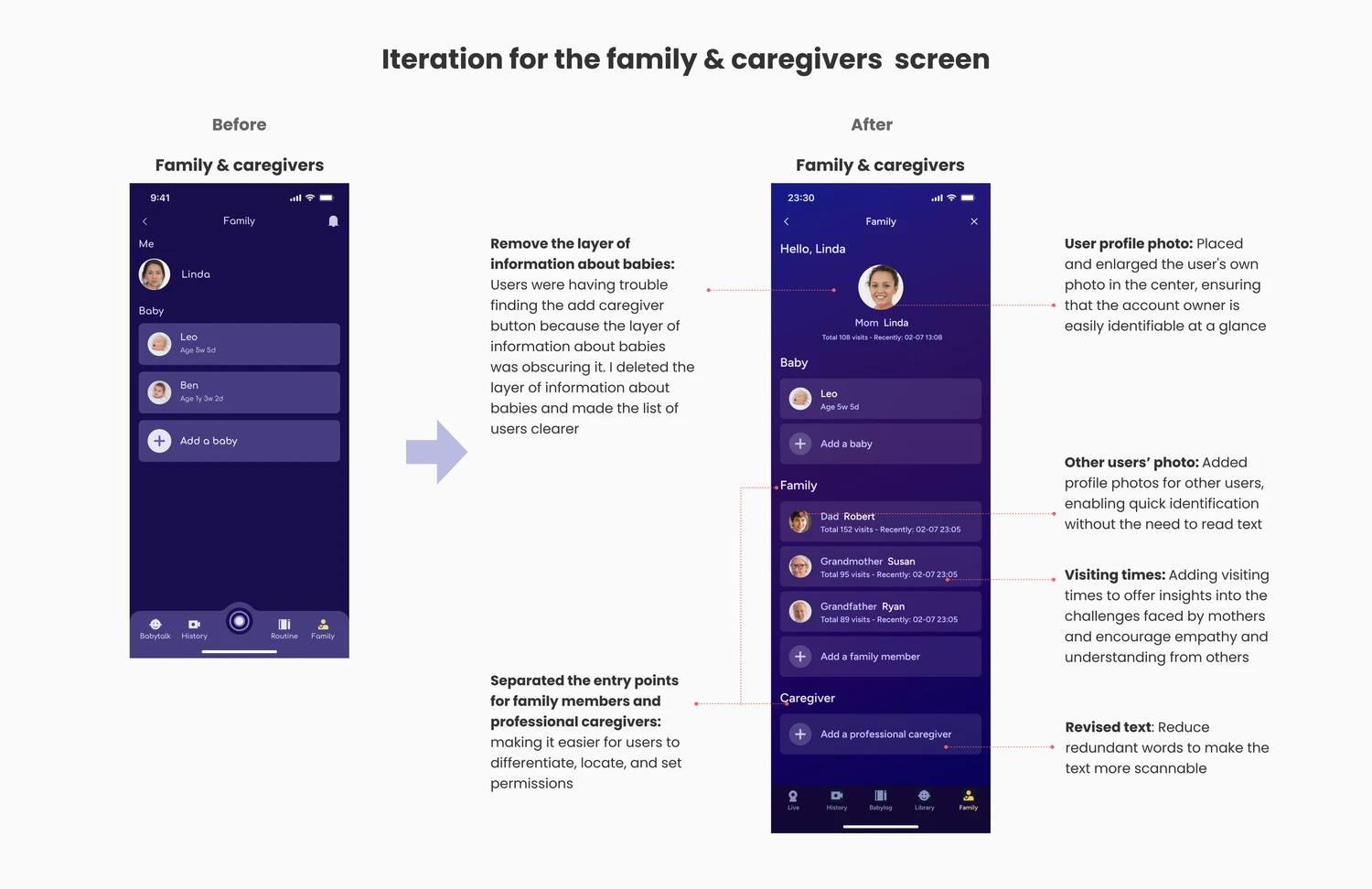
Shared caregiving
Invite family or caregivers: Mothers can invite other caregivers by providing their email addresses. The app sends invitations for them to join and view the baby.
Visit times: Family members’ and caregivers' visit times are displayed on the list, serving as a reminder for family members to provide support, share duties, and offer emotional assistance to mothers, reducing their burden and promoting a sense of support.
Problem
When love meets ethuansation
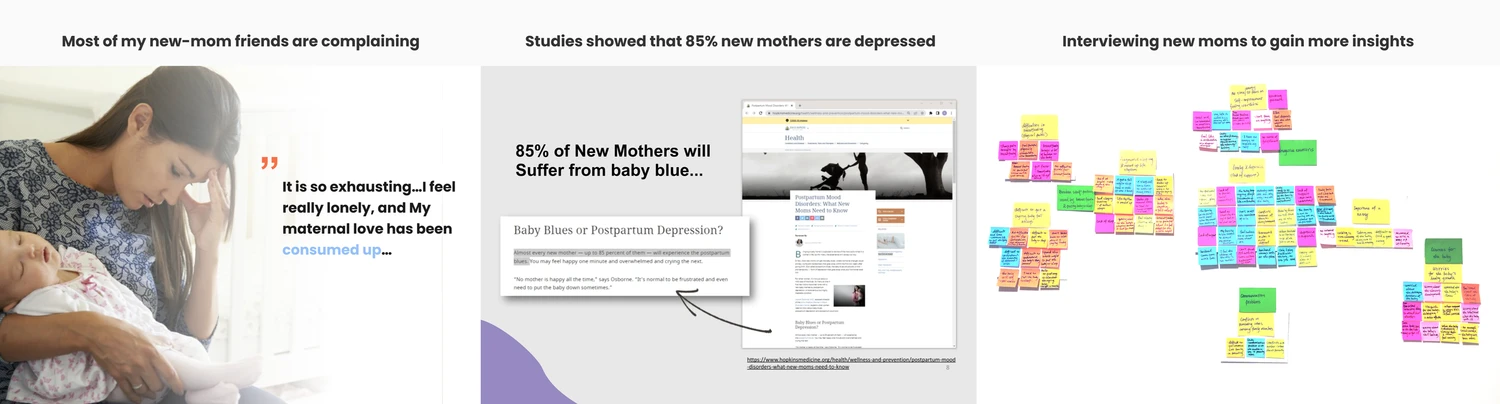
Before this project, I naïvely believed motherhood was mostly joy. But conversations with friends — and deeper research — revealed a different story.
According to Johns Hopkins Medicine, up to 85% of new mothers experience postpartum emotional distress.
User interview
Through interviews with 5 new mothers, I heard things like:
“The baby is screaming for the 100th time… I feel like I’m failing.”
“When my husband comes home, he’s on his phone before I can even ask for help.”
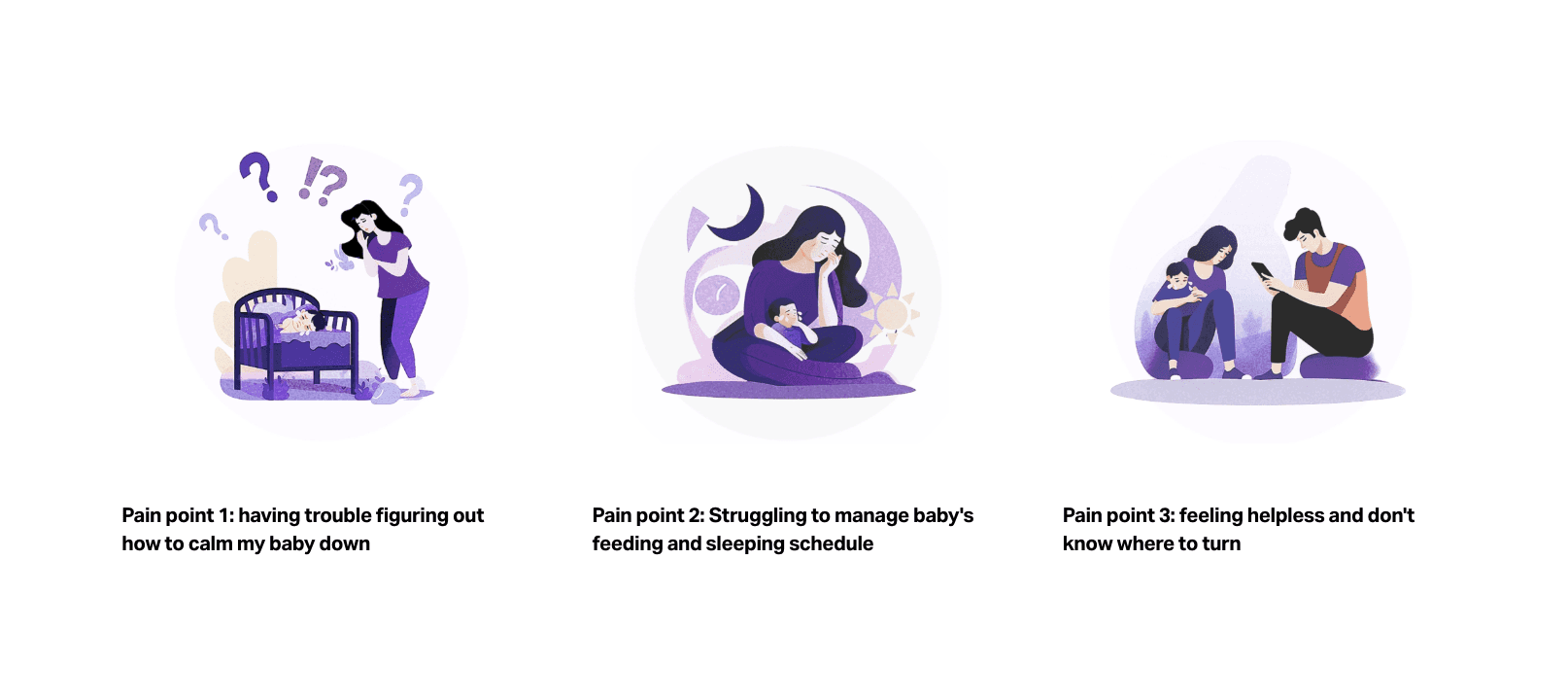
After affinity mapping and journey analysis, three core pain points emerged:
I don’t know why my baby is crying.
I feel anxious about feeding and sleep patterns.
I feel alone and unsupported.
Framing the opportunity
I translated the research into three clear design goals:
1. Real-time clarity: Support inexperienced mothers by interpreting their baby’s status live.
2. Baby pattern visibility: Help mothers understand feeding and sleeping rhythms to reduce anxiety.
3. Shared caregiving: Encourage family members and caregivers to participate actively.
The product vision became clear: CuteTalk would act as a calm, intelligent co-pilot during overwhelming moments.
Defining the MVP
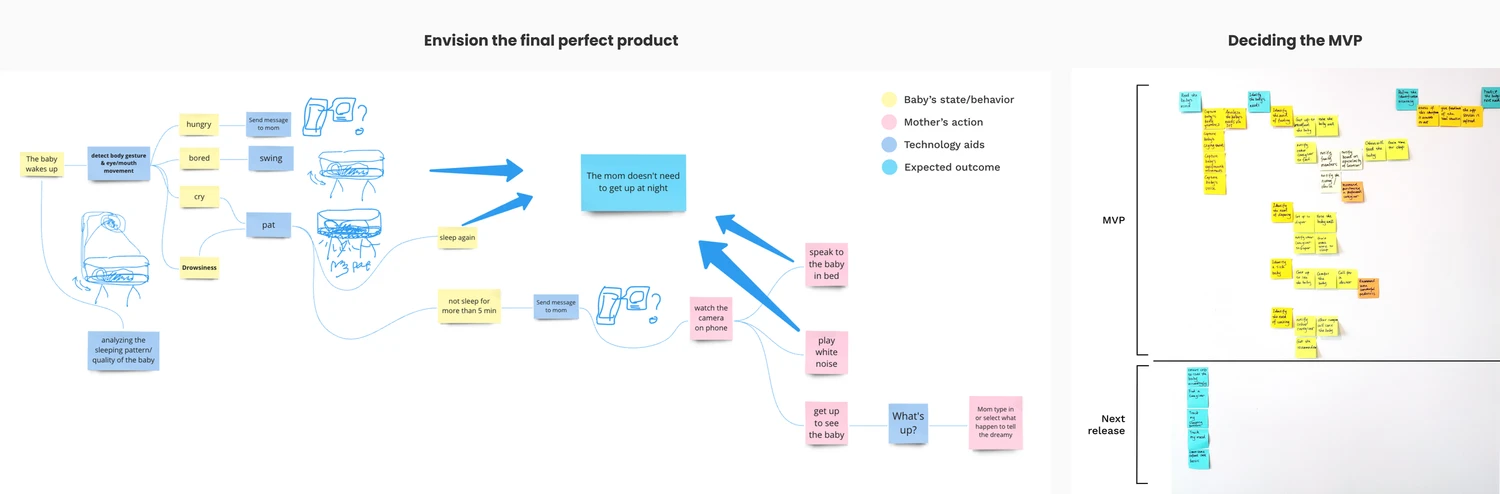
To explore solutions, I ran five 8-minute Crazy Eight sessions, generating 40 raw concepts in 40 minutes.
After a voting session with my team and feasibility discussions, one direction stood out:
A smart camera system that analyzes baby behavior and translates it into actionable insight.
But before committing, I validated feasibility with:
3 computer vision researchers
2 senior engineers
They confirmed that modern motion sensing and low-light detection were capable of reliably detecting infant movement patterns.
That technical validation gave the product credibility and gave me the confidence to design boldly.
Designing the system
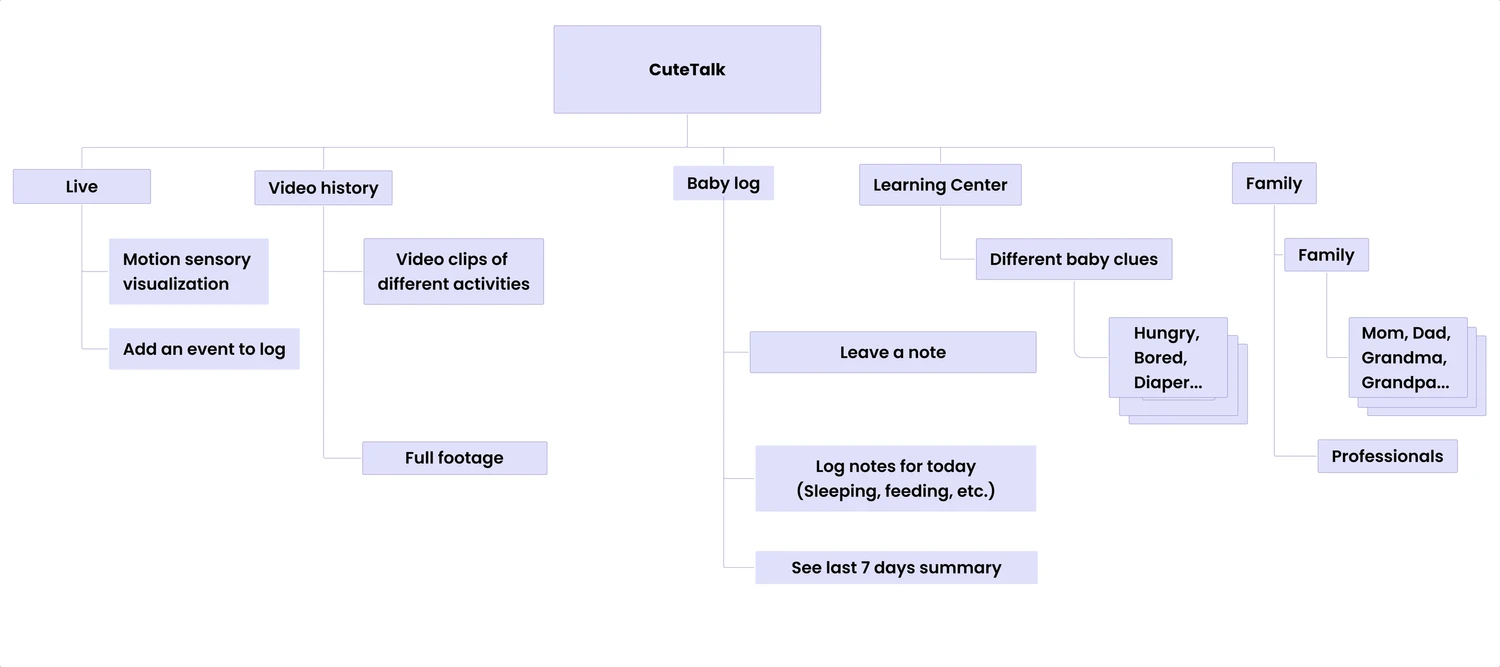
Rather than designing isolated features, I structured CuteTalk as an ecosystem built around five core pillars:
Live Video – Real-time monitoring with AI state detection
Video History – Replay and pattern reflection
Baby Log – Manual input for feedings, diaper changes, etc.
Learning Center – Educational resources
Family – Shared access for caregivers
The information architecture balanced two forces:
System-generated AI insights
User-entered baby data
To build trust, I intentionally separated these visually.
Transparency became a design principle.
Because when AI enters caregiving, clarity isn’t optional; it’s ethical.
Mapping the user flows
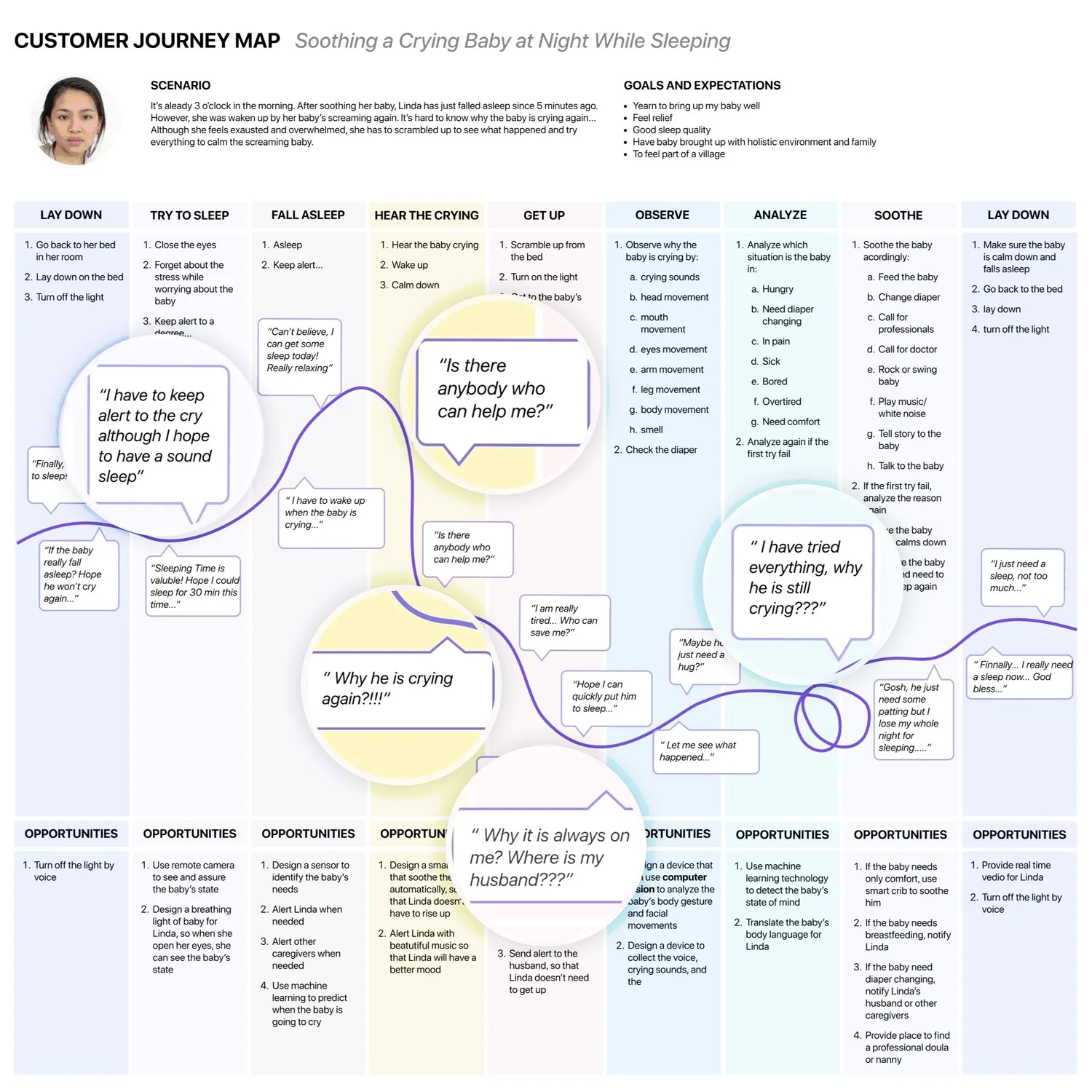
Before designing screens, I mapped the emotional and behavioral journey of a sleep-deprived mother in real moments of stress.
I identified the critical red routes: opening the app during a crying episode, checking the baby’s state, understanding “why,” logging an event, and inviting support.
By mapping trigger → intention → action → feedback, I reduced cognitive load, prioritized AI insights, and ensured the experience moved mothers from uncertainty to reassurance.
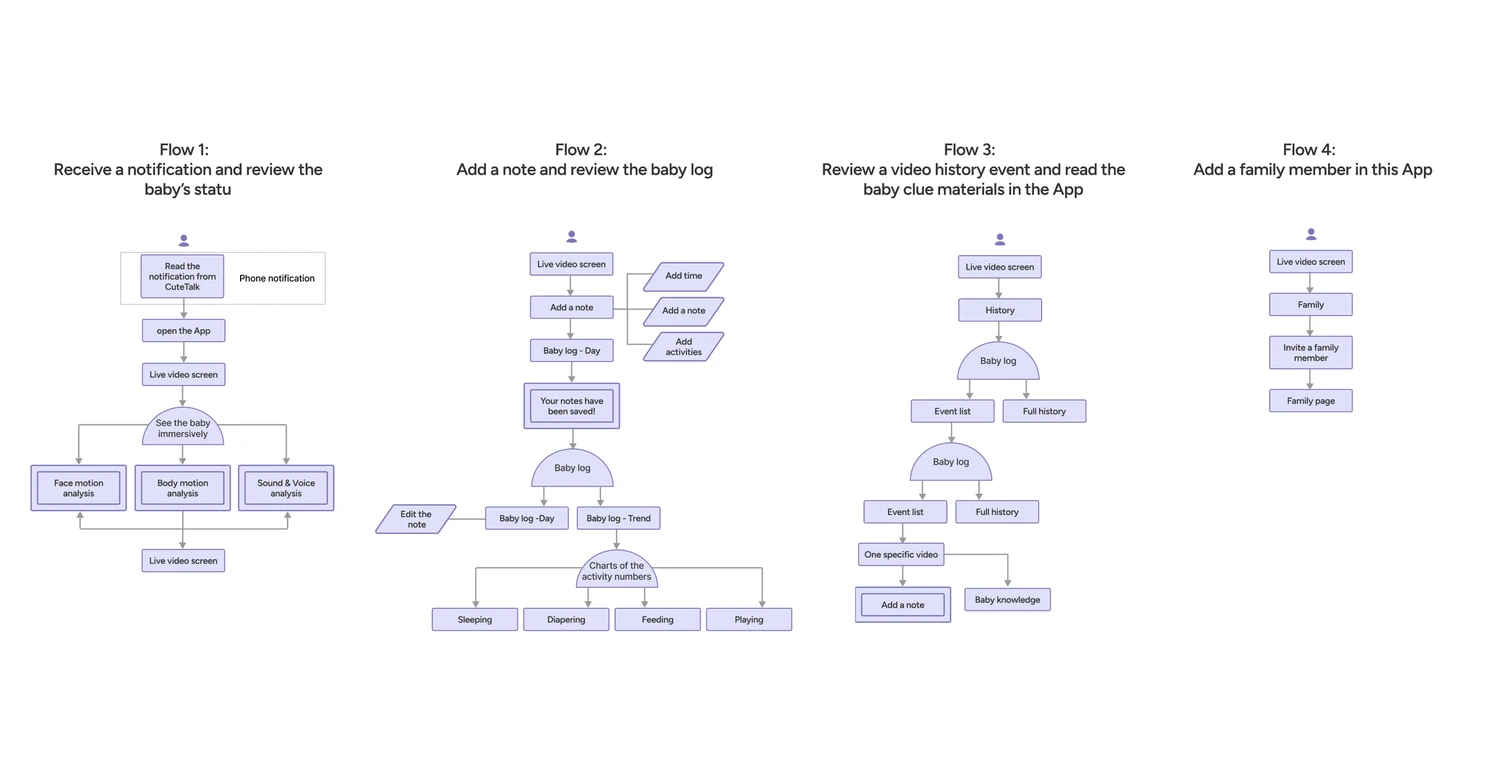
Based on the mapped user flows, I sketched the critical screens along the primary paths and translated them into a low-fidelity prototype.
I tested the prototype with five users to validate clarity, navigation logic, and information hierarchy. The feedback revealed areas of hesitation and confusion, allowing me to refine the flows before evolving them into structured wireframe flows.
This early testing ensured the foundation was solid before investing in higher-fidelity design.
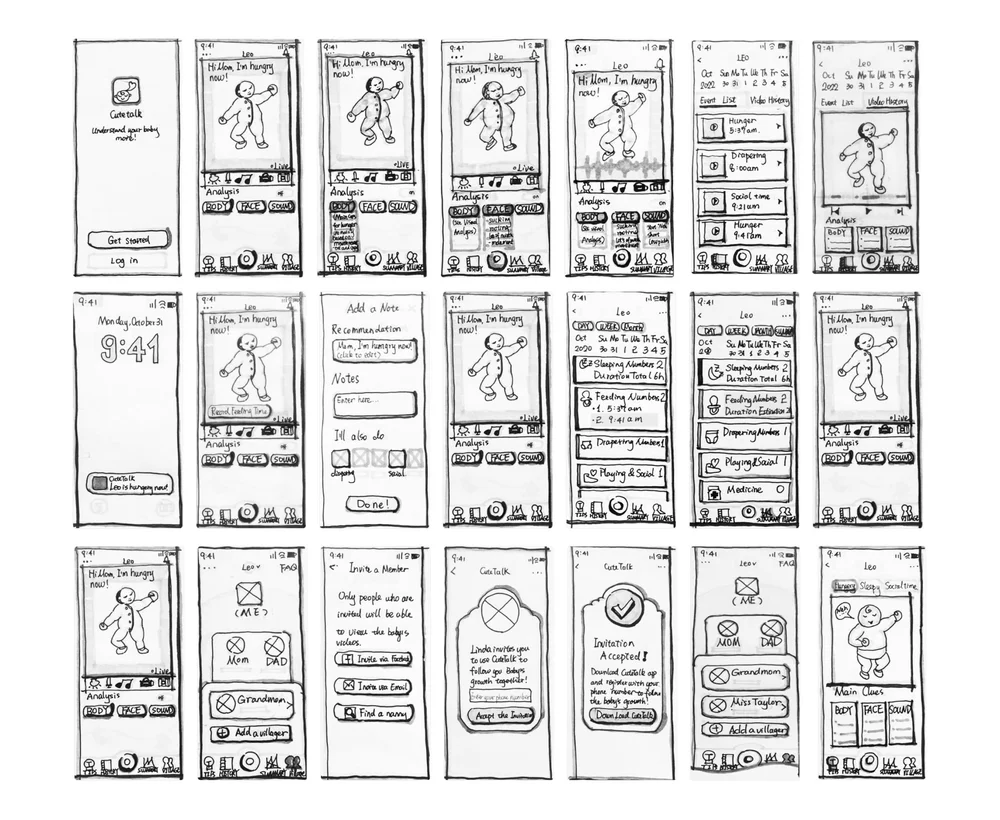
Based on the feedback gained from the first round of user testing with the low-fidelity prototype with sketches, I refined the screen designs and created four wire flows.
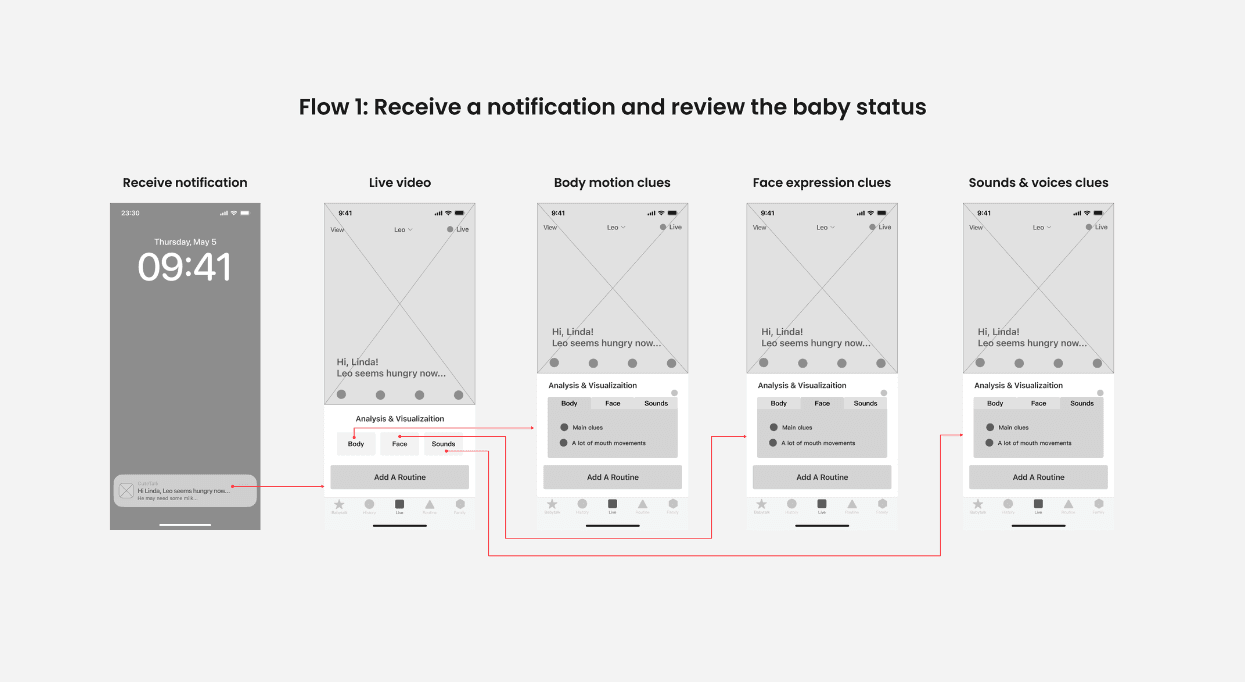
After creating the wireframes, I refined and iterated on the design, resulting in the first version of the high-fidelity prototype. Subsequently, I conducted a second round of usability testing to gather valuable user insights, which allowed me to make further improvements to the design before developing the final version of the high-fidelity prototype.
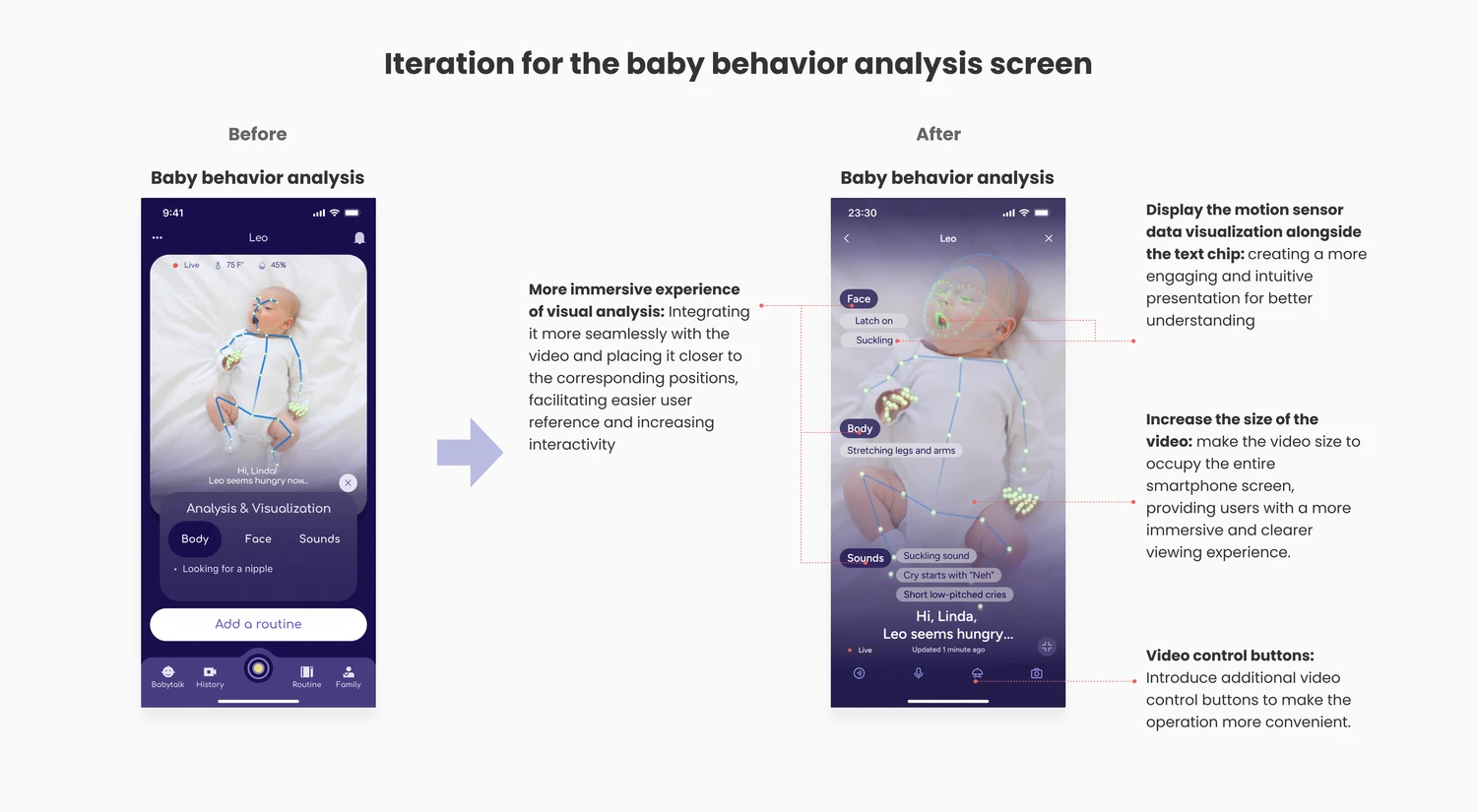
Satisfaction: 8/10 (n=6)
Recommendation: 7.75/10 (n=6)
Helpfulness in understanding baby behavior: 8/10 (n=6)
Helpfulness in understanding living patterns: 7.5/10 (n=6)
Trust in AI improved significantly when data visualization explained how insights were generated (+30% from 4.5/10 to 7.5/10).
What I learned
Designing from zero to one
This was a true 0→1 build — from identifying an emotional gap to delivering a validated, high-fidelity prototype.
It strengthened my ability to move from ambiguity to structure, from intuition to system, and from idea to execution.
Empathy is a discipline
Listening deeply to new mothers changed how I defined success. It wasn’t about adding functionality. It was about reducing anxiety. That shift in perspective guided every decision that followed.
Empathy isn’t a soft skill. It’s a strategic one.
Detail creates safety
Dark mode legibility.
Motion clarity.
Visual hierarchy.
In emotionally sensitive contexts, micro-decisions carry emotional weight. A slightly confusing label or crowded layout can amplify stress.
I learned that thoughtful details don’t just polish a product; they create psychological safety.
Designing AI through collaboration
Great AI products are never designed in isolation.
Early in the process, I proactively reached out to computer vision scientists at Meta and senior developer collaborators to validate feasibility and understand system constraints. By aligning on detection accuracy, latency, and confidence thresholds upfront, I ensured the UX vision was technically grounded and realistically scalable.
This experience reinforced something I deeply believe:
The best AI experiences happen at the intersection of empathy, engineering, and shared curiosity.