From manual to AI-powered self-service: rebuilding Bookiea’s class creation workflow
97% faster setup, 3× teacher onboarding, +42% satisfaction
0%
0%
Reduction in class setup time
0X
0X
Teachers onboarding
0
0
Increase in user satisfaction
My role
Product Designer (Founding Team)
Led end-to-end UX design (research → IA → interaction → usability testing)
Defined product structure in the absence of a PM
Partnered closely with founders and engineers
Planned and conducted usability testing and metrics analysis
Overview
Bookiea is an education SaaS platform that helps after-school program owners and independent teachers manage classes, schedules, and student enrollment.
About this case study
This case study documents the 0→1 design of Bookiea’s teacher self-service class creation experience, from early product definition to MVP launch.
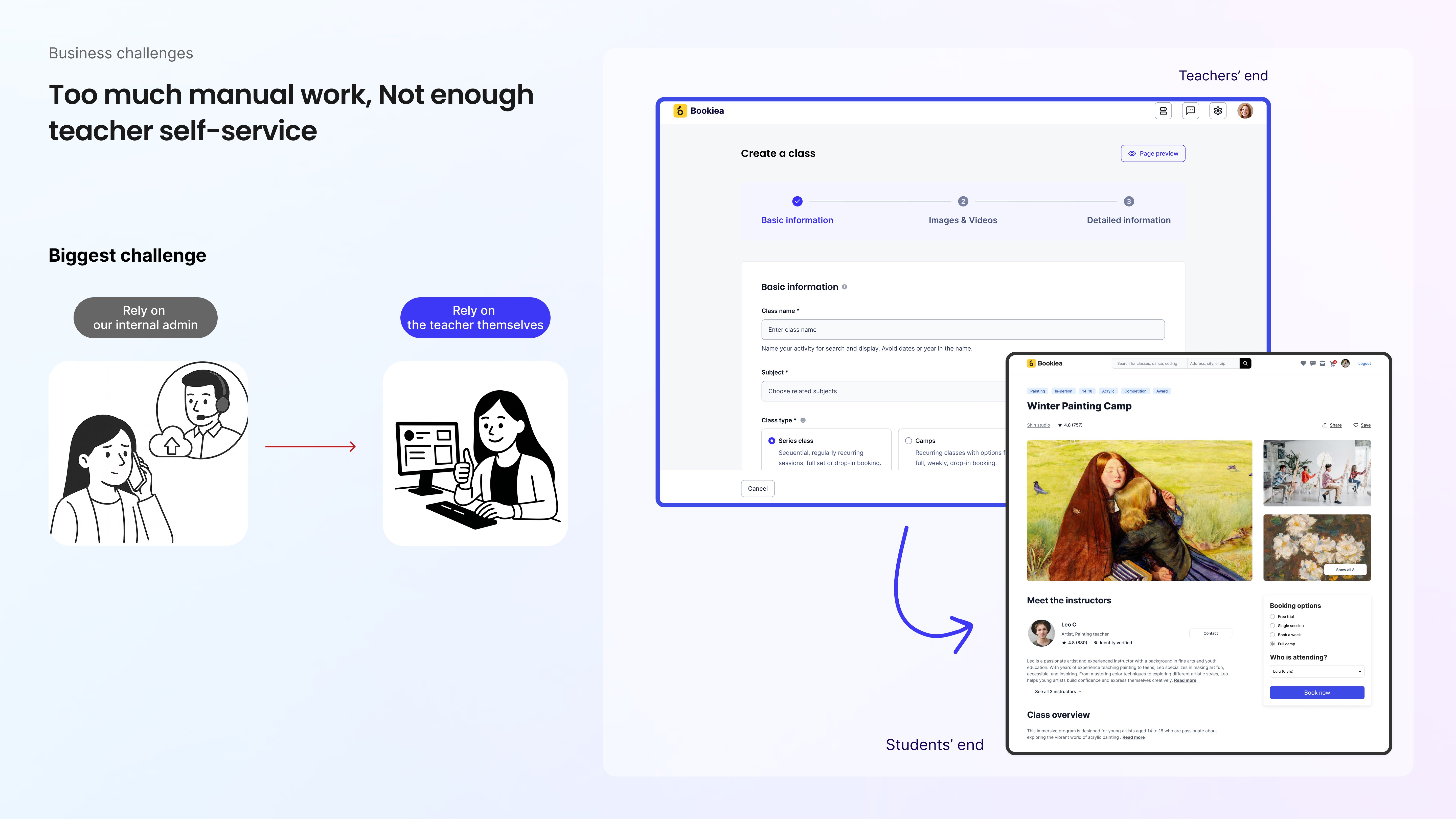
When I joined the project, class creation relied entirely on manual operational support. Teachers had to email or message the team to publish or update classes—making the process slow, error-prone, and fundamentally unscalable.
I led the end-to-end design of a self-service workflow that replaced this manual process with a scalable, intuitive system. This work demonstrates my ability to lead through ambiguity, apply system-level thinking, and deliver measurable business impact through research-driven design.
Timeline
Sep 2023 – May 2024
Problem
Bookiea’s early product relied heavily on manual processes for class creation and updates. Teachers had no way to publish or manage classes independently, resulting in additional time and effort for teachers and limiting the platform’s ability to scale.
Each update required repeated back-and-forth communication and manual intervention, increasing teachers’ time costs and creating a bottleneck for platform growth. As adoption increased, this model became unsustainable for both educators and the business.
Goals
Enable teachers to create and update classes easily and independently
Reduce operational load and increase the platform’s capacity to onboard more teachers and institutions
User research
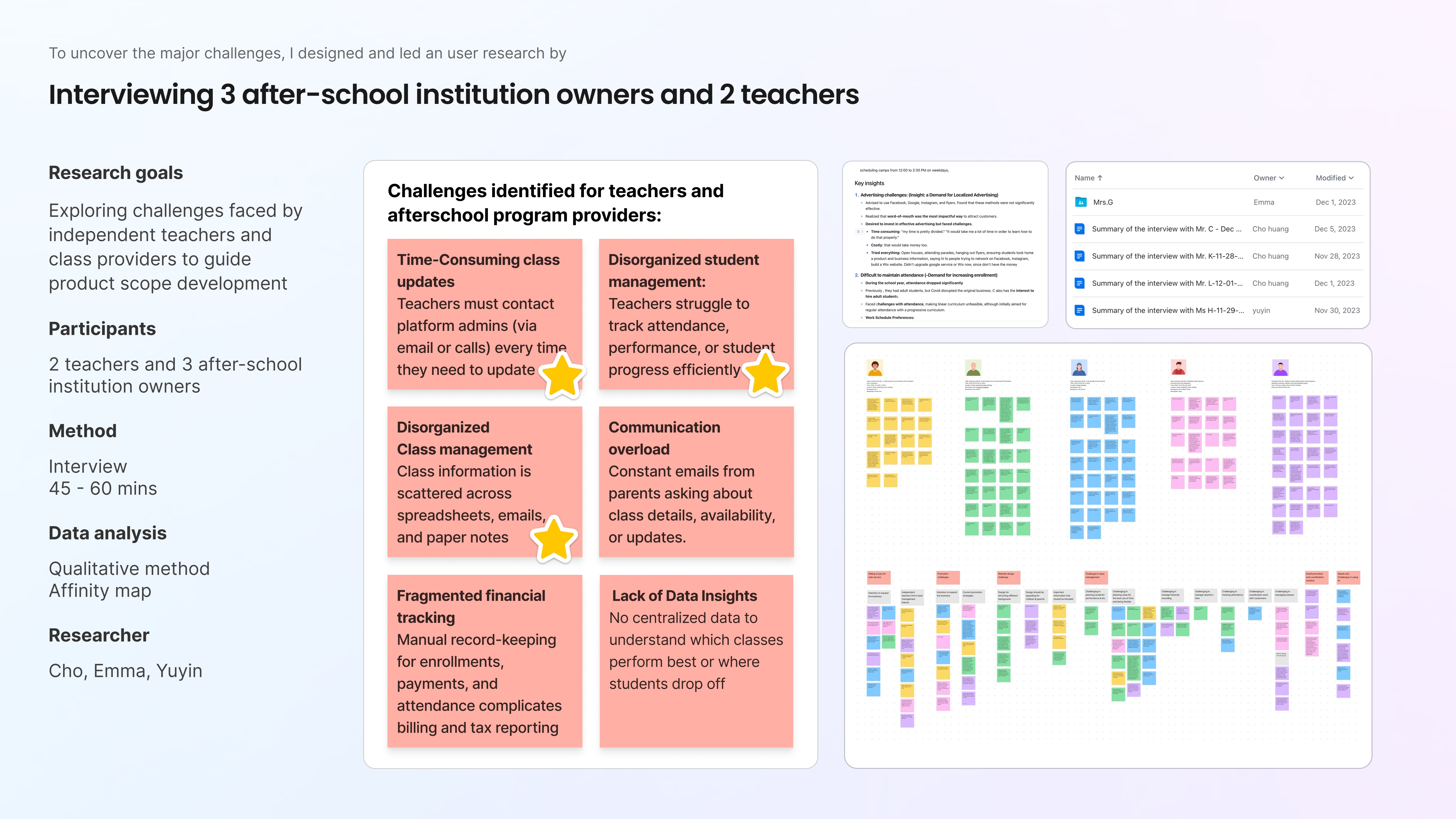
I led a team of 3 conducted five moderated 45–60 minute interviews with:
3 after-school program owners
2 independent teachers
Each session focused on how teachers currently create, update, and manage classes and students. I synthesized insights using affinity mapping to identify recurring patterns and systemic friction points.
Key insights
Three issues directly limited teacher autonomy and platform scalability:
Class updates were slow and support-dependent
Every change required contacting support, causing delays and operational overhead.
No clear class-creation structure
Teachers didn’t know what information was required or in what order, often searching for details mid-process.
No single source of truth
Class information was scattered across spreadsheets, Notion, emails, and notes—creating cognitive load and errors.
These findings revealed that the problem wasn’t “too many steps,” but a lack of clear structure.
Design questions
How might we help teachers create and publish classes easily, accurately, and independently?
Design approach
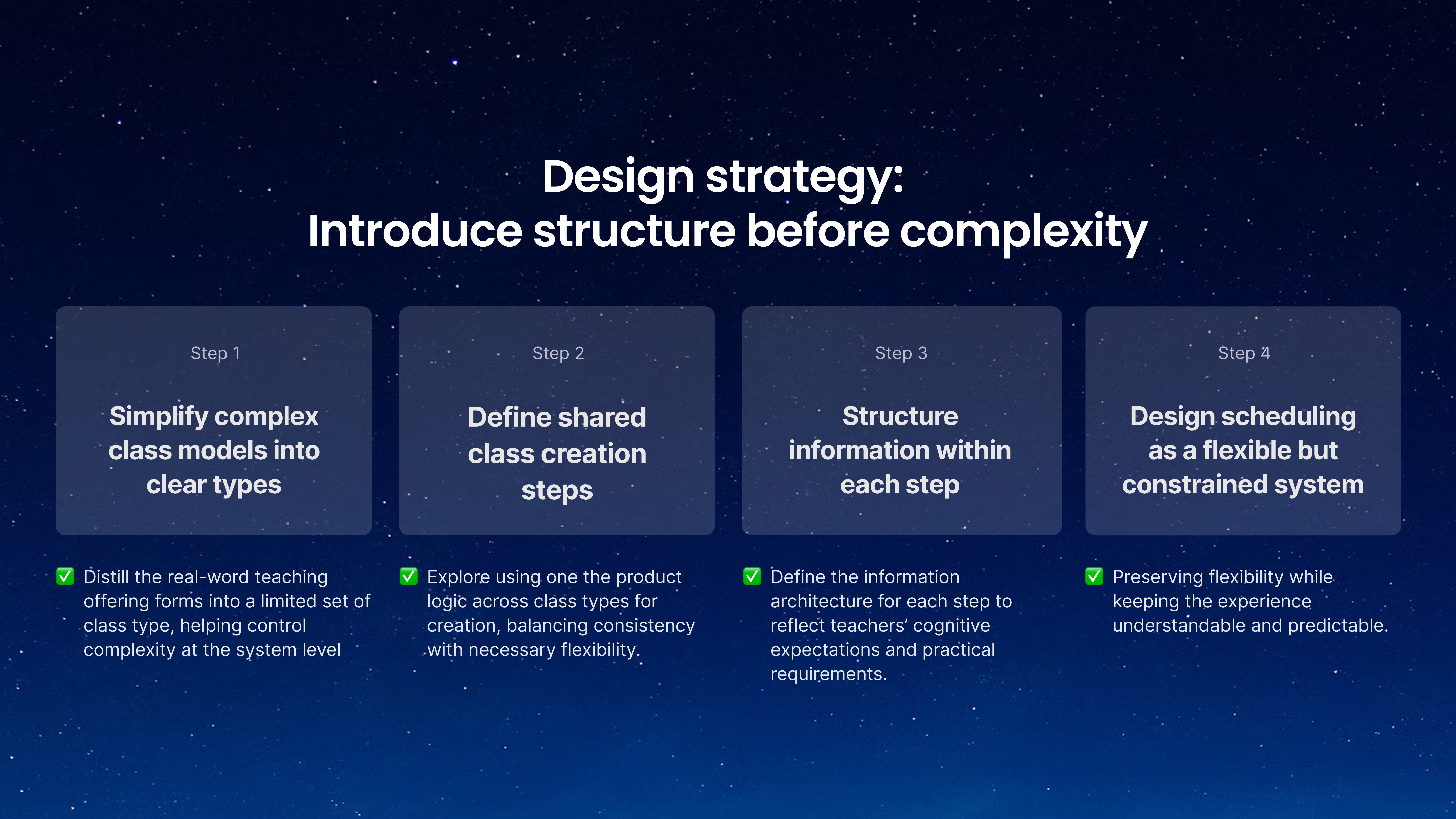
Rather than designing isolated screens, I treated this as a system-level problem.
I followed a layered approach:
Define shared creation steps across class types
Once class types were defined, I explored whether different classes could follow a unified creation flow, balancing consistency with necessary flexibility.
Reduce real-world complexity into clear class categories
I first assessed whether real-world teaching offerings could be distilled into a limited set of class types, helping control complexity at the system level.
Structure information within each step
Once the steps were defined, I designed the information architecture for each step, ensuring inputs matched teachers’ mental models and practical requirements.
Design scheduling as a flexible but constrained system
Finally, I tackled scheduling as a rule-based system, preserving flexibility while keeping the experience understandable and predictable.
This allowed me to introduce structure before complexity, creating a scalable foundation without overwhelming users.
Challenges
Challenge 1: Understanding and categorizing class models
Clarifying what the our product needs to support
At the start of the project, there was no clear product definition or PM. The challenge was product structure, not UI. I led the effort to define the foundational logic of class creation before designing interfaces.
I first needed to understand whether teachers’ real-world offerings could be distilled into a limited set of class types. To be more specific, we aimed to design a system flexible enough to handle diversity without fragmenting the experience.
To address this, I synthesized insights from another round of user interviews, market research (8 institutions), and competitor analysis (5 platforms). Despite surface differences, nearly all offerings could be reliably grouped into three core categories:
User interviews
Market research (8 institutions)
Competitive analysis (5 platforms)

I finally identified three core class categories:
Series & semester classes
Camps
Single events & flexible sessions
These categories surfaced in the UI as just three simple options. Behind that simplicity was extensive synthesis, trade-off, and structural thinking to ensure the categories were intuitive, mutually exclusive, and scalable.

Challenge 2: Defining shared class-creation steps
Once class models were defined, I explored whether these different types of classes could be created through a single, shared flow. My goal was to maintain a consistent experience while leaving room for necessary variation and future expansion.
To validate this direction, I audited 5 class-creation platforms (including ActivityHero, Sawyer, Bookwhen, Teamup, and Classmanager), focusing on how clear and coherent their flows were and how much cognitive effort they required.
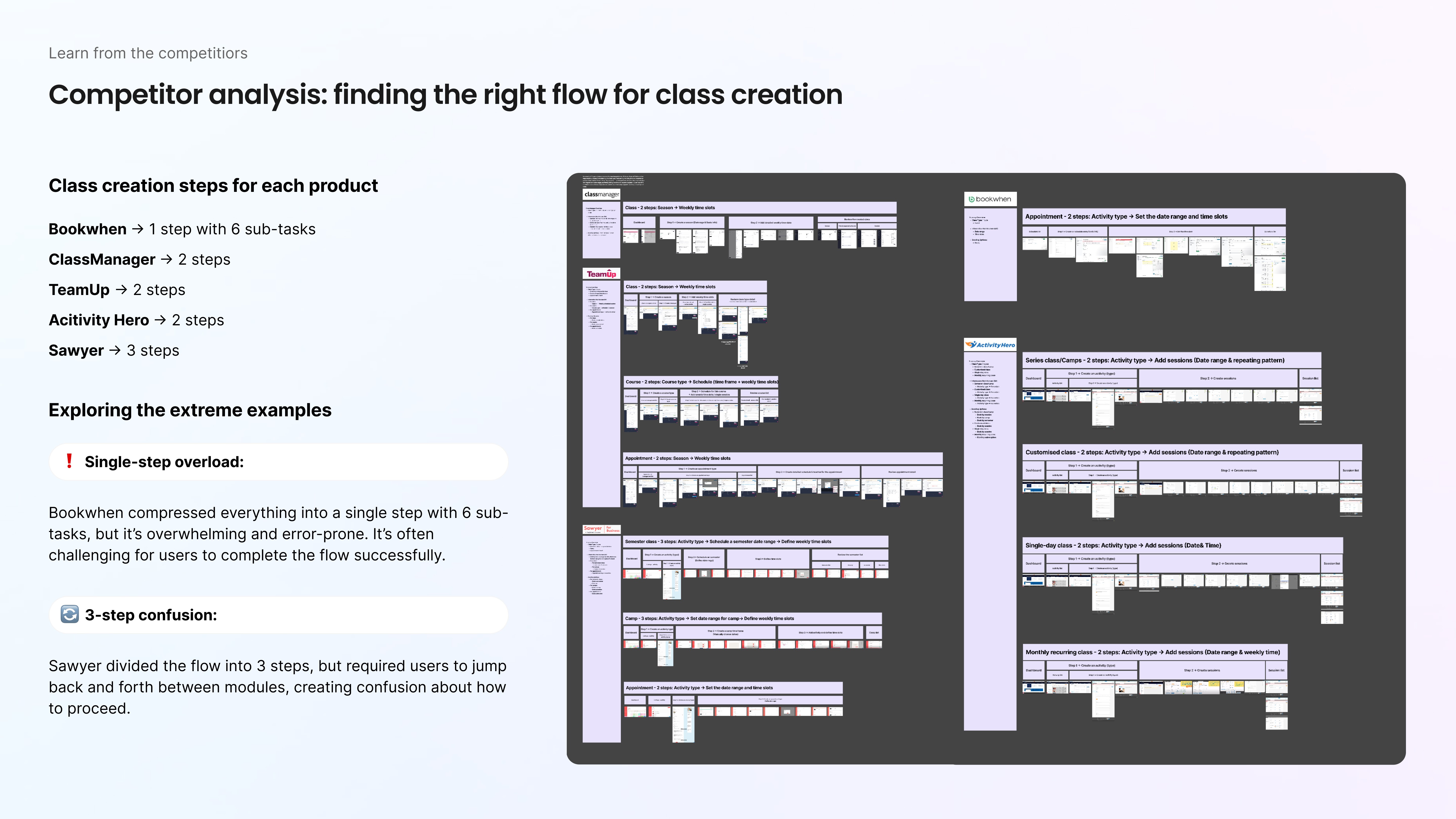
These platforms ranged from supporting only a single class type to supporting multiple types, each with a different creation strategy. Also, I found a clear pattern:
When platforms could reuse the same structure, they did.
When they couldn’t, they introduced additional, special-case steps, often at the expense of clarity and learnability.
Among the strongest examples, one structure stood out and was adopted by 3 out of 5 platforms: a two-step class-creation flow.
Class information — defining what the class is
Schedule setup — defining when it happens
I then validated this structure against all 3 identified class types and found that they could all follow this high-level framework, with variation handled within each step.
Based on this insight, I proposed a two-step class-creation flow that aligns with teachers’ mental models.
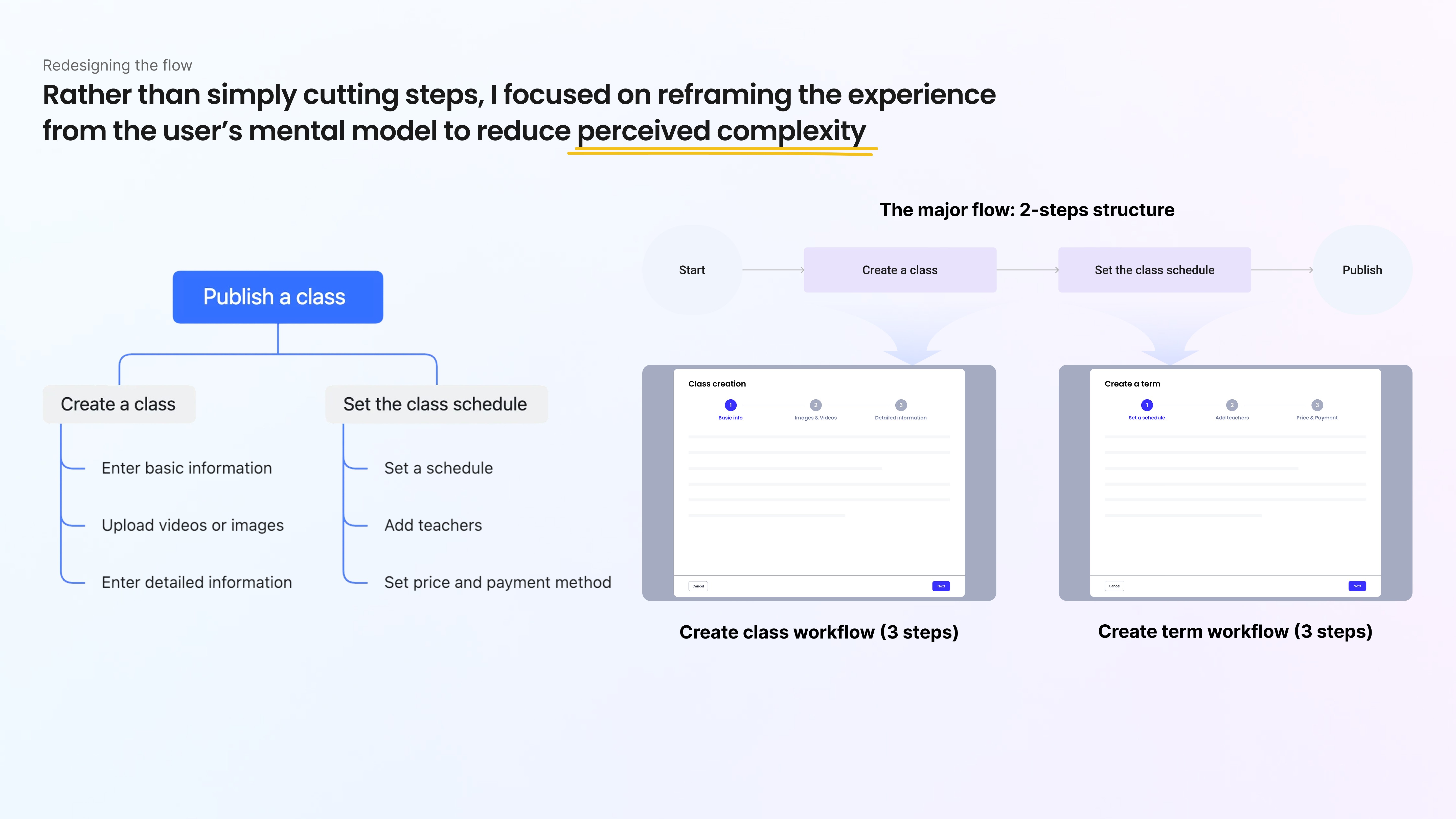
Challenge 3: Simplifying scheduling without losing flexibility
Scheduling was the most complex and cognitively demanding part of the class creation process.
Teachers needed flexibility, recurring sessions, multiple time slots, different enrollment models, but the business needed a system that was scalable, maintainable, and consistent across class types.
Defining the scheduling Model
Earlier, we identified three core class types, including Series, Camps, and 1+ Flexible classes, which together covered nearly all real-world teaching formats. Each reflected how teachers naturally plan their programs:
Series classes support long-term progression while allowing optional drop-ins.
Camps operate within fixed start and end dates, with multiple enrollment models (drop-in, weekly, full-camp).
1+ Flexible classes support modular, short-format sessions designed for irregular schedules.
Rather than fragmenting the experience into multiple systems, I designed one unified structure that remains consistent at the core while adapting dynamically to the selected class type.
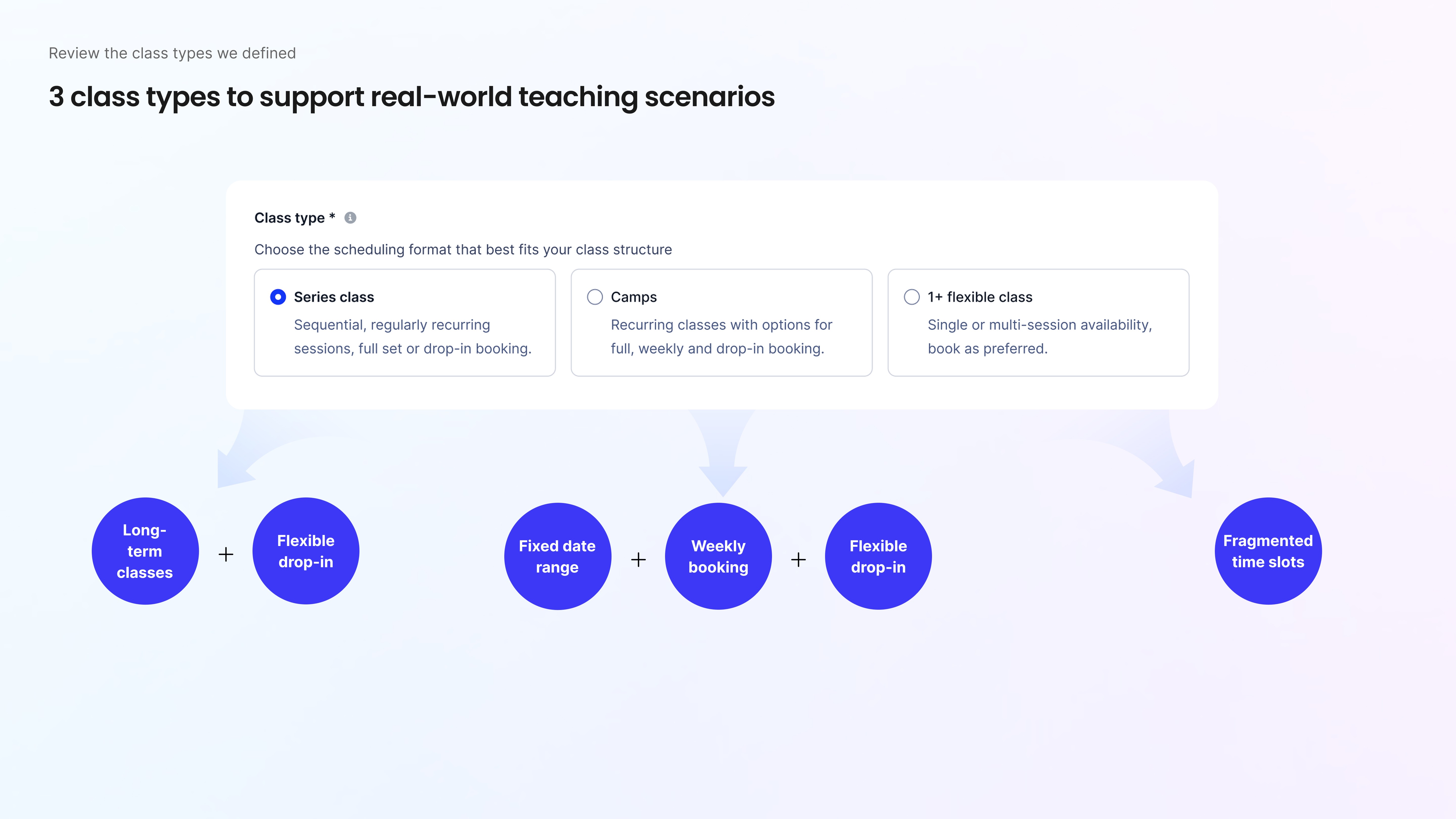
Leveraging industry standards by competitive analysis
Through a detailed audit of scheduling flows across five competitors, , I identified the form–rule–based scheduling model as the industry norm since 5 out of 5 competitor use that pattern.
Also I identified the core capabilities worth retaining, including: flexible recurrence rules, day-specific multi-slot scheduling, full seven-day weekday selection, configurable end conditions, and real-time schedule previews.
At the same time, I was intentional about avoding the weaknesses I observed in competitor products. Many platforms struggled with disconnected date–time relationships, restrictive single-slot scheduling, and unclear recurrence visibility. These are issues that often created confusion and increased the likelihood of errors.
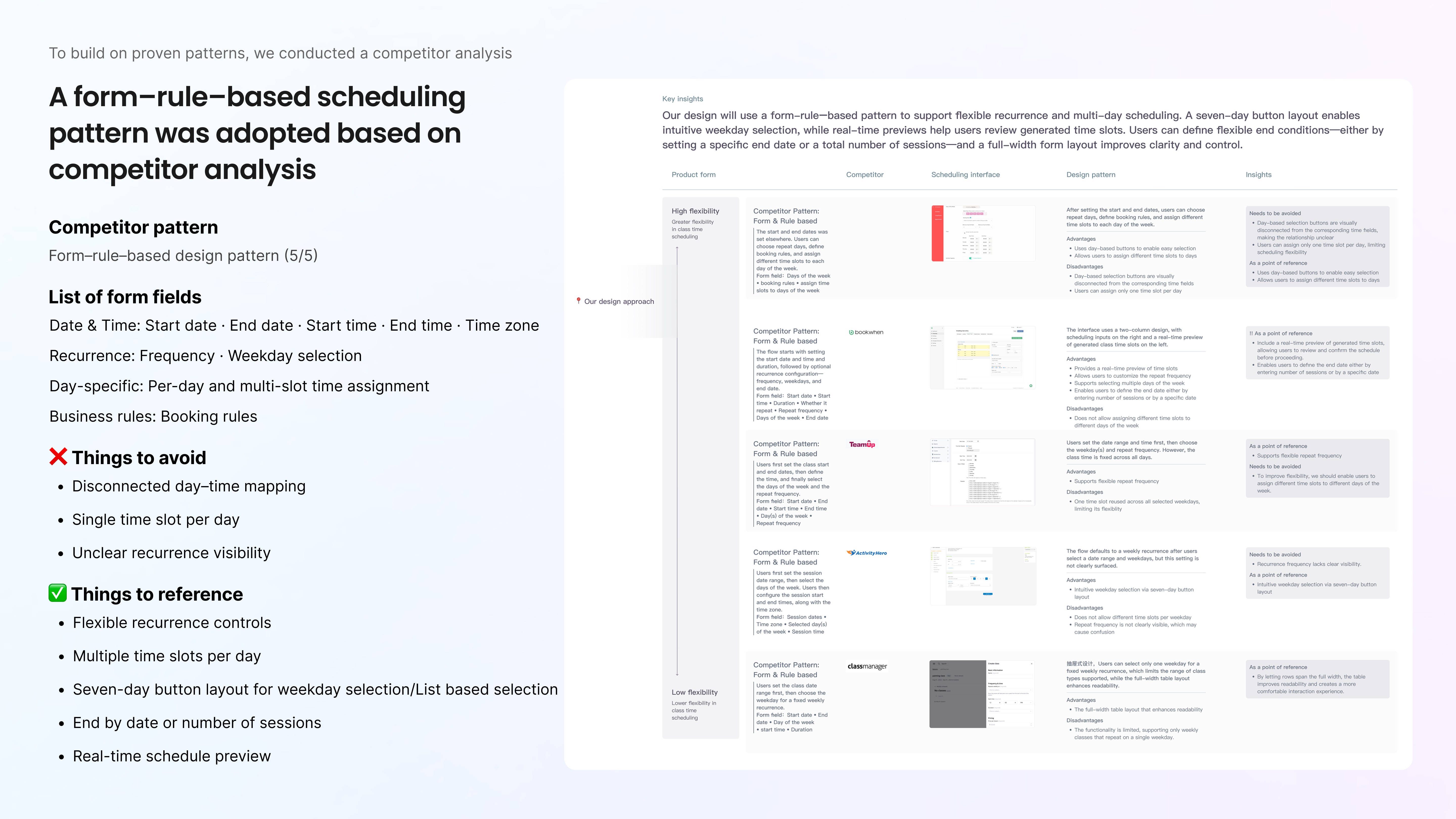
Structuring Complexity Through Progressive Disclosure
I structured the scheduling experience around the principle of progressive disclosure to systematically reduce cognitive load.
The most significant issue I observed in competitor flows was not a lack of capability, but overload. Most platforms surfaced all scheduling fields at once. For teachers managing multiple days and time slots, this created visual noise, increased cognitive strain, and led to decision fatigue.
To address this, I introduced a toggle-based weekday selector. Teachers first select the days they plan to teach. Only when a specific day is activated do the corresponding time and recurrence fields appear. This keeps the interface focused, lowers perceived complexity, and reinforces a clear mental model:
Day → Time → Rule
The result was a system that preserved flexibility while remaining approachable.
Adapting the Pattern Across Class Types
For Series classes, this progressive structure supports recurring schedules while keeping multi-day configuration manageable.

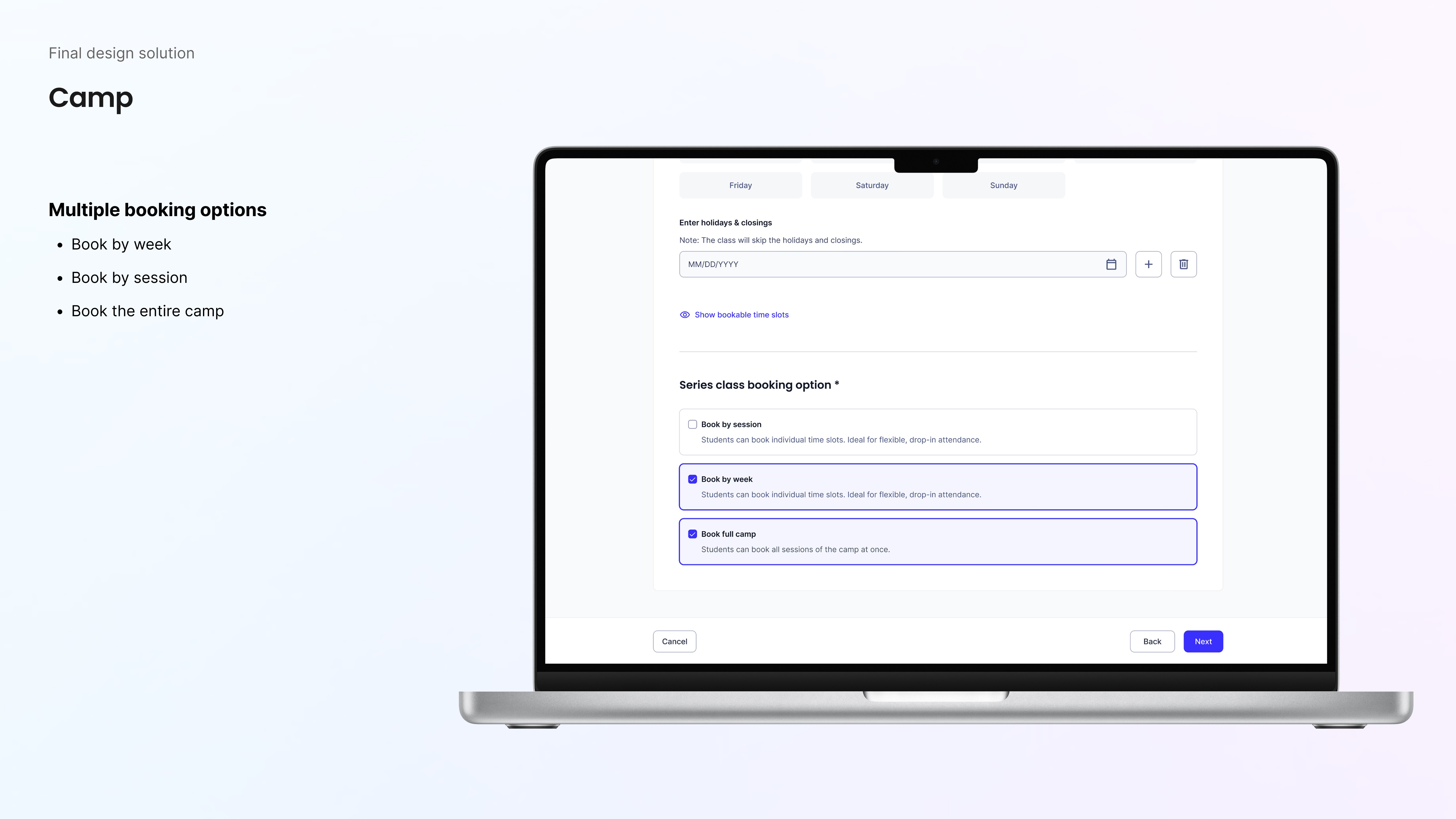
For 1+ Flexible classes, I further optimized efficiency. Unlike many platforms that only allow teachers to add one time slot at a time, I designed the system to support multiple time slots per day and multi-day configuration in a single interaction—reducing repetitive input and setup friction.

Validation & iteration
Here’s how I arrived at the final design.
I went through two rounds of usability testing, paying close attention to hesitation points, moments where users asked questions, and overall ease-of-use scores. The patterns were clear and they guided my refinements.
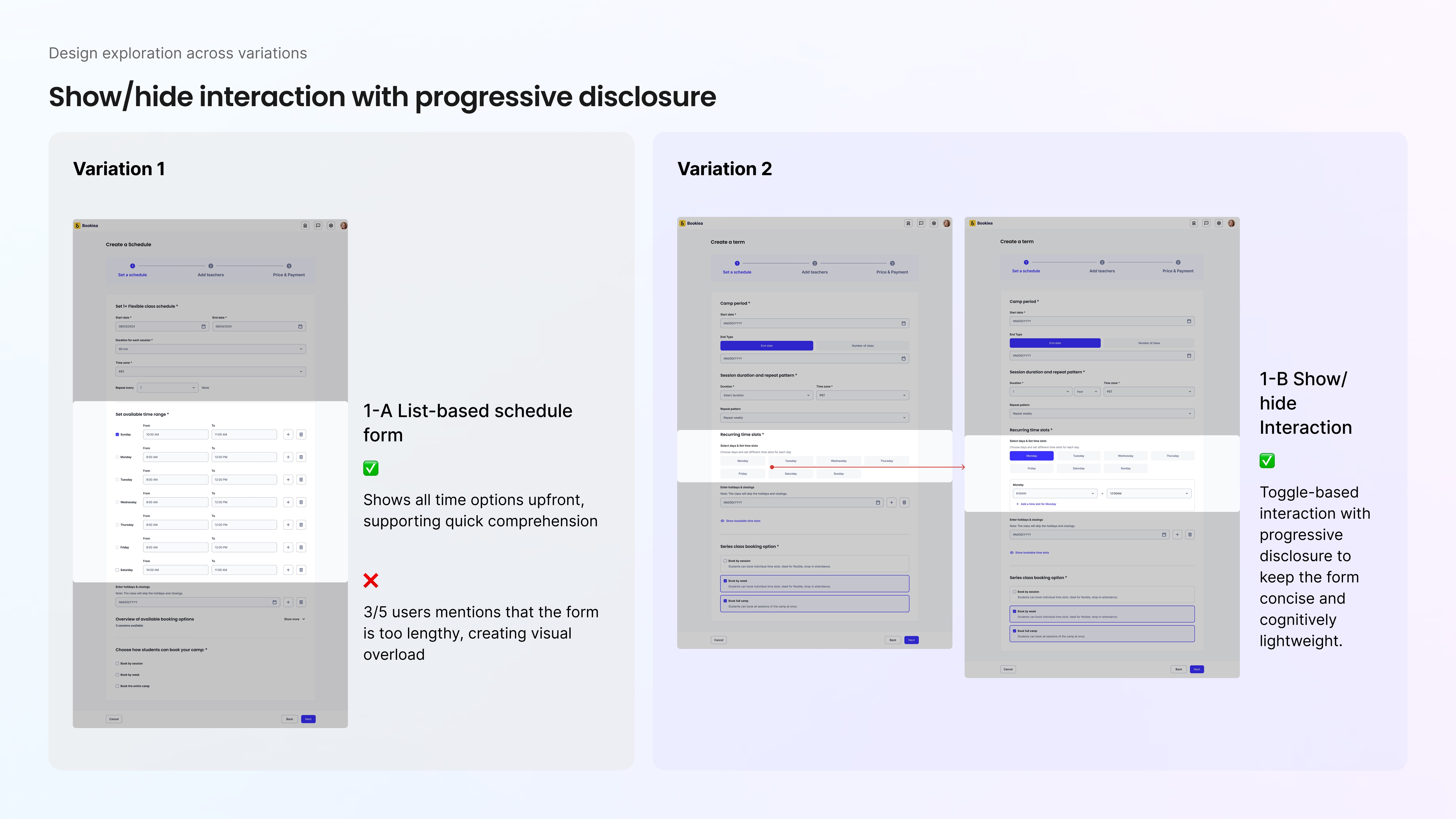
1. Reducing overload without removing flexibility
The initial design surfaced all time options upfront. While comprehensive, 3 out of 5 users found it visually overwhelming.
Instead of removing fields, I restructured how they appeared. I introduced a show/hide interaction using progressive disclosure, revealing time and recurrence fields only when a specific day was selected.
Same flexibility.
Less cognitive weight.
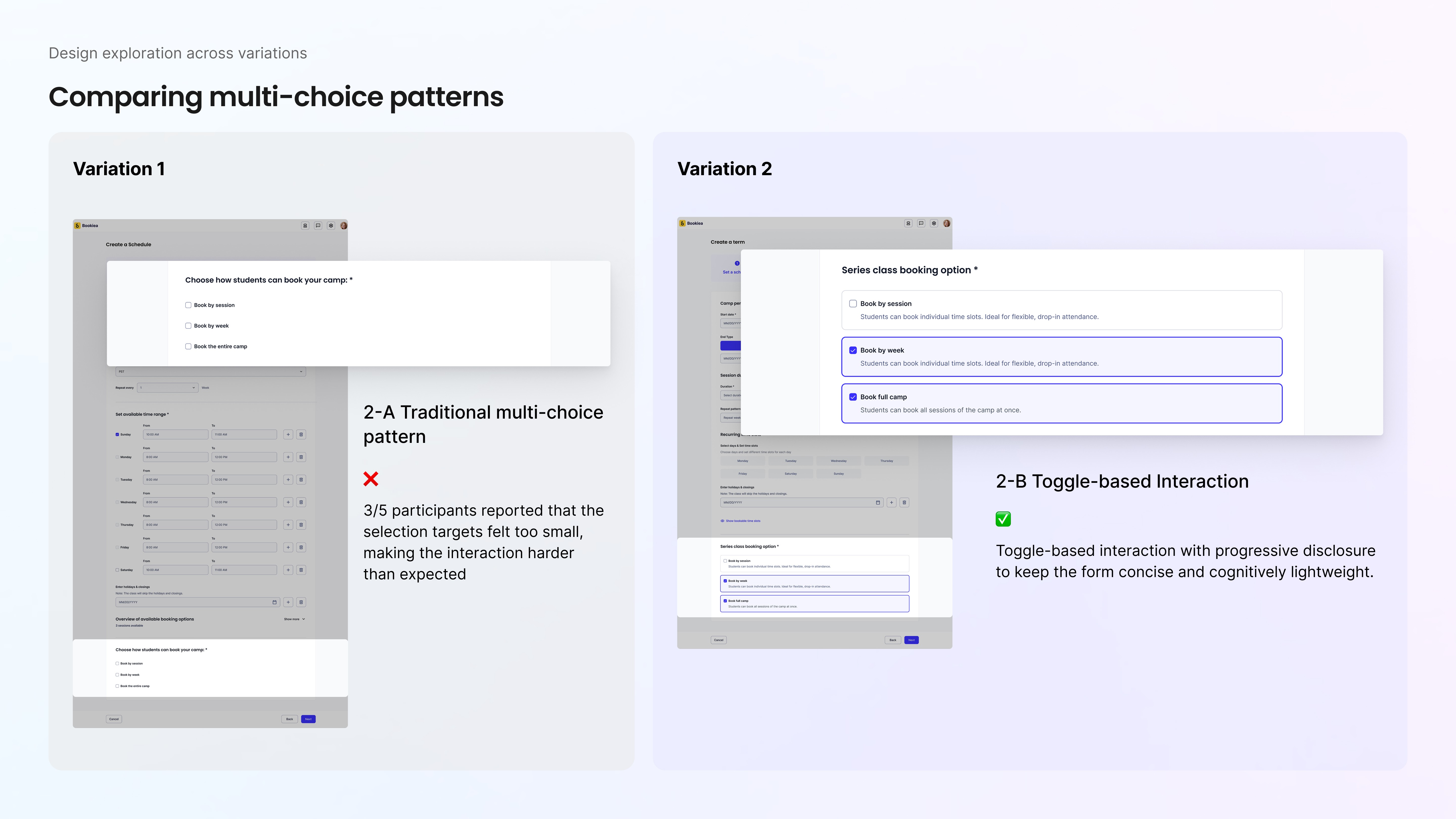
2. Increasing selection confidence
The original multi-choice pattern looked standard, but 3 out of 5 participants reported that the tap targets felt too small. I also observed their hesitation when selecting options.
To address that, I enlarged the selectable areas and refined visual states, improving both speed and confidence—especially in multi-day scheduling.
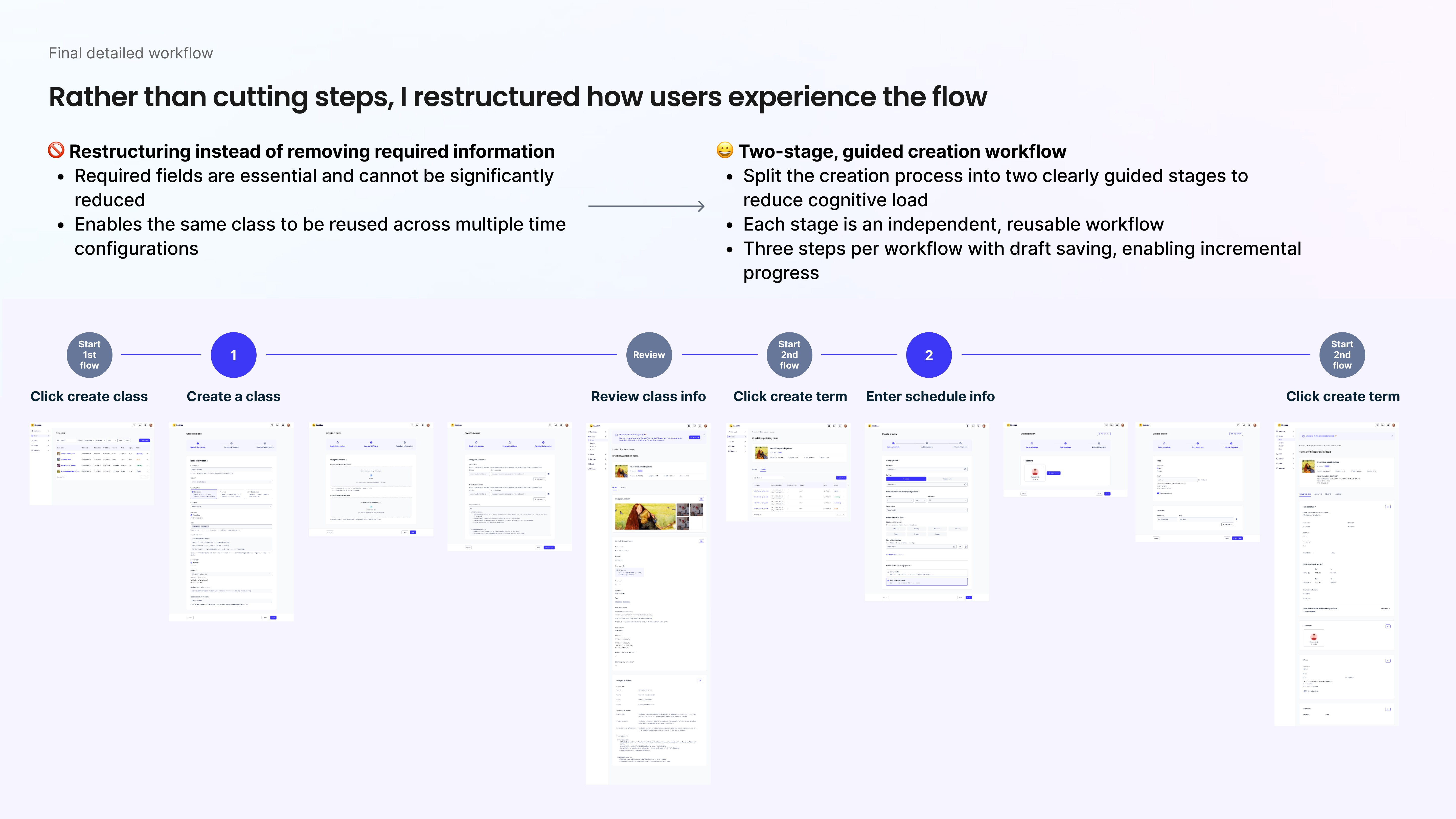
Final workflow
This final workflow reflects the core of my design thinking.
Rather than cutting steps to make the experience appear simpler, I restructured how teachers move through it. The required inputs were essential and couldn’t be meaningfully reduced, so instead of removing information, I redesigned the journey.
I introduced a two-stage, guided creation workflow: Define the class → Configure the schedule.
This separation reduced cognitive load without sacrificing flexibility. Each stage became an independent, reusable workflow with three manageable steps and built-in draft saving, enabling incremental progress.
The structure also allows the same class definition to be reused across multiple time configurations—transforming a linear task into a modular system.
Through this experience, I learned that making a flow intuitive isn’t about making it smaller, while it’s about making it clearer.
Expanding the solution
Reimagining class creation with AI
A highlight of this project was building an AI assistant that enables teachers to create classes even faster than our original form-based workflow.
By designing the experience around transparency and structured guidance, we transformed class creation from a manual process into an intelligent, assistive flow.
Impact:
96% user satisfaction with the AI interaction
64% reduction in correction time after redesign
Significantly higher publish confidence among teachers using AI on our flatform
The problems & Opportunity
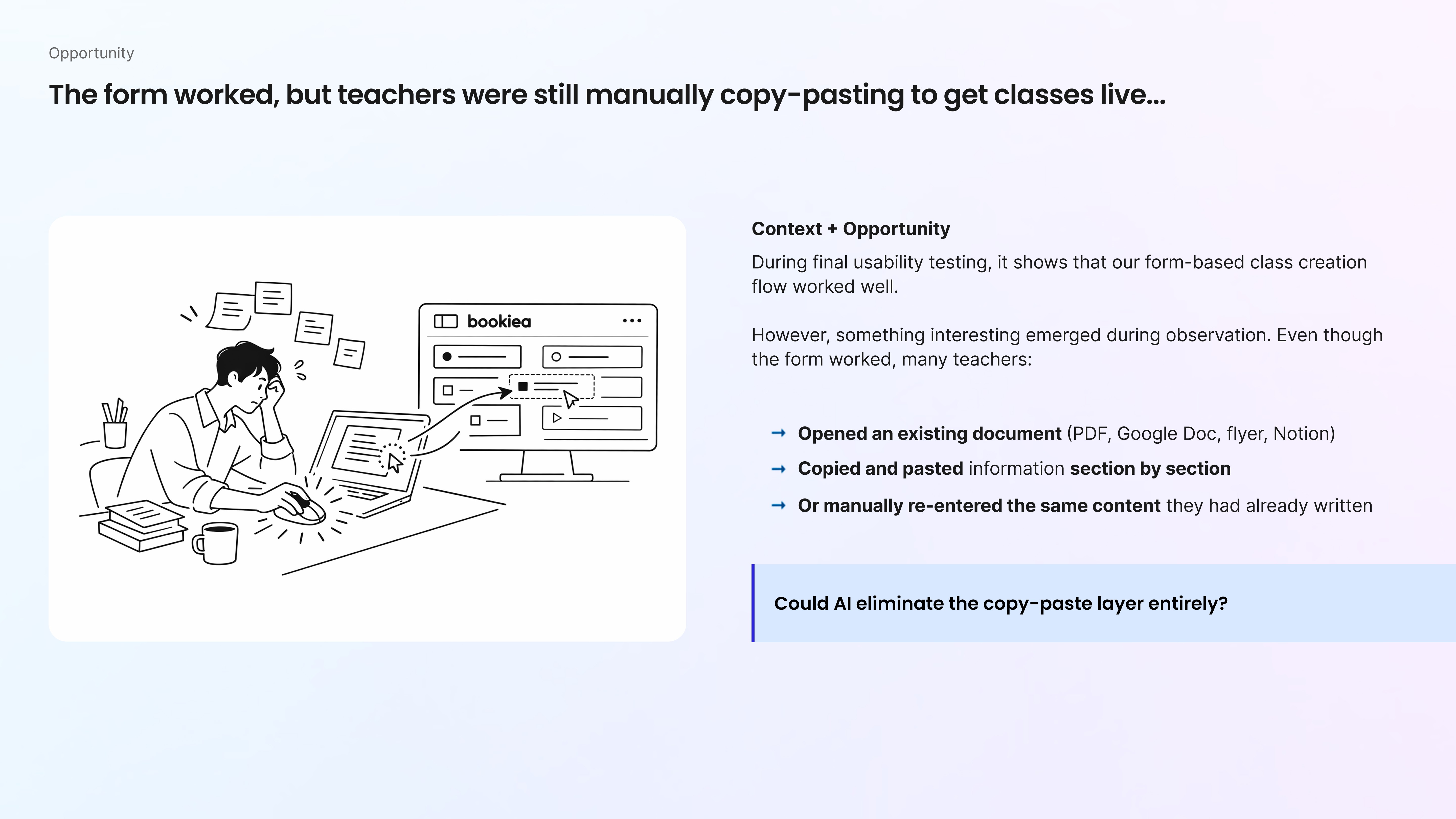
During usability testing of our form-based class creation flow, we validated that the structured form worked well. Task completion was high, and teachers were able to publish successfully.
However, something interesting emerged during observation.
Even though the form worked, many teachers:
Opened an existing document (PDF, Google Doc, flyer, Notion)
Copied and pasted information section by section
Or manually re-entered the same content they had already written
I found that teachers were struggling to convert unstructured documents into structured platform fields.
That insight opened a new opportunity:
Could AI eliminate the copy-paste layer entirely?
Our first attempt (and failure)
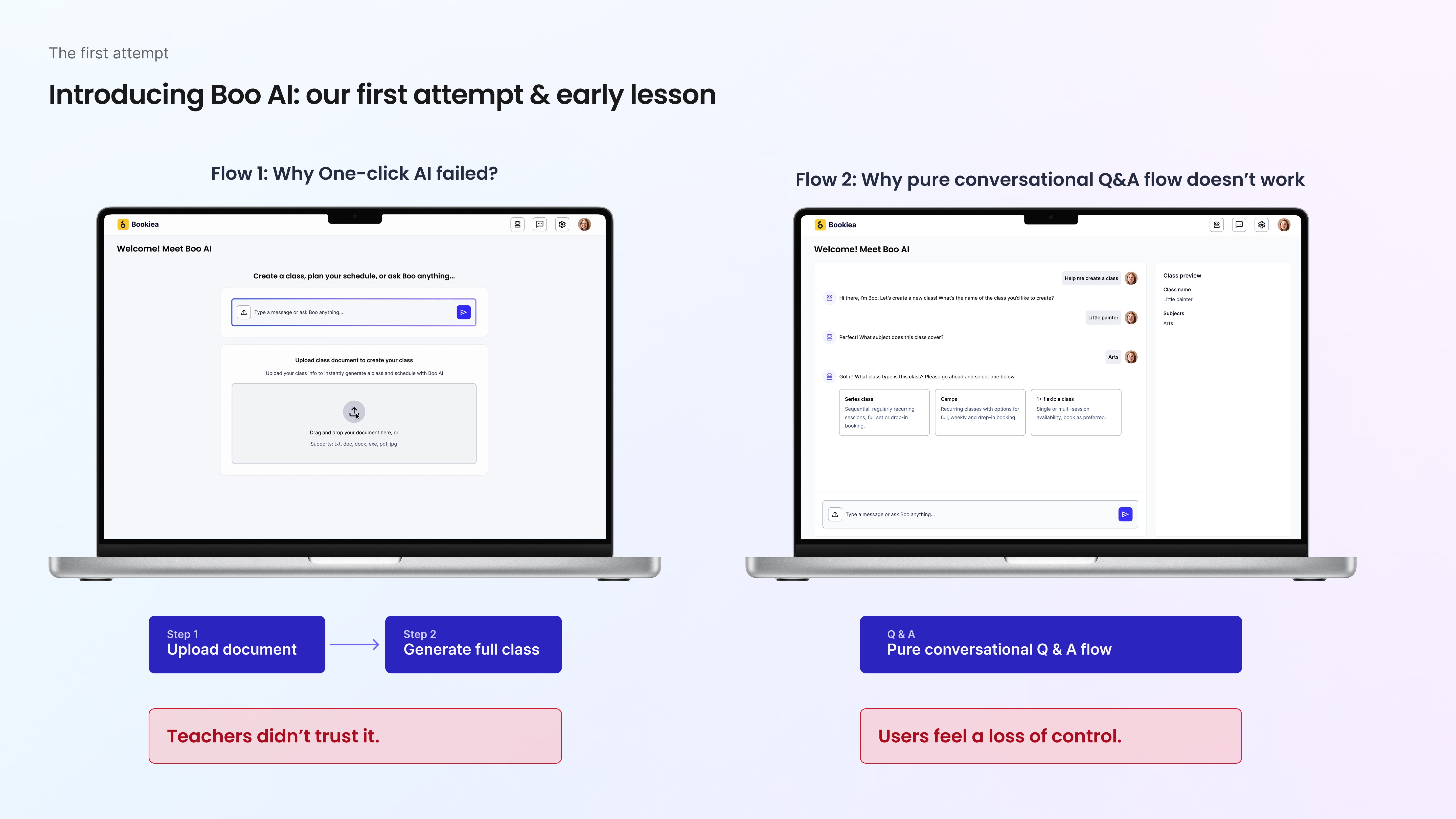
In our first attempt with Boo AI, we built 2 versions:
An one-click experience: upload a document and instantly generate a full class. It was fast and impressive.
A pure conversational Q&A flow: a step-by-step AI chat to collect information.
Both worked from an engineering standpoint.
However, during testing, teachers didn’t trust either approach.
The one-click version felt risky. The problems are:
❌ Frequent extraction errors and hallucinations
❌ Heavy correction effort
❌ No visibility into how AI made decisions
❌ Low confidence before publishing
The conversational flow wasn’t much better. It still required manual input and felt like a slower form. The problems are:
❌ Limited big-picture visibility
❌ Hard to edit previous answers
❌ Interaction felt interrogative
❌ Perceived loss of control
In both cases, the issue wasn’t functionality — it was trust.
What users want
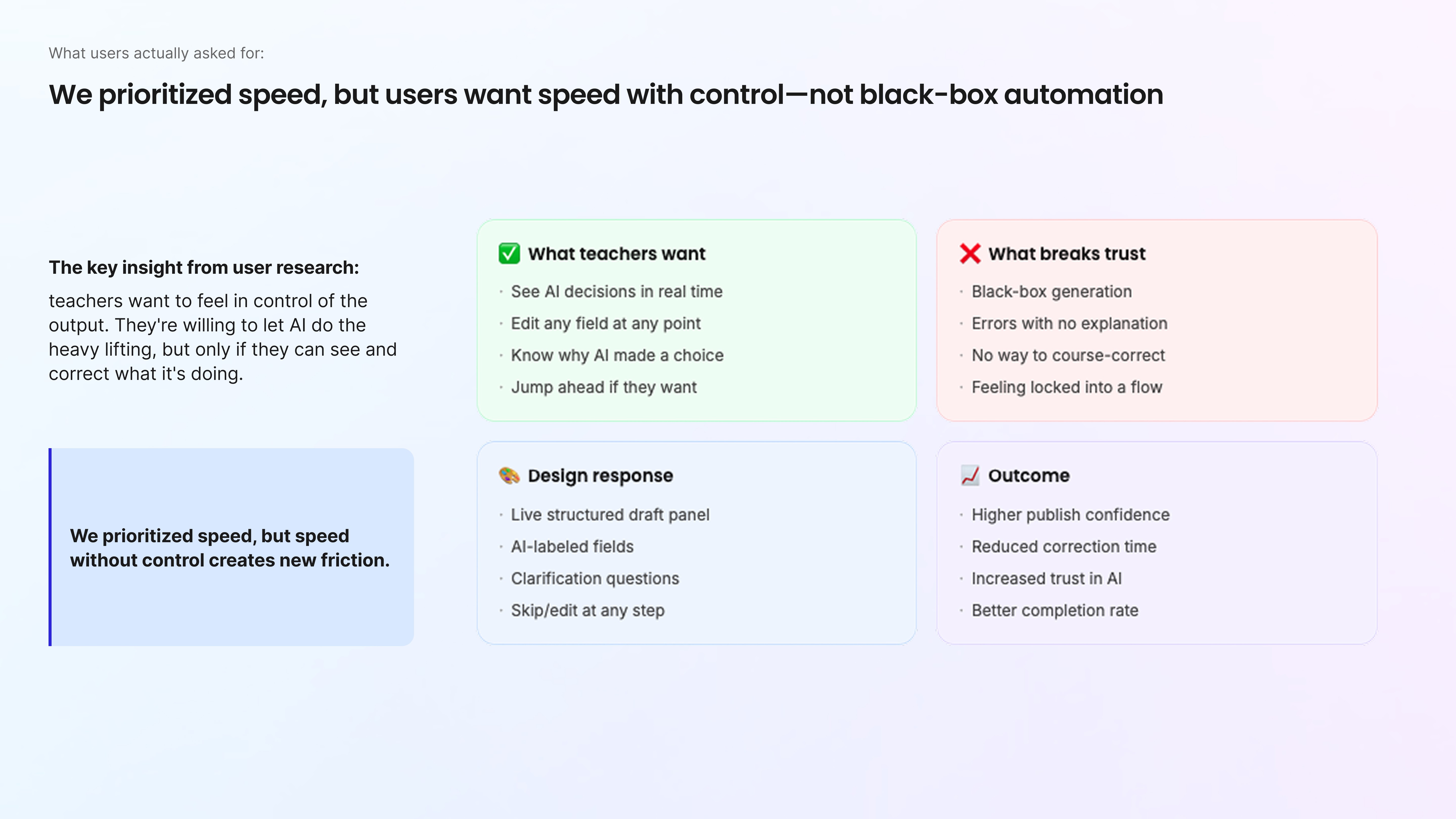
In our first version, we optimized for speed. The AI could generate a full class instantly, and technically, it worked.
But user research revealed something deeper.
Teachers weren’t asking for faster automation. They were asking for control. They’re happy to let AI finish the tasks for them quickly, but only if they can see what it’s doing and correct it in real time.
We learned that: Speed without control actually creates new friction.
Redesign for user's trust
Defining the high-level conversational structure
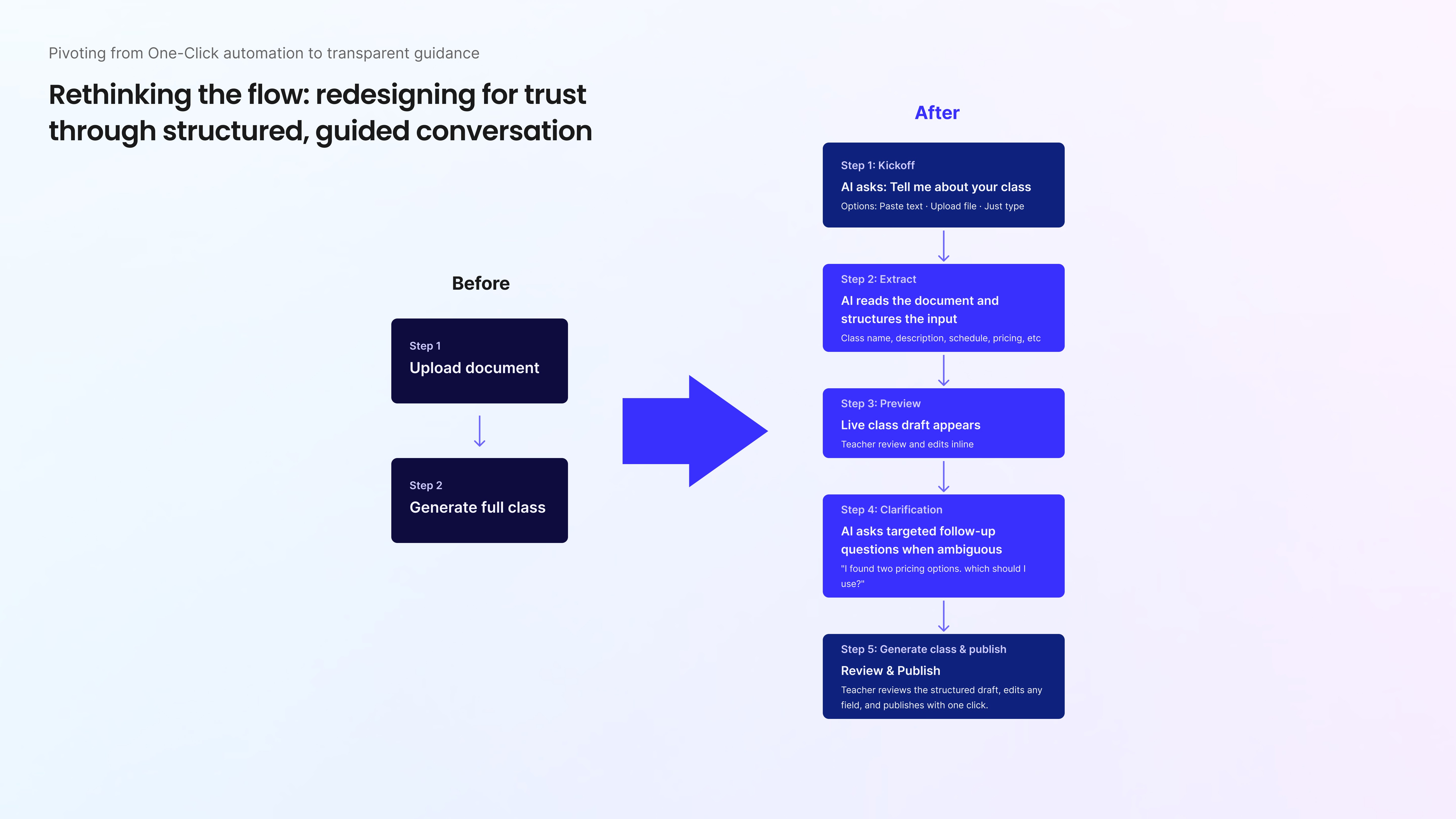
Given that teachers were asking for transparency and control, we pivoted from one-click automation to transparent guidance.
Instead of jumping into the UI, we redefined the high-level conversational structure. We realized trust couldn’t be layered on visually. It had to be built into the flow itself.
Core changes
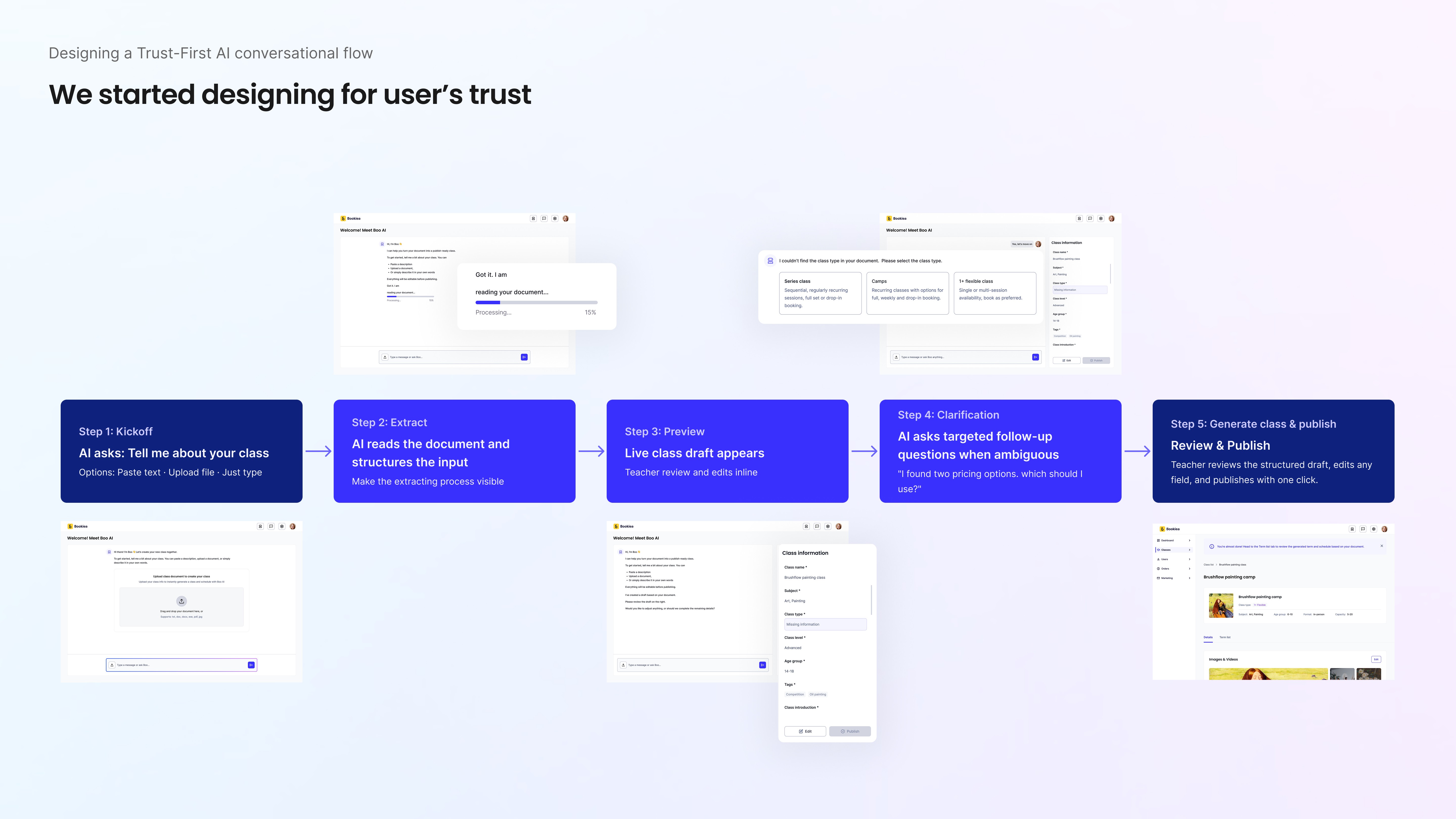
Building on our earlier one-click approach, we introduced a trust-first conversational framework:
Step 1 - Flexible entry: teachers can upload a file, type, or paste text to begin.
Step 2 - Visible processing: instead of a black box, we surface clear states like “reading… extracting… drafting…”
Step 3 - Live structured draft: a real-time preview appears, with missing information clearly highlighted.
Step 4 - Clarify, don’t guess: when the AI is unsure, it asks targeted questions rather than making assumptions.
Step 5 - Review before publish: teachers can edit, approve, and publish with confidence.
Every step is transparent and controllable. The AI conversational flow accelerates the work — while teachers remain fully in control of the outcome.
Results & Takeaway
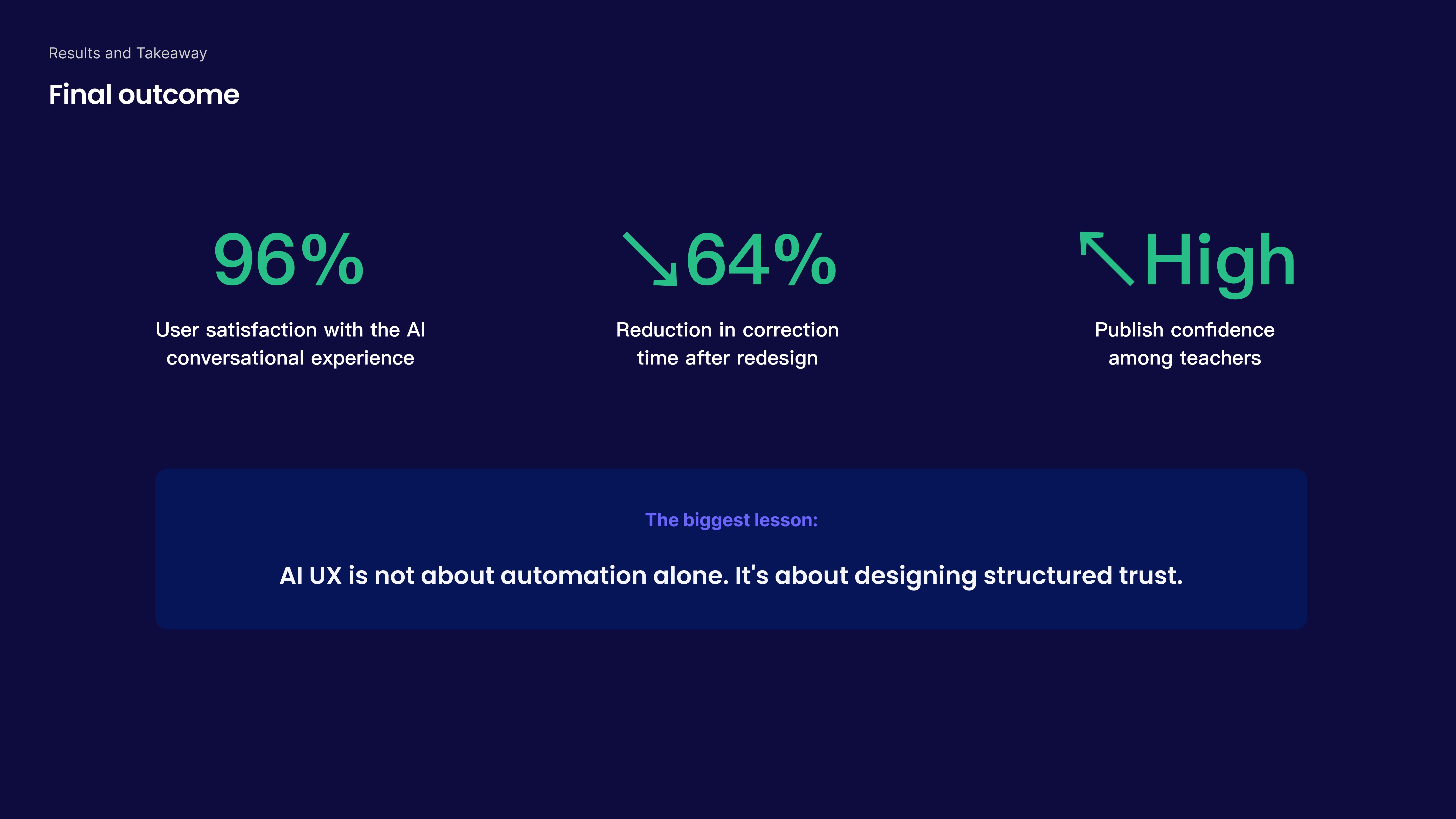
After redesigning the flow around transparency and control, the results validated our shift.
User satisfaction with the AI interaction reached 96%.
Correction time dropped by 64%.
Most importantly, teachers reported significantly higher confidence before publishing.
But beyond the metrics, the bigger takeaway was strategic.
We learned that, AI UX isn’t about automation alone. It’s about structured trust.
Reflections
Simple on the surface, rigorous beneath
1. Defining structure before screens
In the absence of a PM and during early product definition, I had to step back before moving forward. Before designing interfaces, I needed to define the system itself, including its structure, logic, and scalability.
What looked like a simple UI decision, such as choosing between three radio buttons, required deep research, synthesis, and deliberate trade-offs behind the scenes. The simplicity users experience is often the result of clear defined structure. This project reinforced that strong product design begins long before pixels.
2. Balancing logical clarity with perceived effort
A design can be logically clear yet still feel heavy.
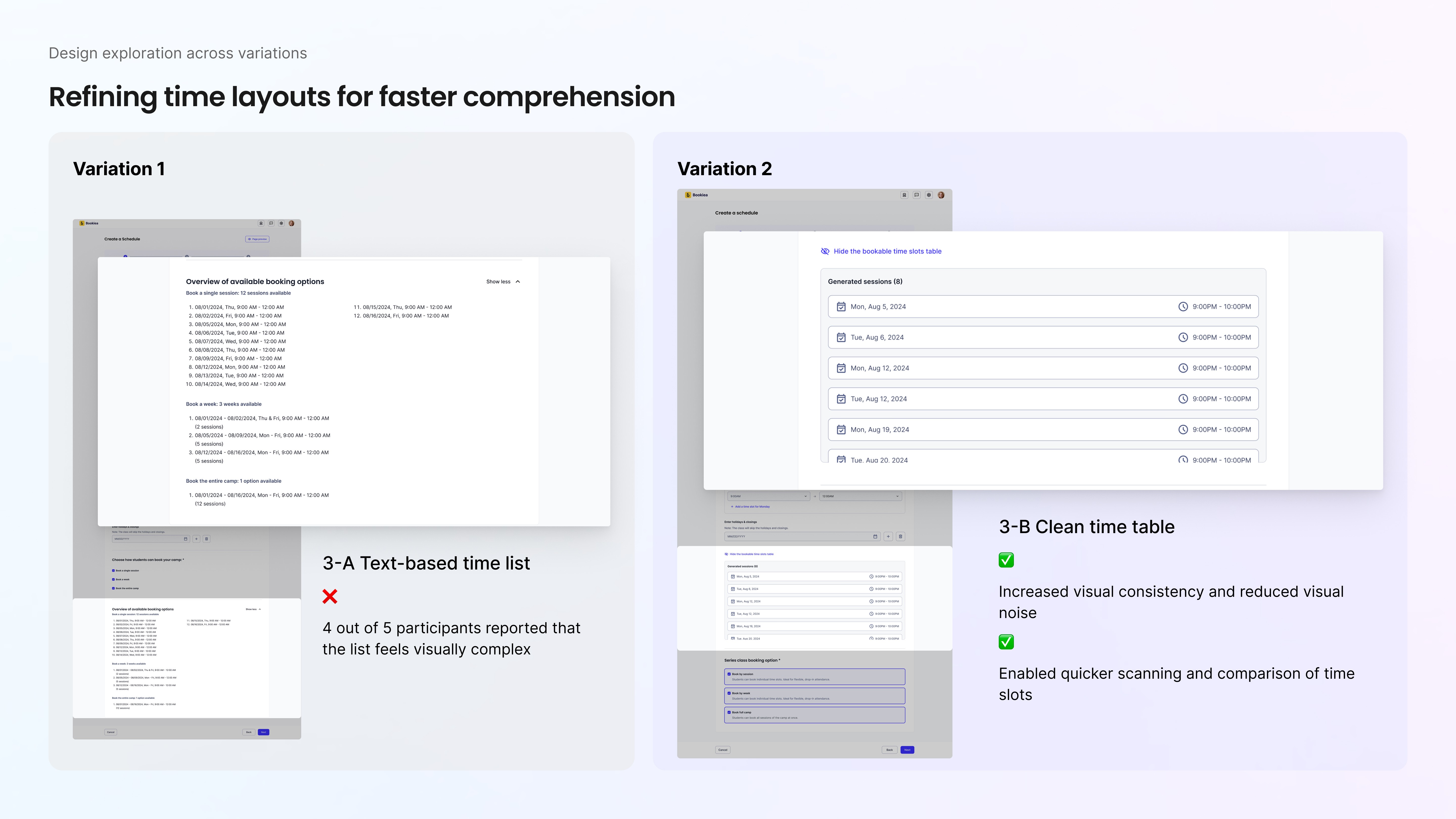
The table-based layout for scheduling fields made structural sense to me, but usability testing revealed hesitation. Users described it as long and overwhelming, even though nothing was technically wrong.
That shifted my perspective.
Clarity in logic doesn’t guarantee ease in perception. To address this, I introduced progressive disclosure, which revealing scheduling fields only when relevant, reducing cognitive load without sacrificing flexibility.
3. Simplifying through structure, not reduction
This experience deepened my belief that intuitive design is not about removing steps. It’s about organizing complexity.
Instead of shrinking the workflow, I restructured it. Instead of hiding complexity, I managed it intentionally.
I learned that simplicity doesn’t come from making things smaller, but from making them clearer.
Trust is the foundation for AI
This project reshaped how I think about AI design. It’s not the intelligence or speed that changes behavior, instead, it’s whether people feel safe using it.
I learned that transparency, visibility, and reversibility aren’t “nice-to-haves”. They’re the foundation of AI design. When users can see what the system is doing and shape the outcome, AI shifts from feeling risky to feeling empowering.