Redesigning FIC search experience to improve clarity, engagement, and conversion
Achieved an 87.5% increase in task success rate
Overview
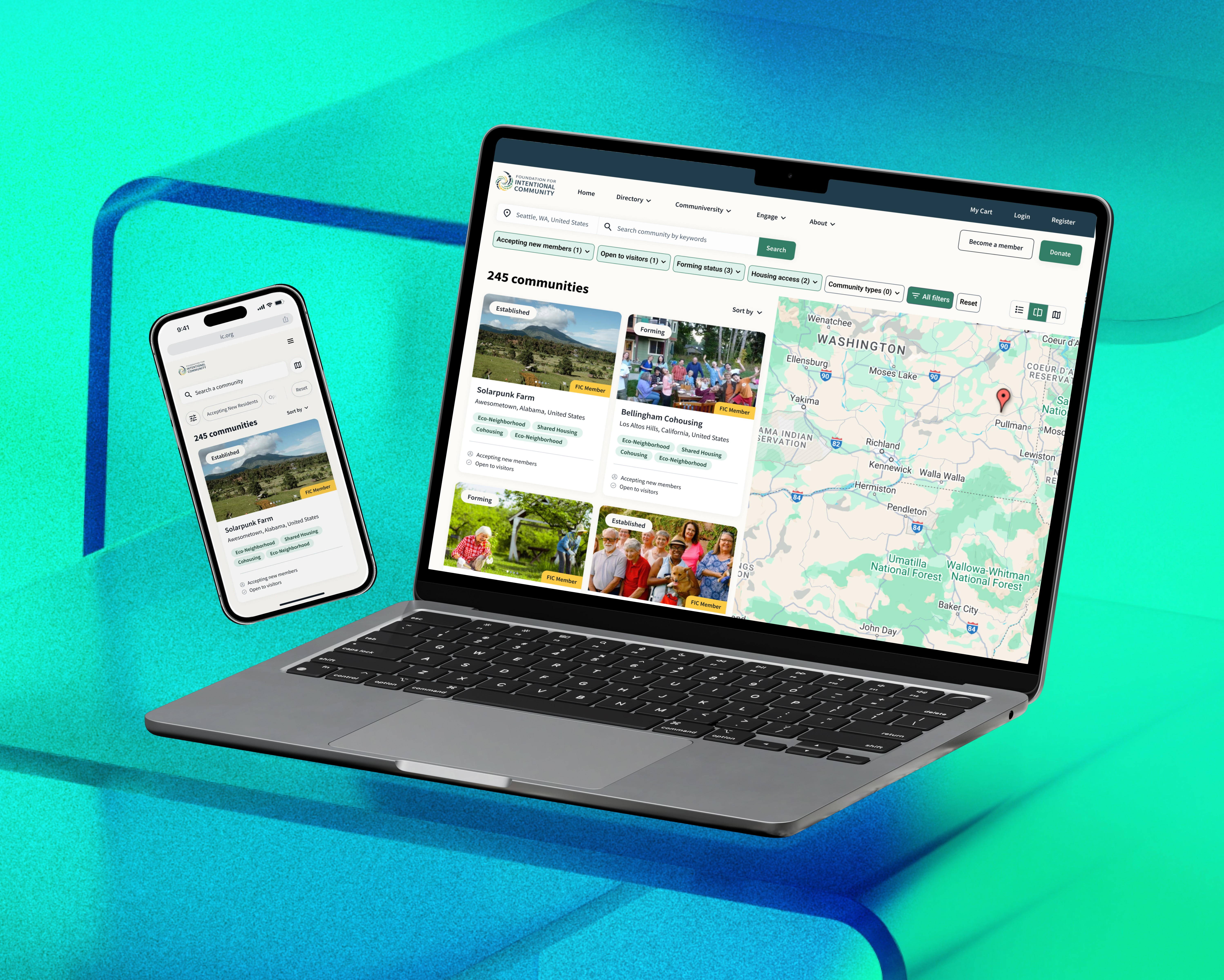
FIC is a global bridge for people seeking alternative ways of living: cooperative housing, ecovillages, and shared-value communities. But while the mission was visionary, the digital experience was a "maze of friction." As a Product Designer, I stepped in to lead the charge in transforming a confusing, data-heavy directory into a trusted, high-converting journey.
Timeline
July 2024 – July 2025
My role
Product Designer (Led the search experience design)
Collaborating with:
2 designers
2 PMs
2 researchers
2 engineers
In a space with:
No direct competitors
Limited user access
4 different user personas
40+ filters
The project challenged me to lead with ownership, drive alignment, and ground decisions in evidence.
Problem
FIC is a platform that helps people discover, join, or create intentional communities — cooperative living models centered around shared values.
But the website wasn’t working.
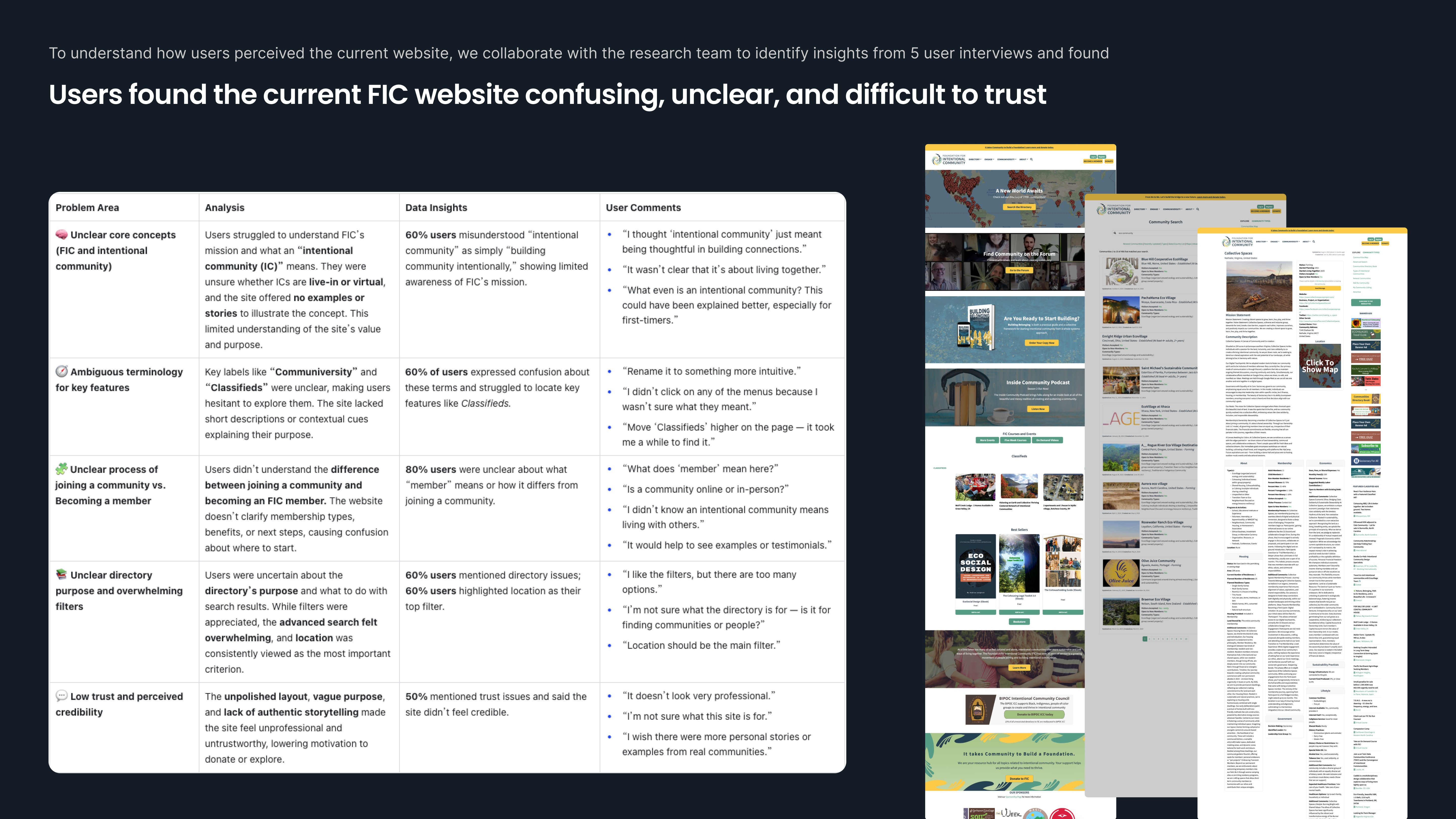
📉 32.58% homepage bounce rate
📉 19.82% search bounce rate
😕 80% of users didn’t understand what FIC actually was
😵 60% felt overwhelmed by filters
❓ 60% didn’t know what action to take on community profile pages
The CEO flagged declining engagement and low conversions.
We had one big question:
How might we revamp FIC’s core flows within a limited timeline — and deliver real impact?
Goal
Our goal is clear: turn an overwhelming, "dated" website into a trusted bridge for people seeking a collective way of life.
However, we had a massive scope and limited time. As a senior designer and a service-leader in this agile team, I knew we couldn't fix everything, so I championed a "Human-First, Data-Informed" prioritization strategy.
Navigating the fog
Defining focus through data and user journey analysis
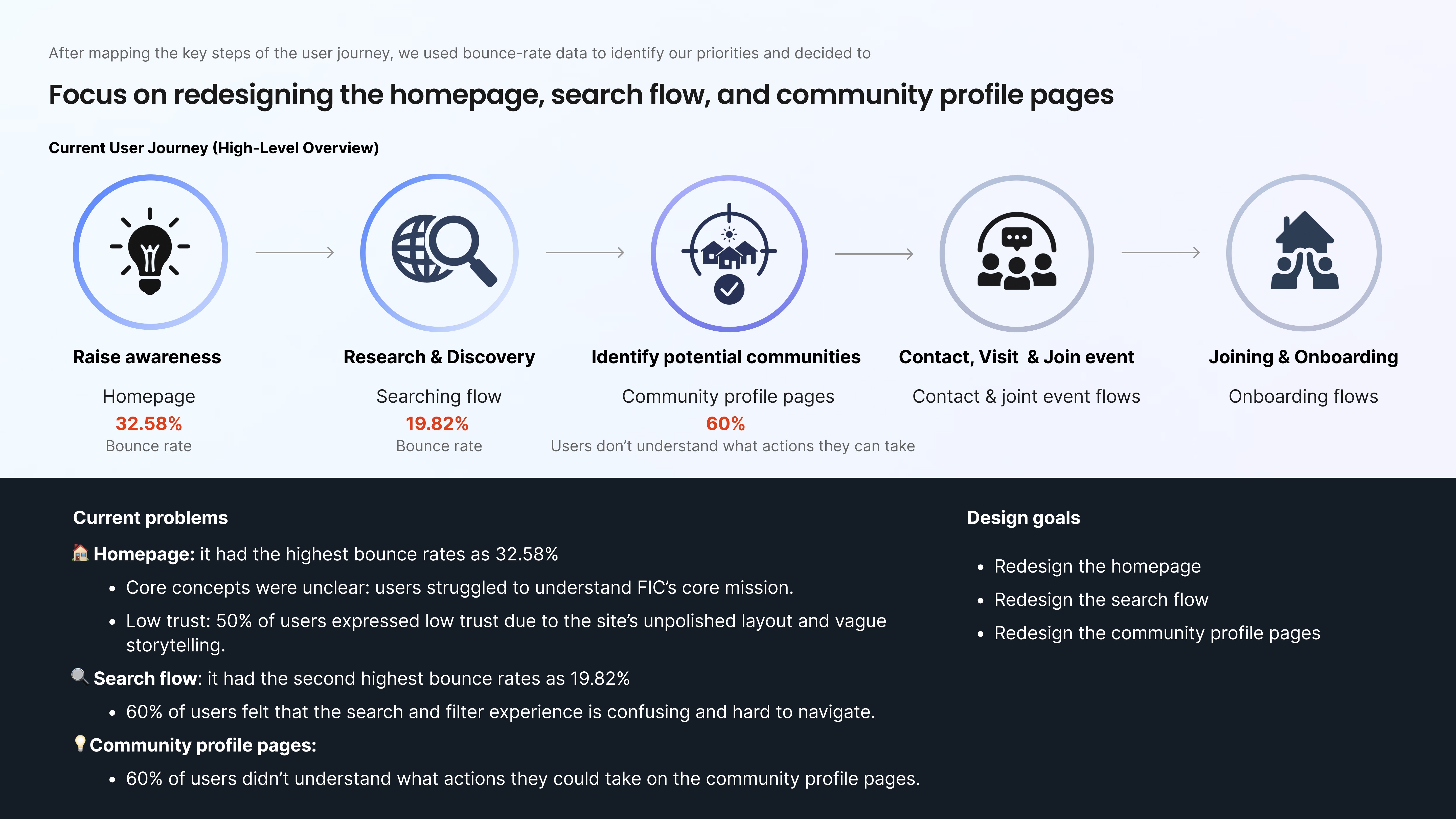
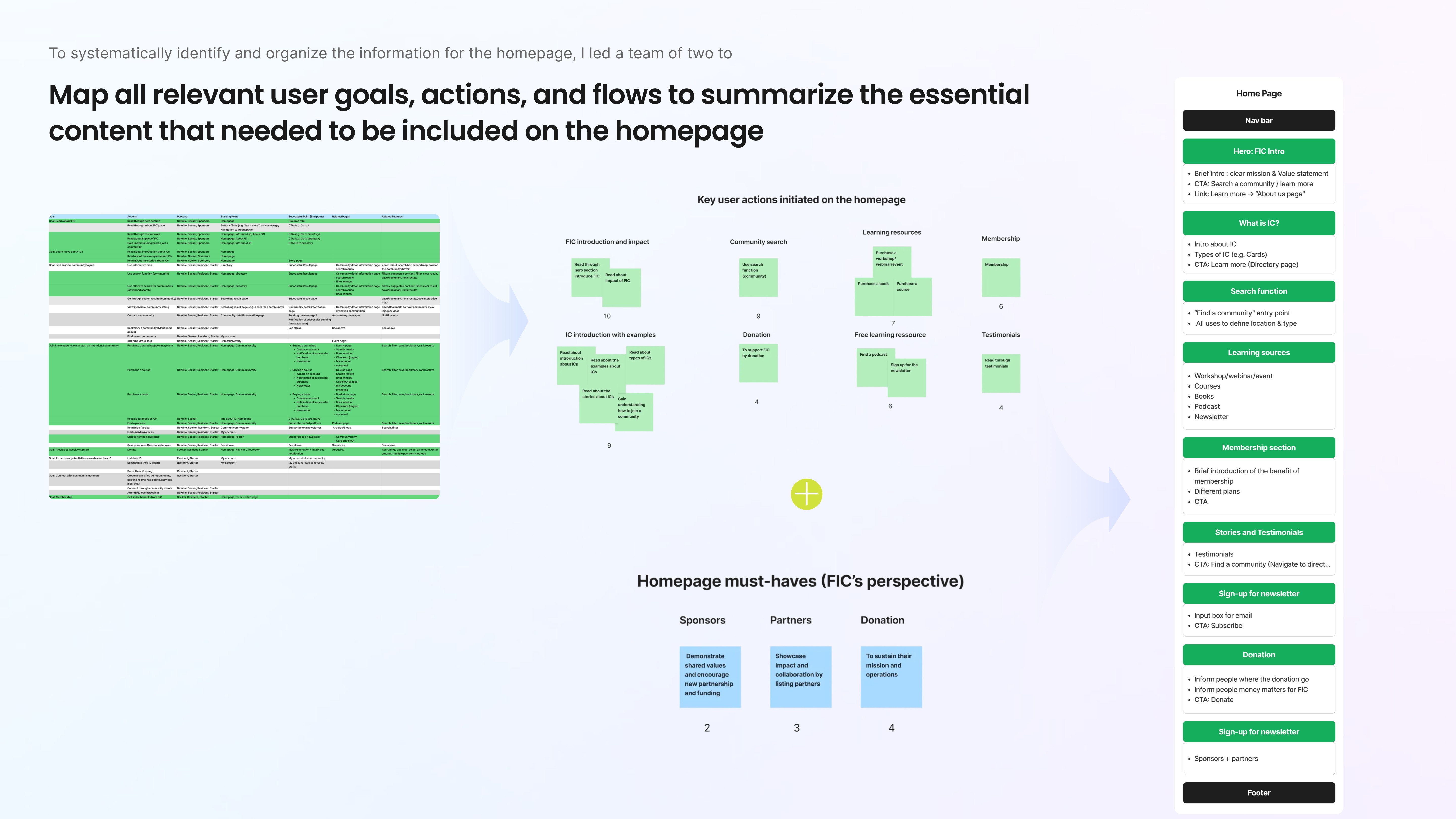
I’m a big believer that you can’t fix a house if you don’t know where the leaks are! Instead of diving headfirst into a total overhaul, I helped the team hit "pause" so we could map the high-level user journey together. We identified five key stages: from that first spark of curiosity to long-term community belonging.
By layering in Google Analytics and behavioral data, the "Aha!" moment became crystal clear: our biggest drop-offs were happening right at the front door. We found that the first three steps, landing, searching, and evaluating, were where we were losing our humans. So, we decided to pour all our energy into the homepage, the search experience, and those vital community profiles.
This wasn’t cutting scope; it was a strategic choice to stop chasing every pixel and start focusing on the moments that actually mattered. By narrowing our lens, we were able to pour our energy into the highest-impact areas, turning stakeholder hesitation into total confidence in our roadmap.
Strategy
Fix the moments that matter
By triangulating user interviews, GA analytics and the high-level user journey, our "High-Impact" roadmap practically wrote itself. I realized we didn’t need to fix everything, instead, we needed to fix the moments that matter. I framed our mission around three pillars:
The First Impression: Reimagining the homepage to turn "What is this?" into "I belong here."
The Discovery Flow: Transforming a complex search into an intuitive, low-friction conversation.
The ‘Yes’ Moment: Simplifying community profiles so seekers can move from curious browsing to confident action.
By obsessing over these core flows, which are the exact spots where our users felt most lost, we didn't just move pixels; we built a foundation of trust.
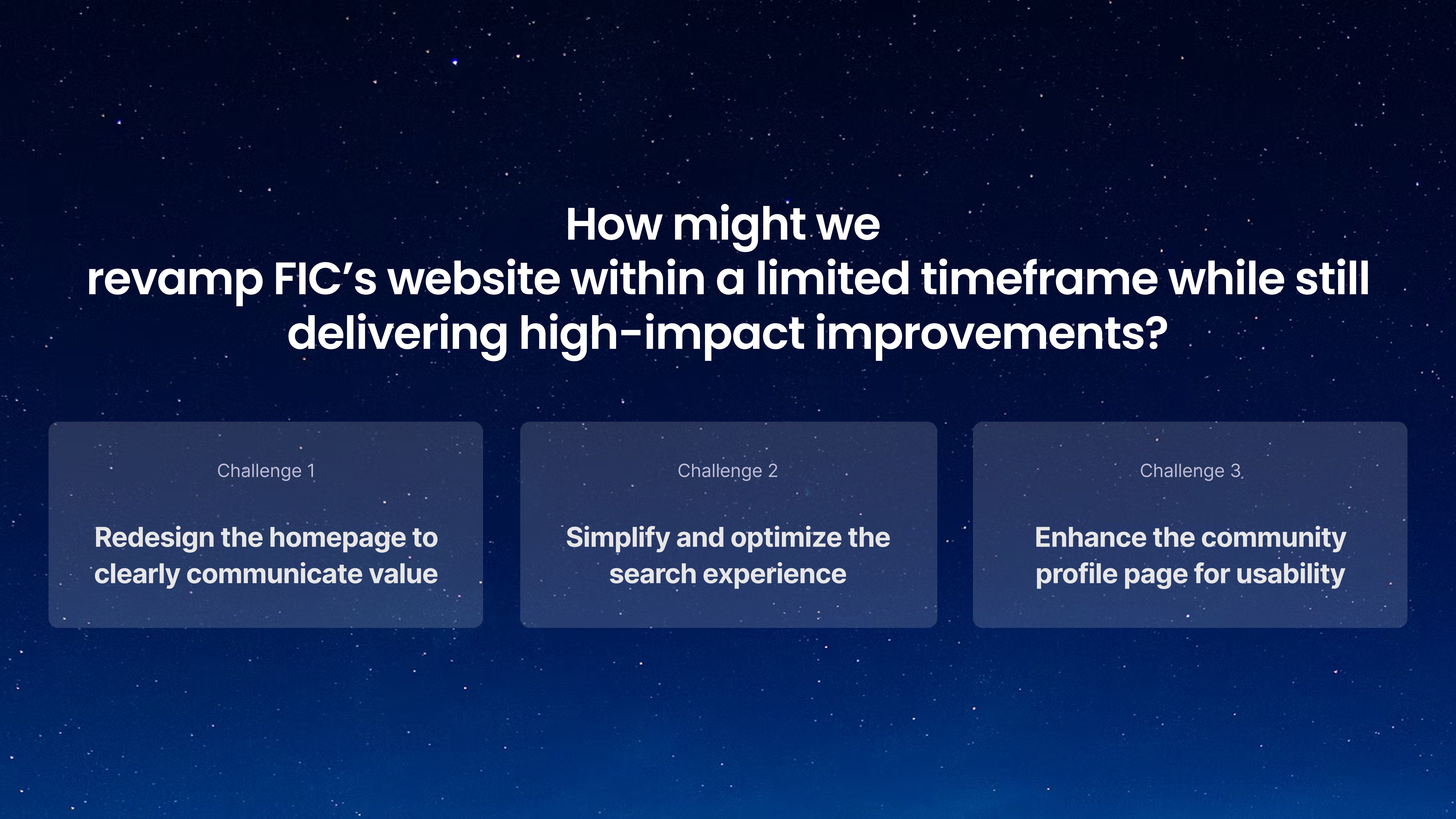
Challenge 1: Translating mission into meaning
The reality check: Solving a "Mystery" homepage
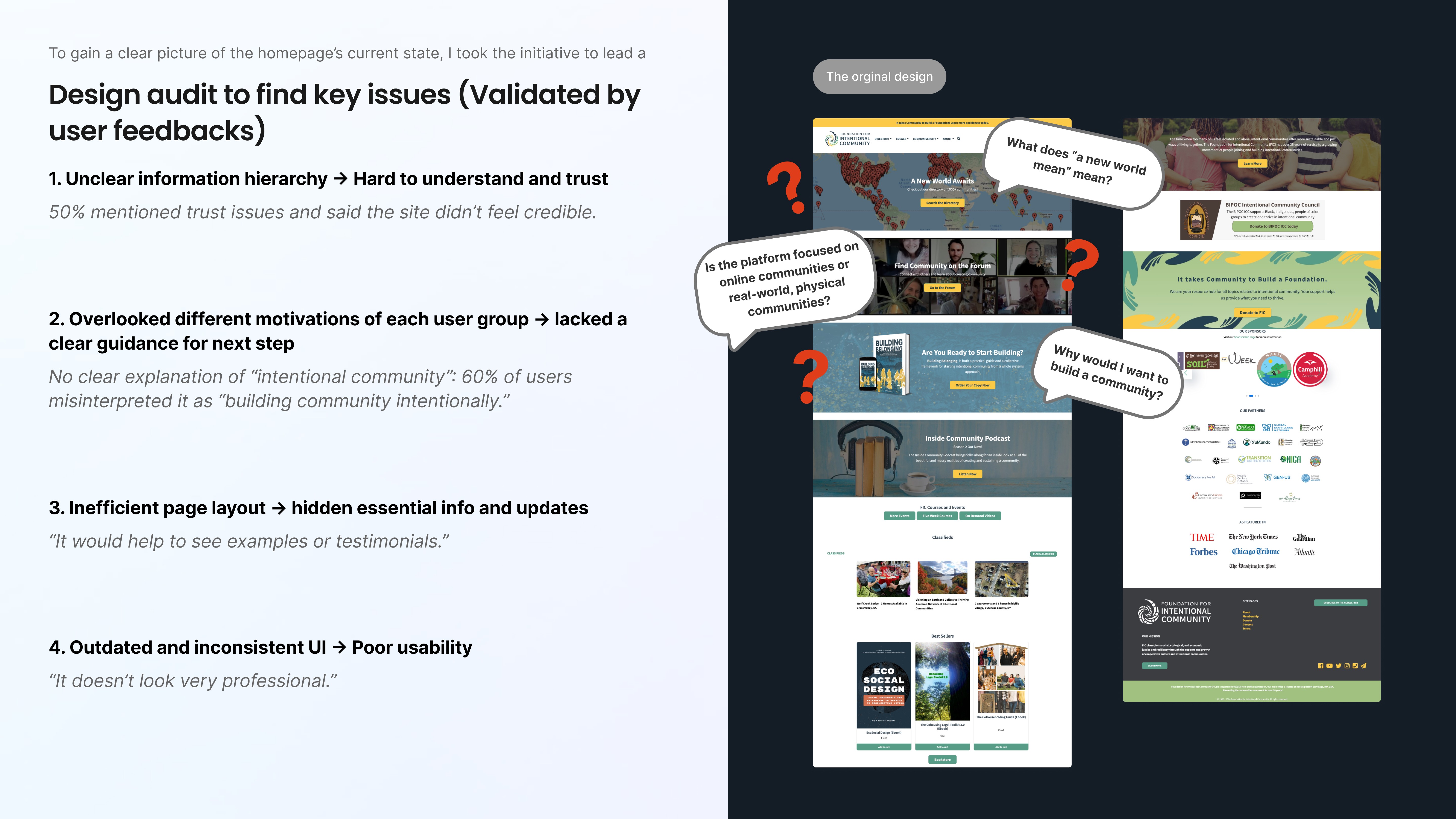
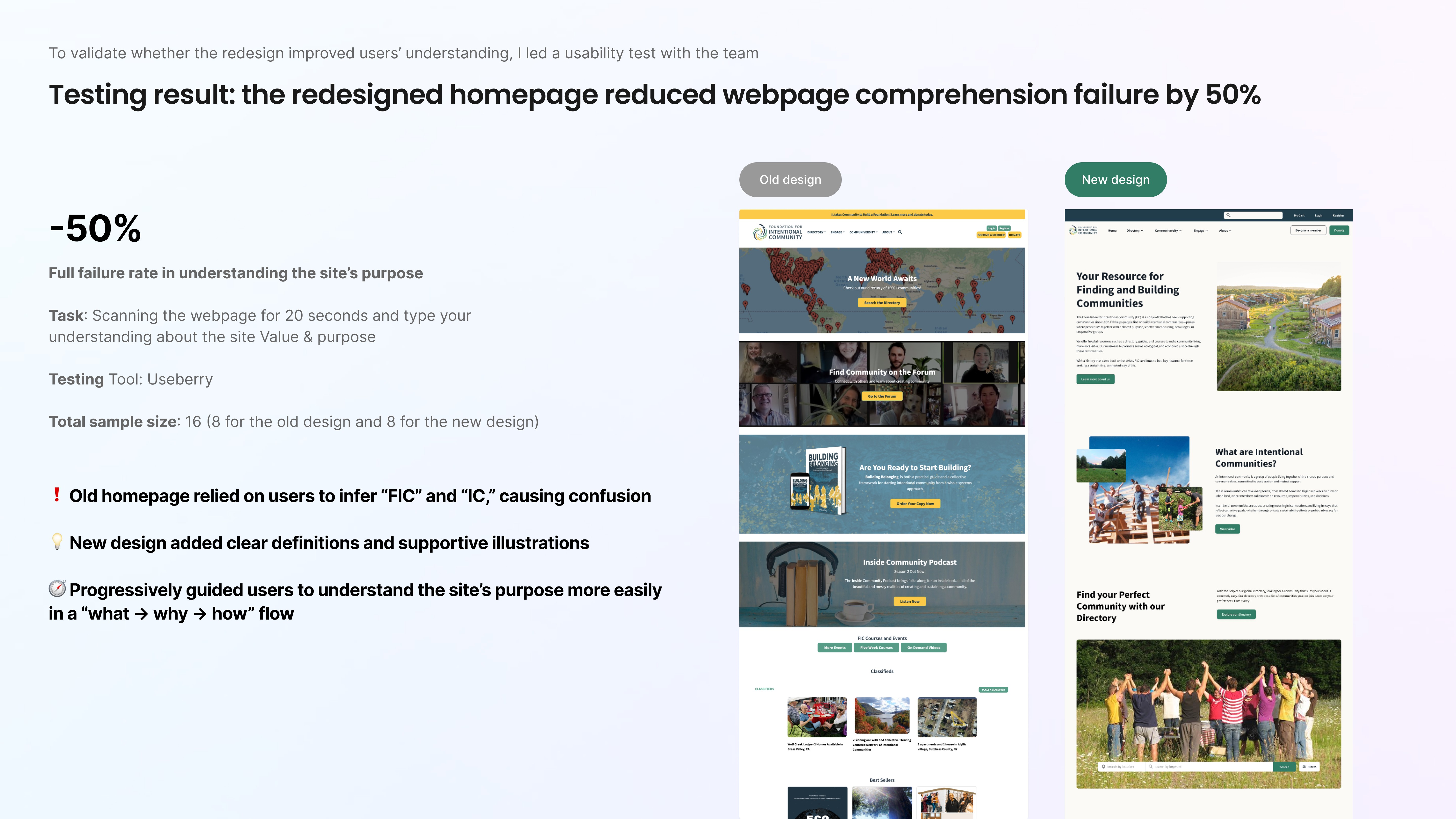
Our initial usability testing hit us with a hard truth: 4 out of 6 users couldn't explain what FIC actually did within 20 seconds of landing. FIC had a "vision gap": a beautiful mission trapped behind a confusing interface.
The Diagnosis: Strategy over pixels
As a product designer, I know that jumping straight into "making it pretty" is a trap. If the foundation is cracked, the paint doesn't matter. Thus, we conducted a comprehensive design audit to look under the hood and diagnose the root causes of this confusion.
We identified four core problems:
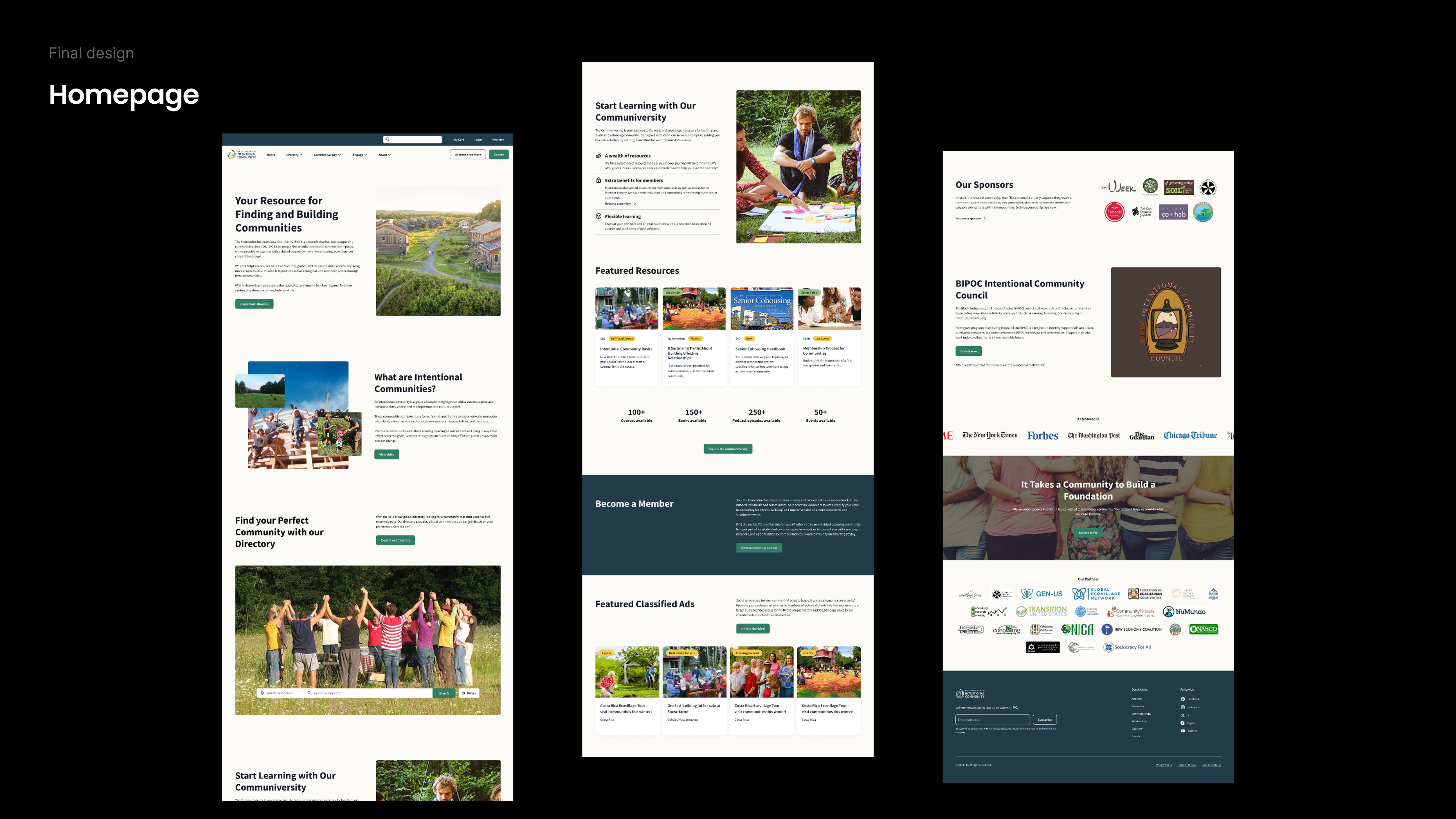
Confusing information hierarchy: first-time visitors struggled to understand what FIC or “intentional communities” meant.
Lack of clear guidance for different user types: seekers, residents, and founders were not given intuitive next steps.
Buried key content: important information lacked structural and visual priority.
Outdated interface patterns: the UI introduced unnecessary cognitive friction.
The verdict was clear: This wasn't a "make it pop" project. This wasn’t simply a visual problem, instead, it was a structural one.
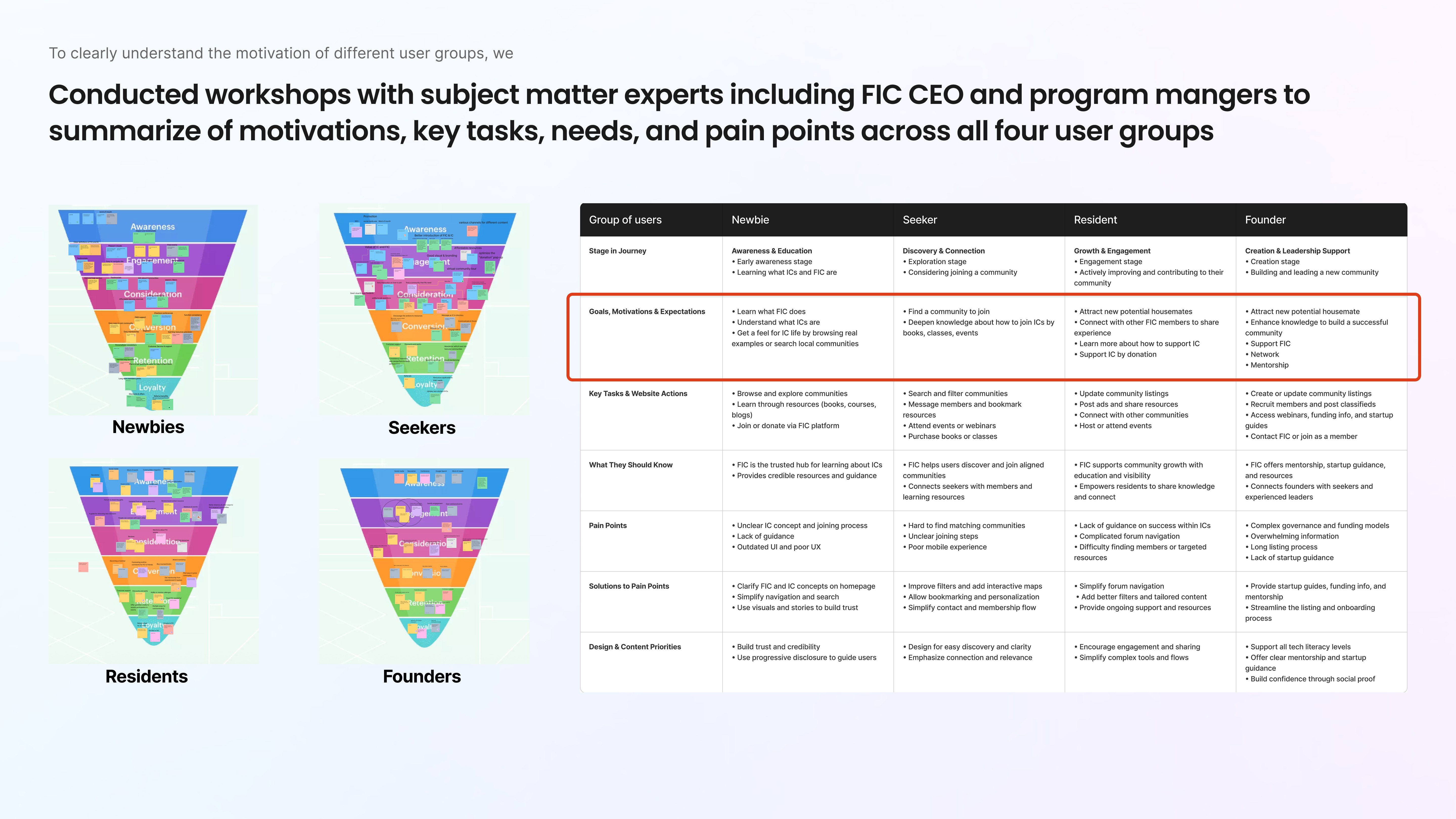
Creating clarity by User Experience Workshop with SMEs
When resources are tight and timelines are shrinking, we couldn't get more interviews across all user segments. However, we couldn't let that stall our momentum.
To move forward, we conducted a cross-functional workshop and invited key stakeholders, including the CEO, program manager, communications director, and IT lead, to participate as subject-matter experts.
Together, we mapped:
The motivations of different user types (seekers, residents, founders)
Core tasks for all 4 user types
Key decision points
And potential drop-off moments
We walked through the entire lifecycle:
Awareness → Engagement → Consideration → Conversion → Retention → Loyalty
Next, I led the synthesis of these insights into a structured framework, systematizing user motivations, tasks, and pain points. This process not only deepened our understanding of the diverse user base but also validated our core design hypotheses.
Challenge 2: Rebuilding search: From friction to flow
Search was failing users
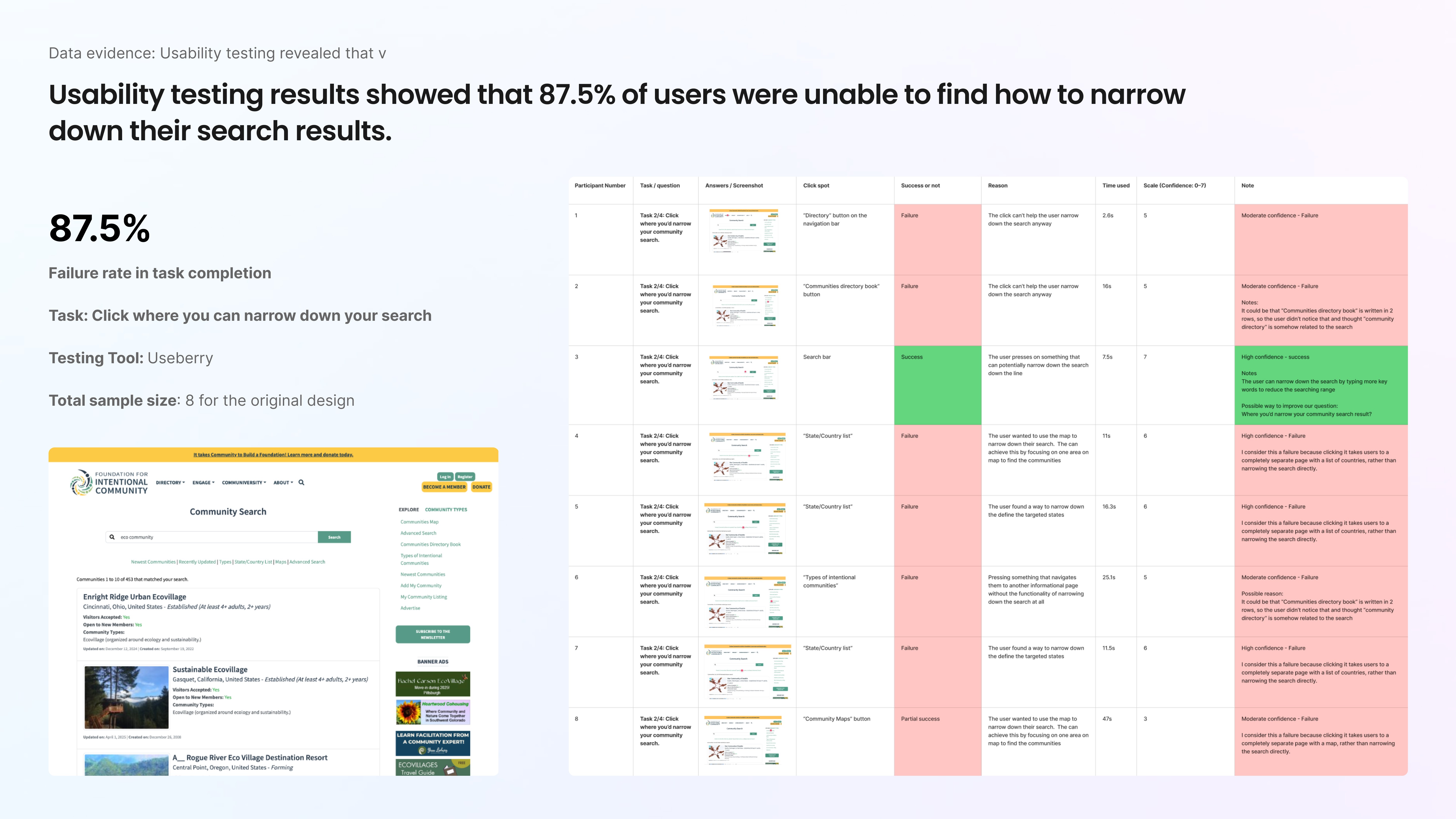
When we tested the original search experience, the results were hard to ignore.
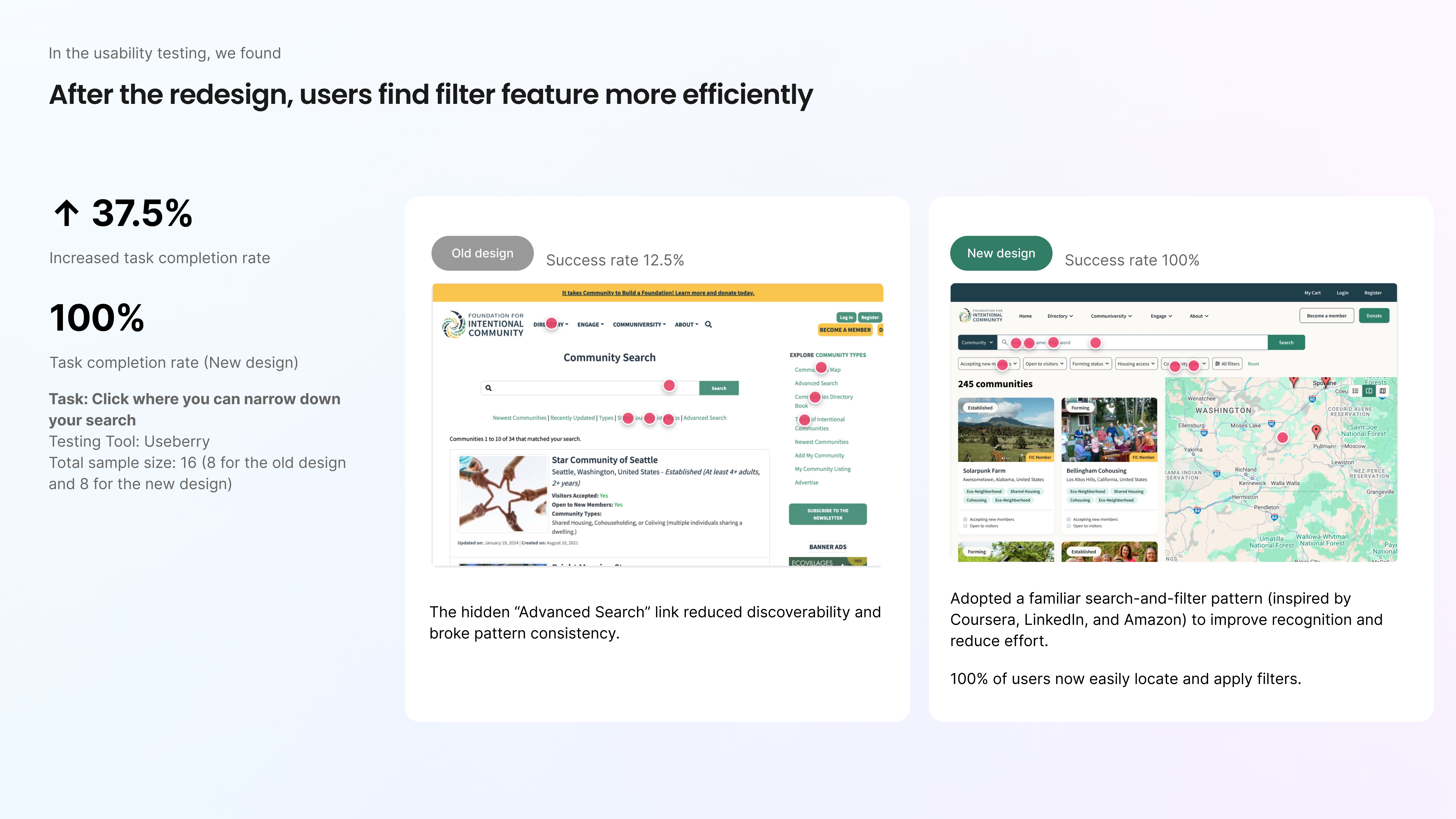
87.5% of users couldn’t find how to narrow down search results.
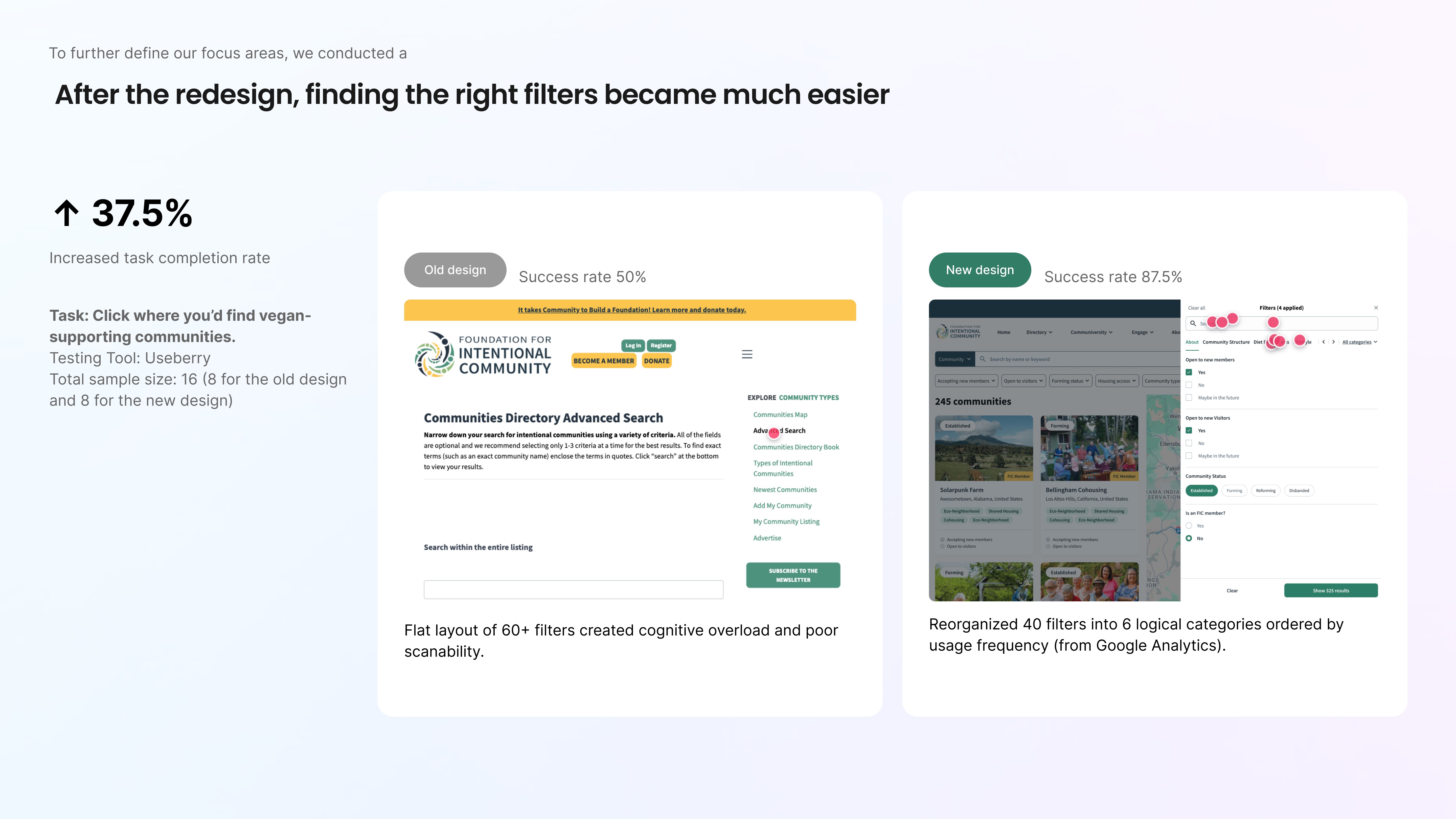
On the filter page, only 50% could locate the vegan-friendly filter during the usability task
However, search is the heart of discovery.
If users can’t filter, they can’t decide.
If they can’t decide, they leave.
This wasn’t something that could be solved with minor UI adjustments. It required rethinking how the entire search experience worked.
My Approach: Fix the system, not the surface
Rather than adjusting isolated UI elements, I treated this as a system-level redesign.
Step 1: Learning from adjacent markets
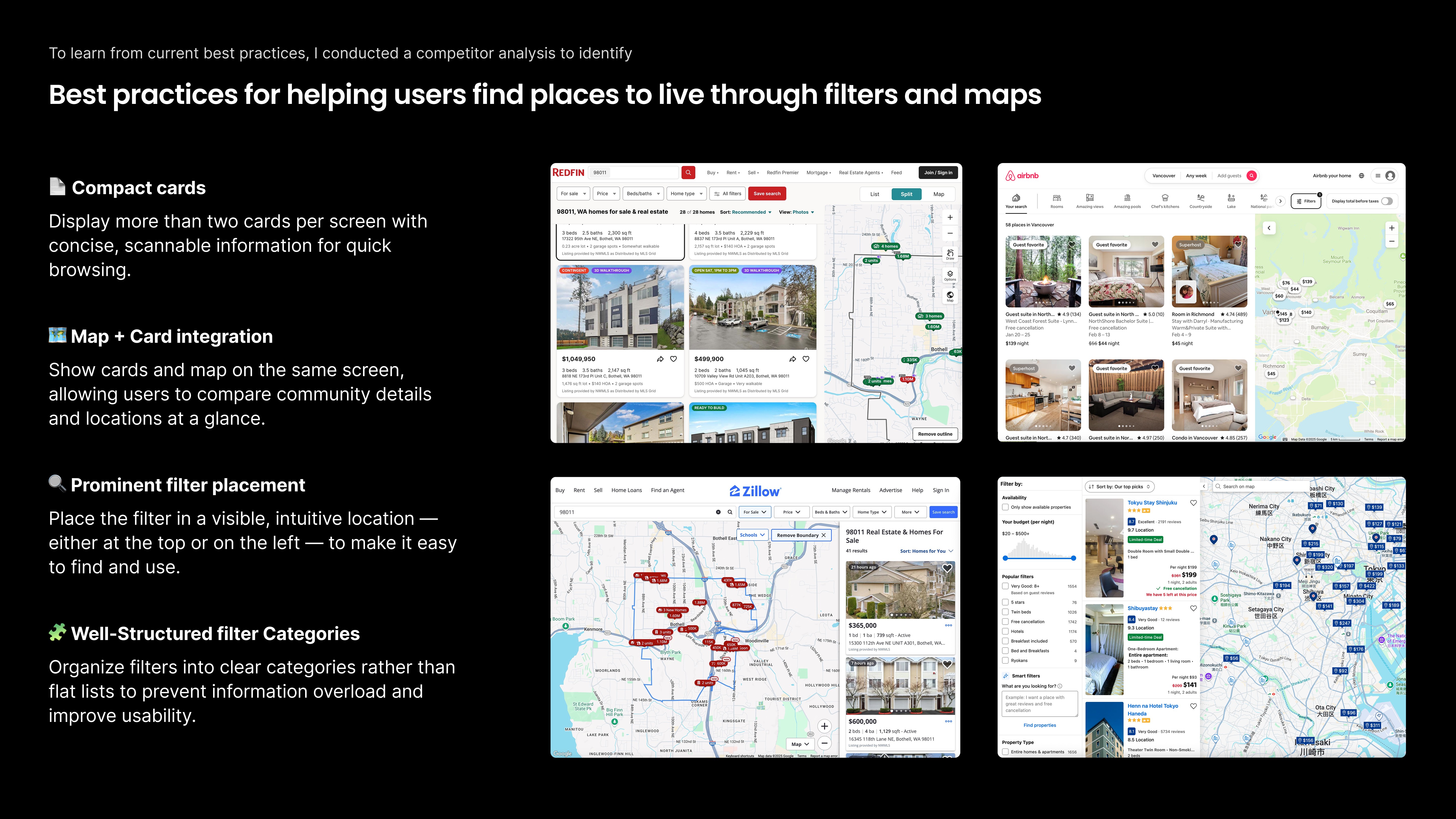
Without a direct competitor, I expanded the lens and analyzed housing, directory, and marketplace platforms to understand how they structure complex search interface.
I focused on:
How search results are laid out
How maps and cards work together
Where filters live and how visible they are
How much information appears at once and how it’s prioritized
Finally, clear patterns emerged. The strong platforms did three things exceptionally well:
Made filters impossible to miss
Organized categories in a way that felt intuitive, not overwhelming
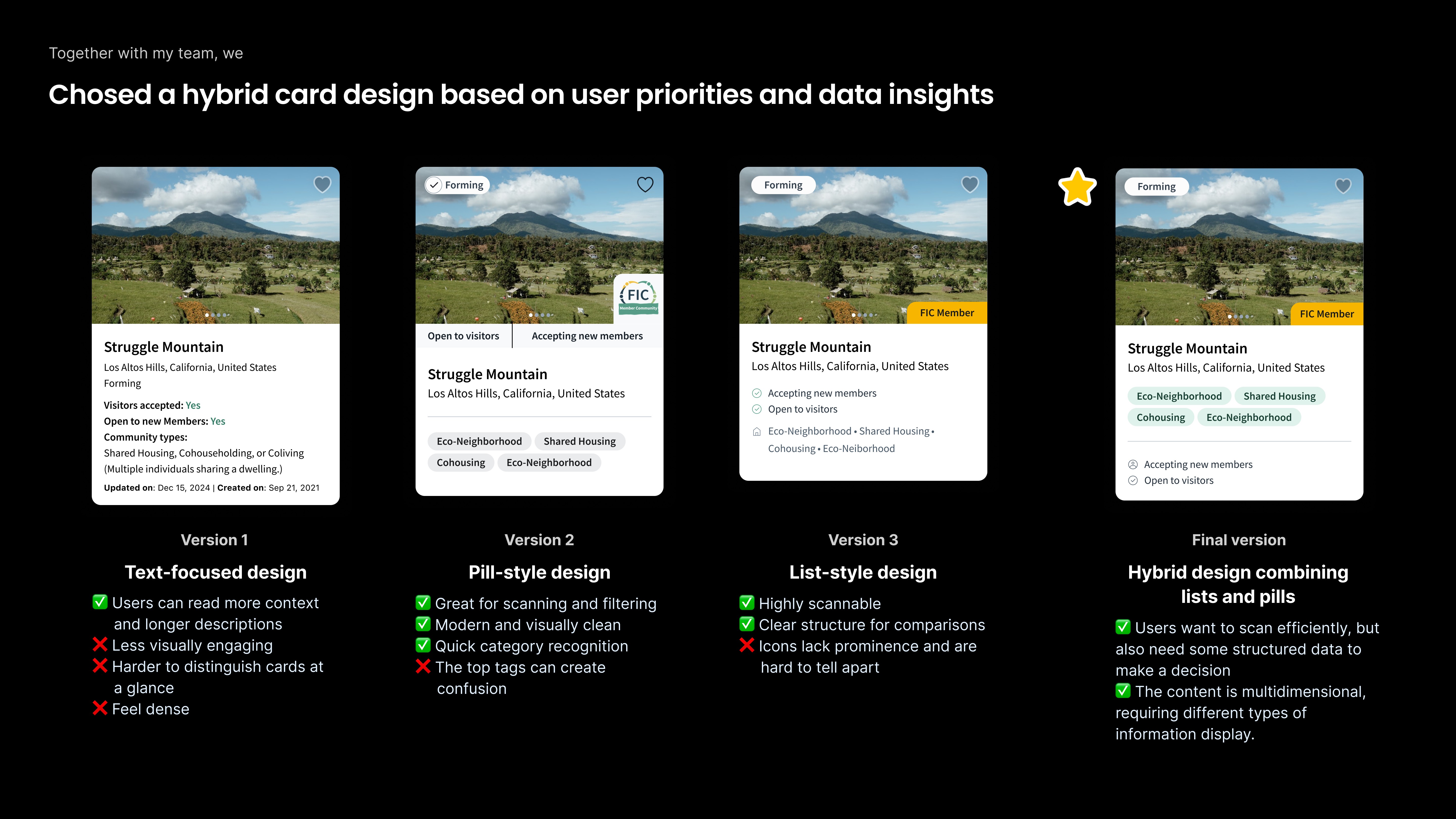
Designed cards for fast scanning and easy comparison
Step 2: Letting data drive filter prioritization
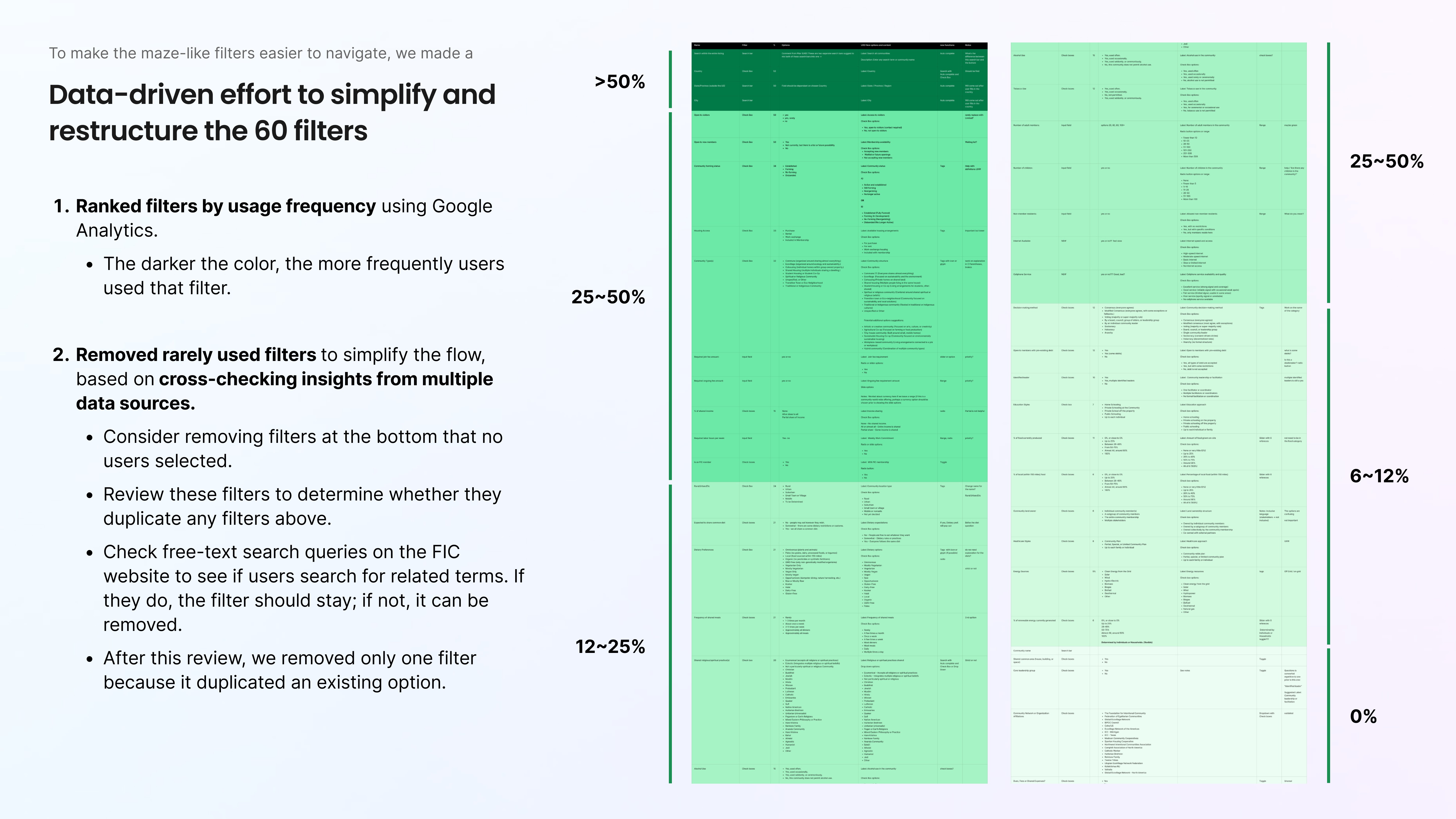
Instead of debating which filters “felt important,” I teamed up with a teammate to analyze Google Analytics data to rank every filter by usage frequency.
Here's what we did:
Group 60 filters into logical clusters
Cross-reference low-usage filters with user feedback
Remove rarely used or redundant options
The result:
Reduced from 60 filters to 40
Organized into 8 structured categories
This dramatically reduced cognitive load while preserving functionality.
Step 4: Restructuring the filter interaction pattern
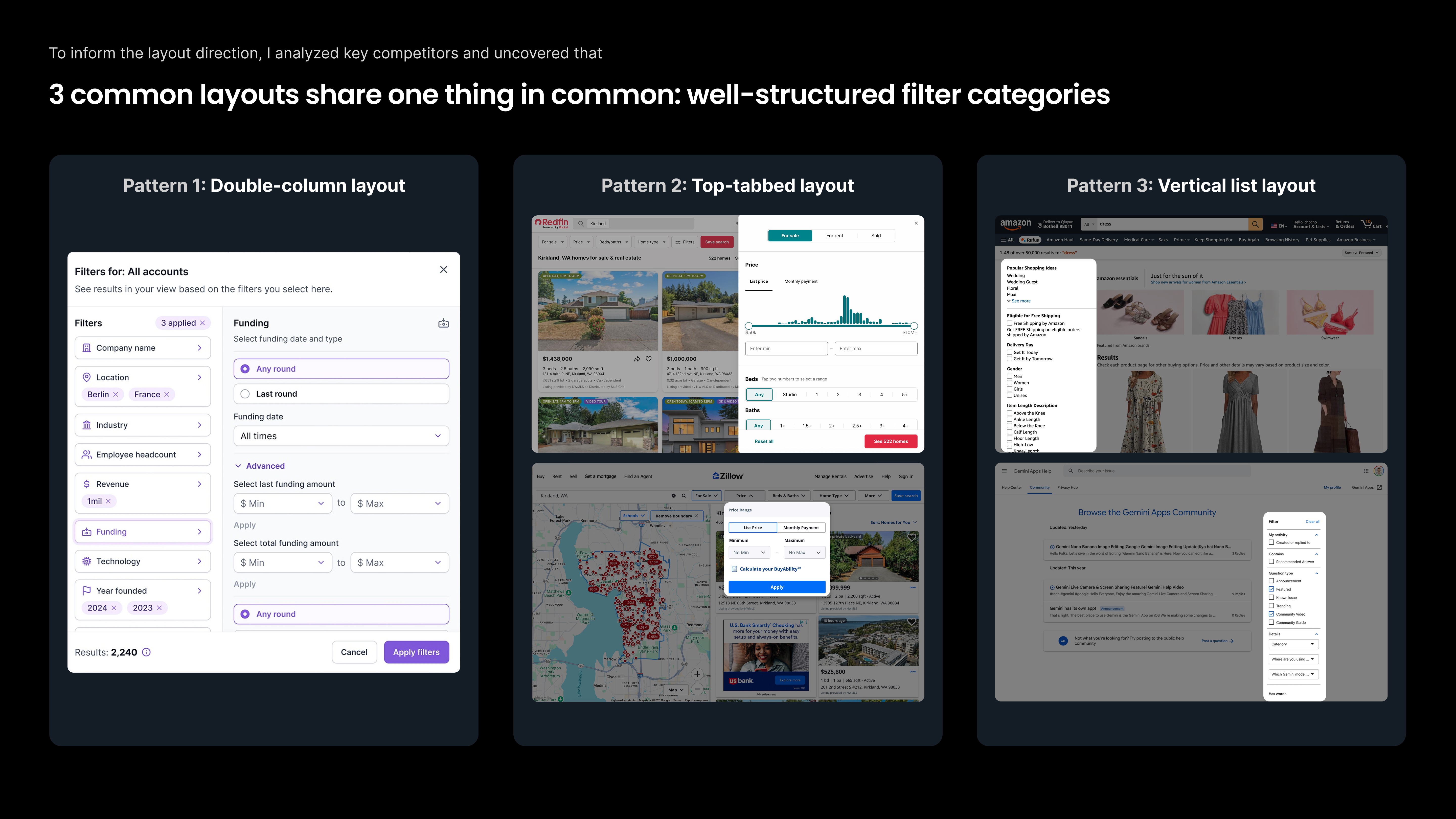
To improve navigability, I did copeptior analysis to summrize the most established filter layout patterns, I found 3 patterns:
Double-column layout
Top-tab navigation
Vertical list
Each option offered different usability strengths and implementation implications.
Validation & iteration
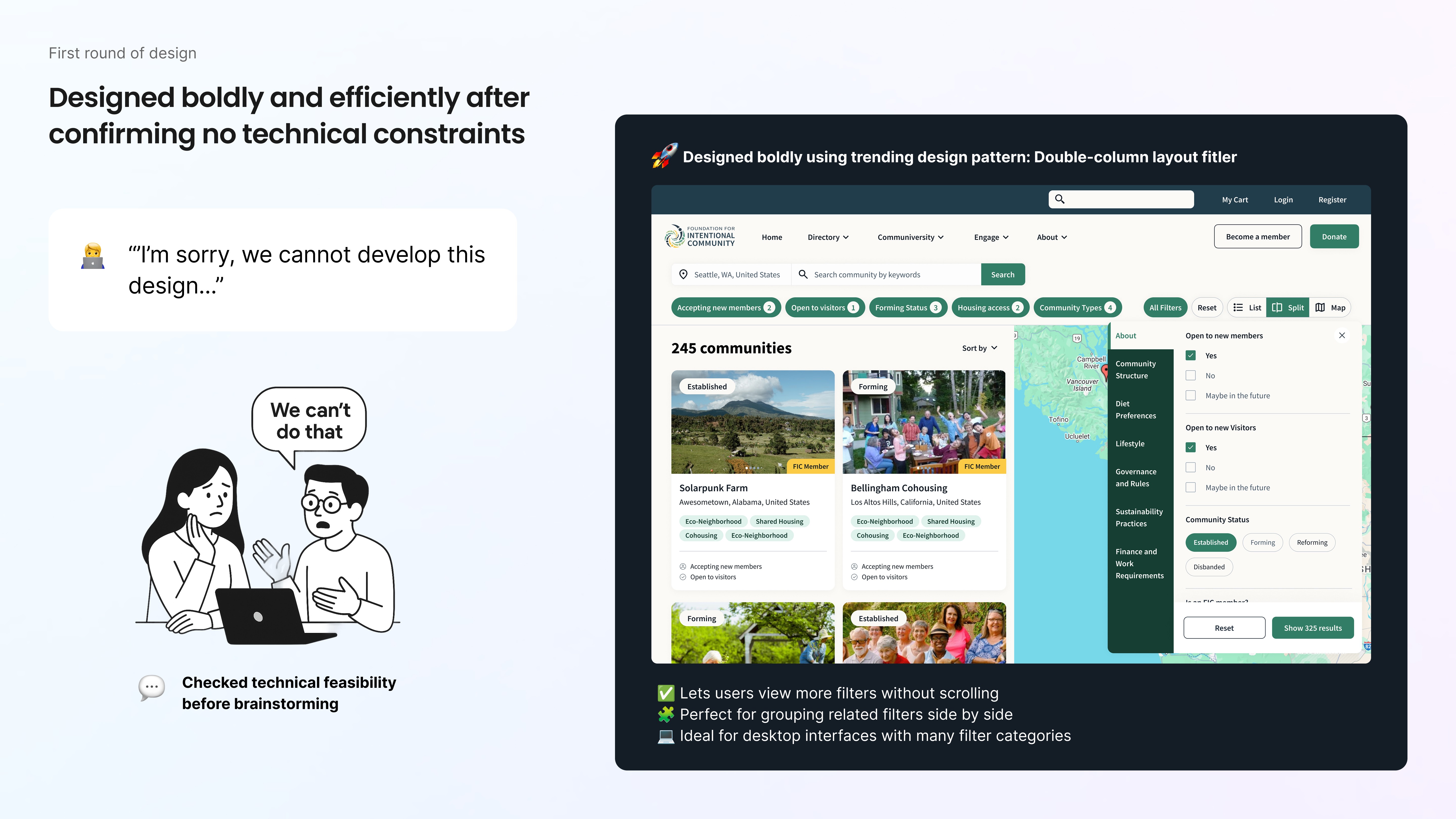
At first, I was excited about the double-column layout.
With eight clearly defined filter categories, each containing multiple options. It felt like the perfect structural match. Double-column patterns are great for distributing dense information and reducing visual overload, so I quickly designed a prototype and shared it with engineering.
And then came the reality check.
Engineering flagged major implementation constraints: the interaction model would be too complex within our current architecture and timeline.
Instead of pushing for the “ideal” design in isolation, I took a step back.
Good design isn’t just about what looks right, it’s about what works holistically.
So I reassessed the trade-offs across:
User clarity
Interaction efficiency
Technical feasibility
Long-term scalability
I then proposed an alternative that preserved category visibility while simplifying the interaction model.
Together with engineering, we aligned on a top-tabbed structure, a solution that maintained strong discoverability, reduced complexity, and was practical to implement.
It wasn’t the flashiest option. But it was the right one. And that’s what product designer is about: not insisting on your first idea, but co-creating the best possible solution within real-world constraints.
The Outcome:
Post-redesign usability testing showed significant improvement:
+37.5% increase in success rate
100% task completion rate
–25% failure rate
Improved filter discoverability and navigation efficiency
What was once a high-friction, investigative experience became intuitive and structured.
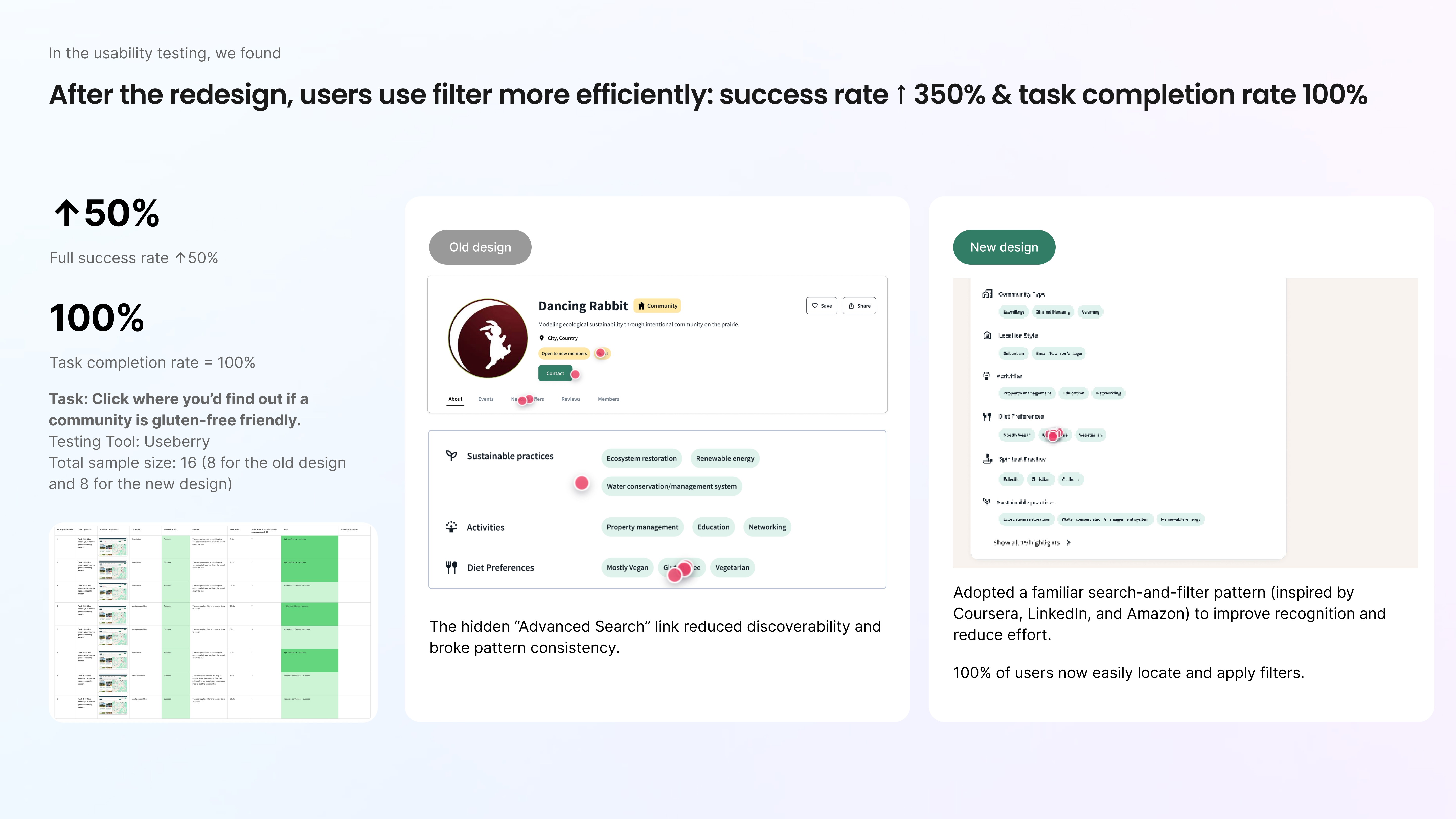
Challenge 3: Simplifying the community profile page into a Clear Decision Space
Final design
Identifying the problems
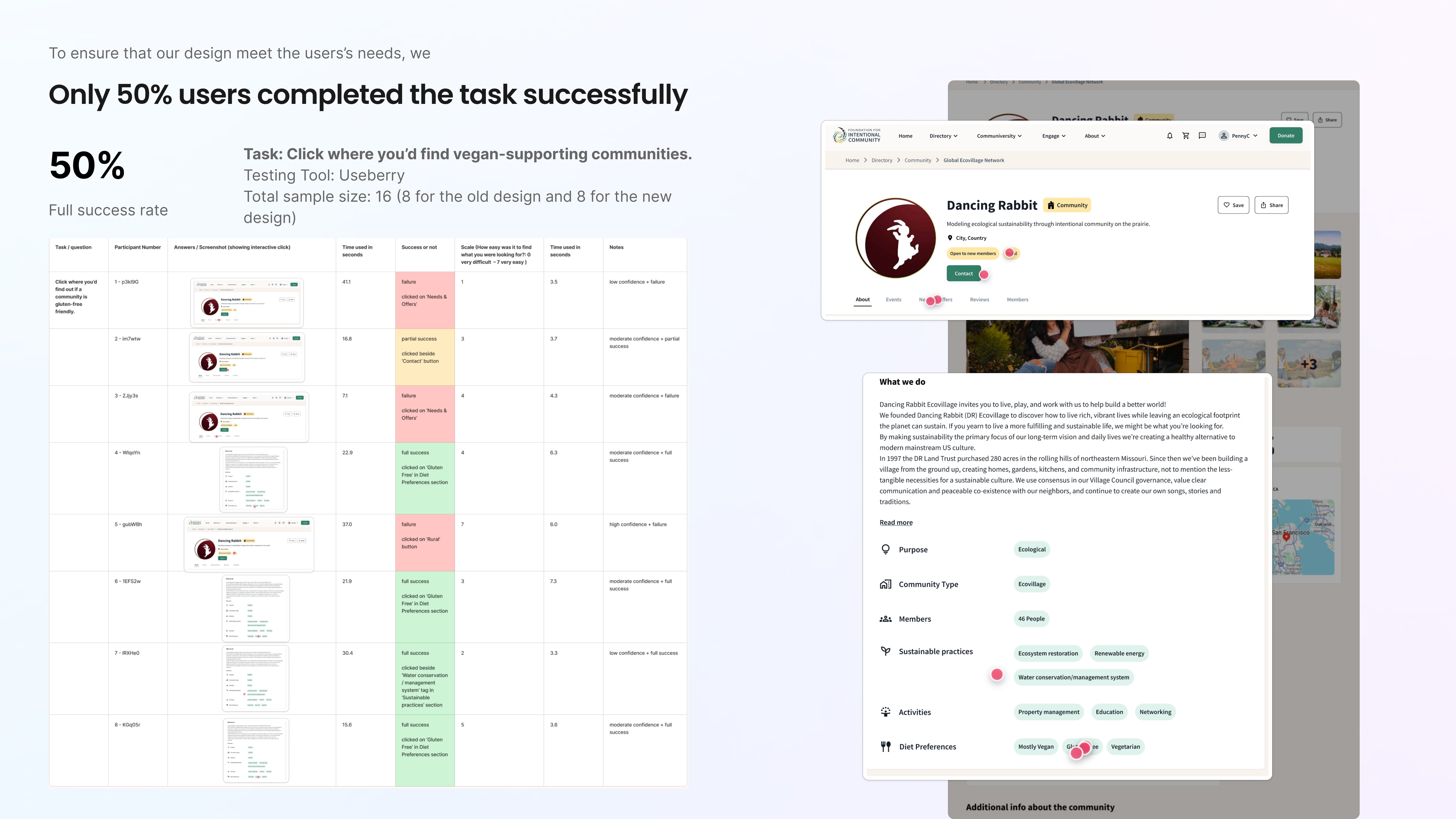
When we tested the revised community profile page, the results were unexpected.
We asked users to find where a community indicates whether it is gluten-free. Only 50% succeeded. The issue wasn’t missing information. It was misplaced attention.
Users gravitated toward prominent header tags or navigation tabs, assuming the answer lived there. The relevant content was technically present, but the structure wasn’t guiding behavior effectively.
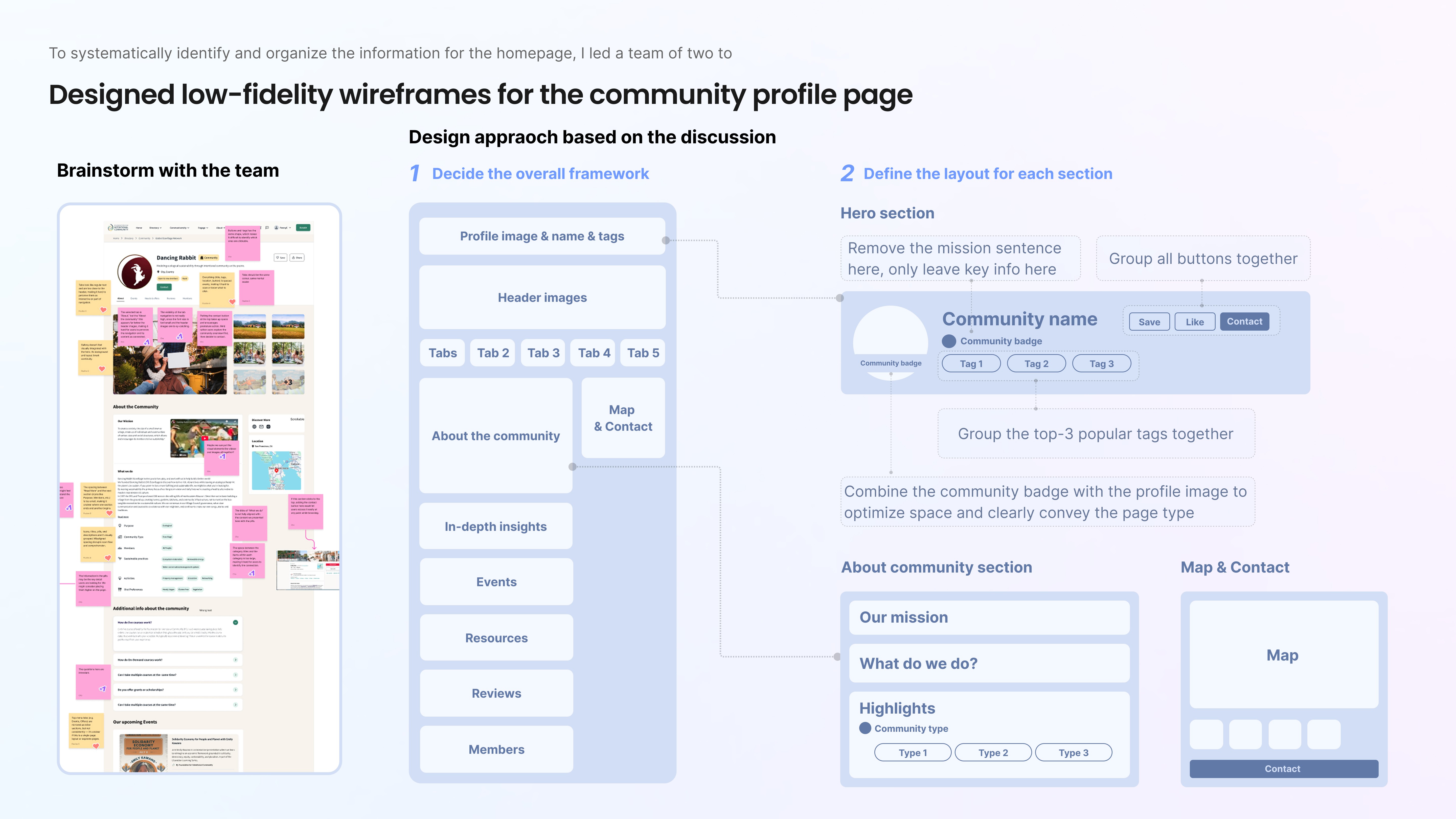
That’s when I realized: we need to revise this page too.
Reflections
This project strengthened my belief that clarity is a strategic advantage.
At FIC, we weren’t simply redesigning pages; we were rebuilding understanding. Users were confused about what the platform offered, how to search effectively, and how to make decisions with confidence. The challenge wasn’t a lack of features. It was a lack of structure.
What this project taught me most is that great design is rarely about adding more. It’s about organizing complexity in a way that makes the right path feel obvious.
Three lessons stand out:
1. Clarity requires alignment
Because we couldn’t always access every user segment directly, I learned how to turn stakeholders into meaningful subject-matter partners. Conducitng workshops, synthesizing competing perspectives, and translating ambiguity into structured direction became just as important as interface design itself.
Design leadership is not about having the loudest opinion; it’s about creating shared clarity.
2. Data builds confidence
When there were no direct competitors to benchmark against, we relied on analytics, usability testing, and iterative validation.
From restructuring 60 filters into prioritized categories, to improving search discoverability by 7x, to reaching 100% task completion, every decision was anchored in evidence.
This reinforced something important: intuition guides direction, but data earns trust.
3. Ownership means knowing when you’re not done
The profile page had already been redesigned once, but usability results showed something still wasn’t working. It would have been easy to move on. Instead, I stepped in, re-audited the hierarchy, and pushed for refinement.
That experience deepened my understanding of ownership. I learned that product design isn’t about shipping once. It’s about staying accountable to outcomes.
Growth
This project helped me grow into a designer who:
Thinks in systems, not screens
Uses structure as a strategic tool
Balances user needs, stakeholder priorities, and technical constraints
Iterates until measurable clarity is achieved
In the end, we delivered:
37.5% improvement in search success rate
50% reduction in homepage comprehension failure
Significant gains in discoverability and filter efficiency
But more importantly, we transformed the experience from something users had to “figure out” into something that simply made sense.
And that shift, from confusion to clarity, is the kind of impact I aim to create in every product I work on.