Subsease

Subscription management made easy
My role

Product Designer

Overview

Subscriptions are designed to be invisible, until they quietly drain your account.

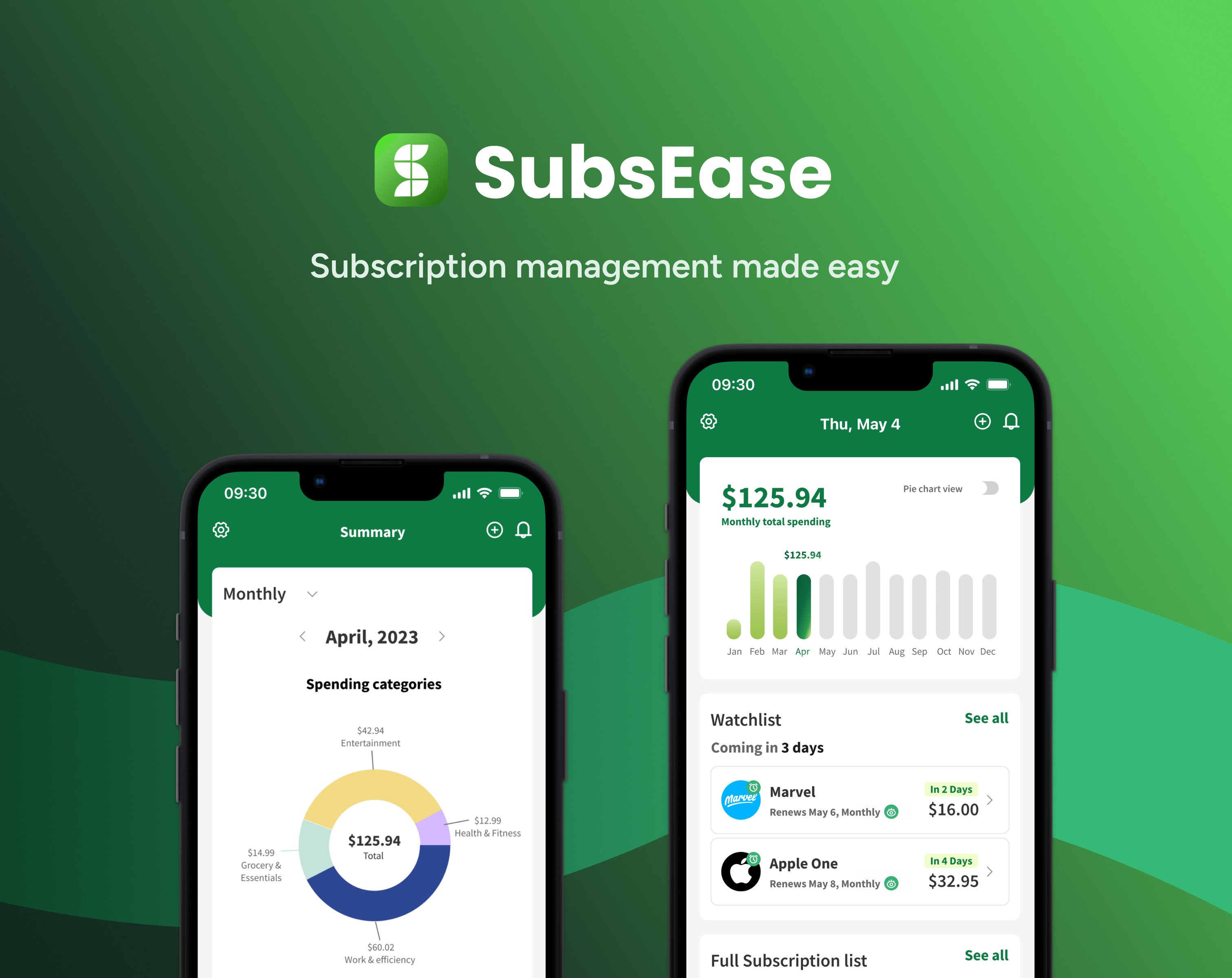
SubsEase is a mobile concept that helps users see, control, and anticipate their subscription spending. As a product designer, I led the project end-to-end: from research and competitive analysis to interaction design, prototyping, and usability testing.

The mission was simple but powerful:

Turn subscription anxiety into financial clarity.

Results

  • 100% of participants successfully located their total monthly subscription cost

  • 100% identified upcoming renewals without assistance

  • Users completed subscription management tasks with minimal hesitation

  • Average satisfaction score: 9.4/10

Summary First, Details on Demand

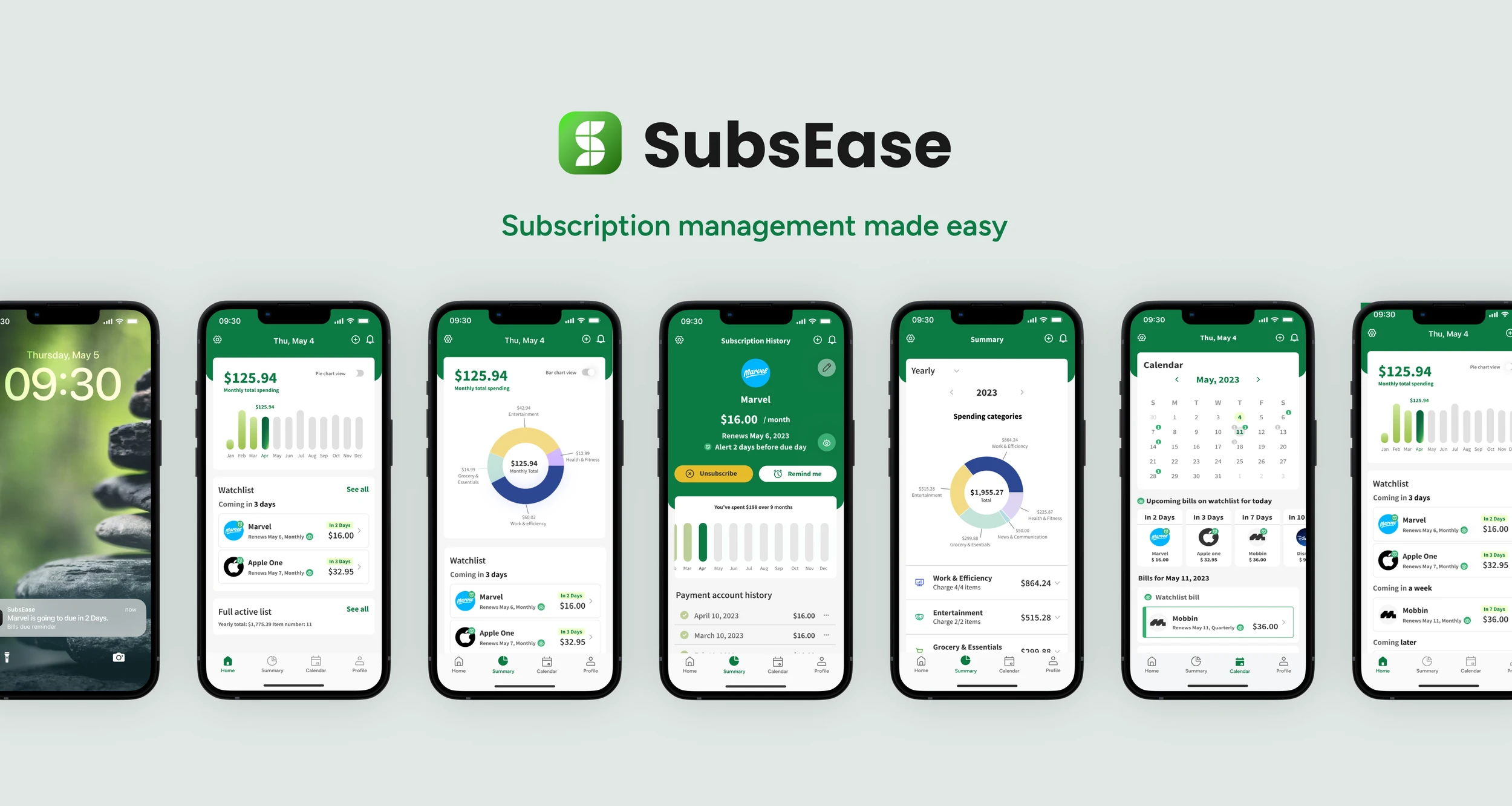
Upon launching the app, users will be directed to the home page, featuring three panels: the chart panel, watchlist panel, and full subscription list. This layout allows users to efficiently track key information related to their subscriptions.

When users tap 'Summary', they will see their current month's spending summary with categories and trends.

Tapping the 'Monthly' title with the arrow, users will switch to the 'Yearly' subscription summary.

Users can also tap on a category panel for detailed subscription information in a drop-down menu.

Upon launching the app, users will be directed to the home page, featuring three panels: the chart panel, watchlist panel, and full subscription list. This layout allows users to efficiently track key information related to their subscriptions.

Summary First, Details on Demand

Shared caregiving

Summary First, Details on Demand

A clear snapshot of monthly and yearly spending

Invite family or caregivers: Mothers can invite other caregivers by providing their email addresses. The app sends invitations for them to join and view the baby.

Visit times: Family members’ and caregivers' visit times are displayed on the list, serving as a reminder for family members to provide support, share duties, and offer emotional assistance to mothers, reducing their burden and promoting a sense of support.

Upon launching the app, users will be directed to the home page, featuring three panels: the chart panel, watchlist panel, and full subscription list. This layout allows users to efficiently track key information related to their subscriptions.

The Summary view gives users an immediate understanding of their subscription expenses for the current month, including category breakdowns and spending trends.

By tapping the arrow next to “Monthly,” users can seamlessly switch to a Yearly view to see the broader financial impact of their subscriptions.

Each category panel is interactive. With a single tap, users can expand it to reveal detailed subscription information — using progressive disclosure to maintain clarity without overwhelming the screen.

The Challenge

User research and business goals converged around three core problems:

  1. Lack of visibility: Users couldn’t see their total subscription spending in one place.

  2. Friction in canceling: Unsubscribing felt complicated and opaque.

  3. Unexpected renewals: Users often forgot about auto-renewals until money was already deducted.

The real design challenge wasn’t feature creation. It was information prioritization. So, I had to decide:

  • What matters most?

  • How do we reduce cognitive overload while preserving control?

User interview

I conducted 5 in-depth user interviews to understand behaviors and emotional triggers around subscriptions.

Key insights

  1. Totals matter more than individual bills

“I want to know how much I spend in total each month.”

Users care about the big picture first, not isolated charges. Monthly totals and category breakdowns were consistently prioritized.


  1. Upcoming bills must be visible immediately

“I hope to see upcoming bills on the first page.”

Users want proactive visibility — not reactive discovery.


  1. Financial tools shouldn’t feel boring

“I don’t want to see a lot of forms.”
Competitive Analysis

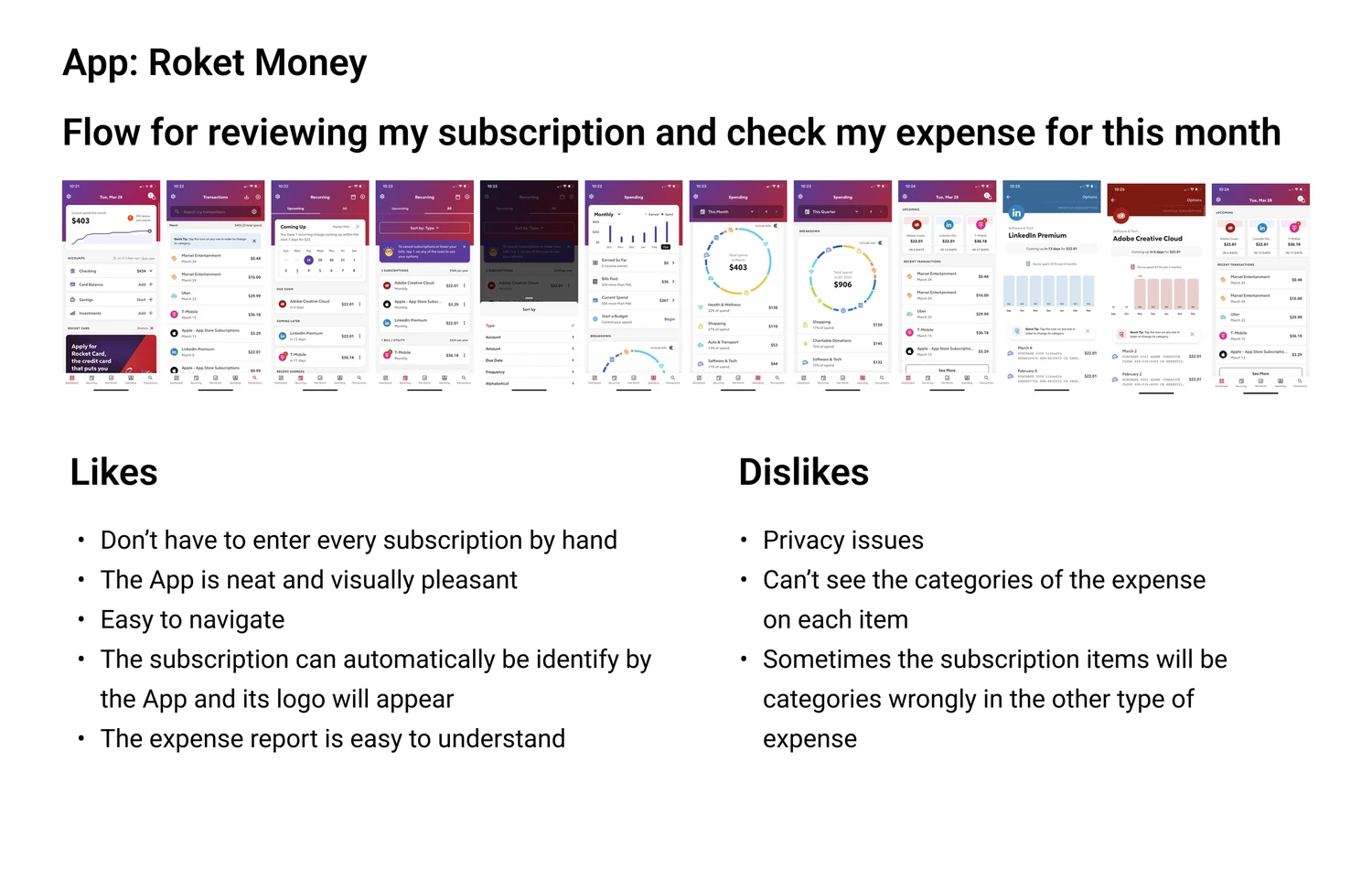
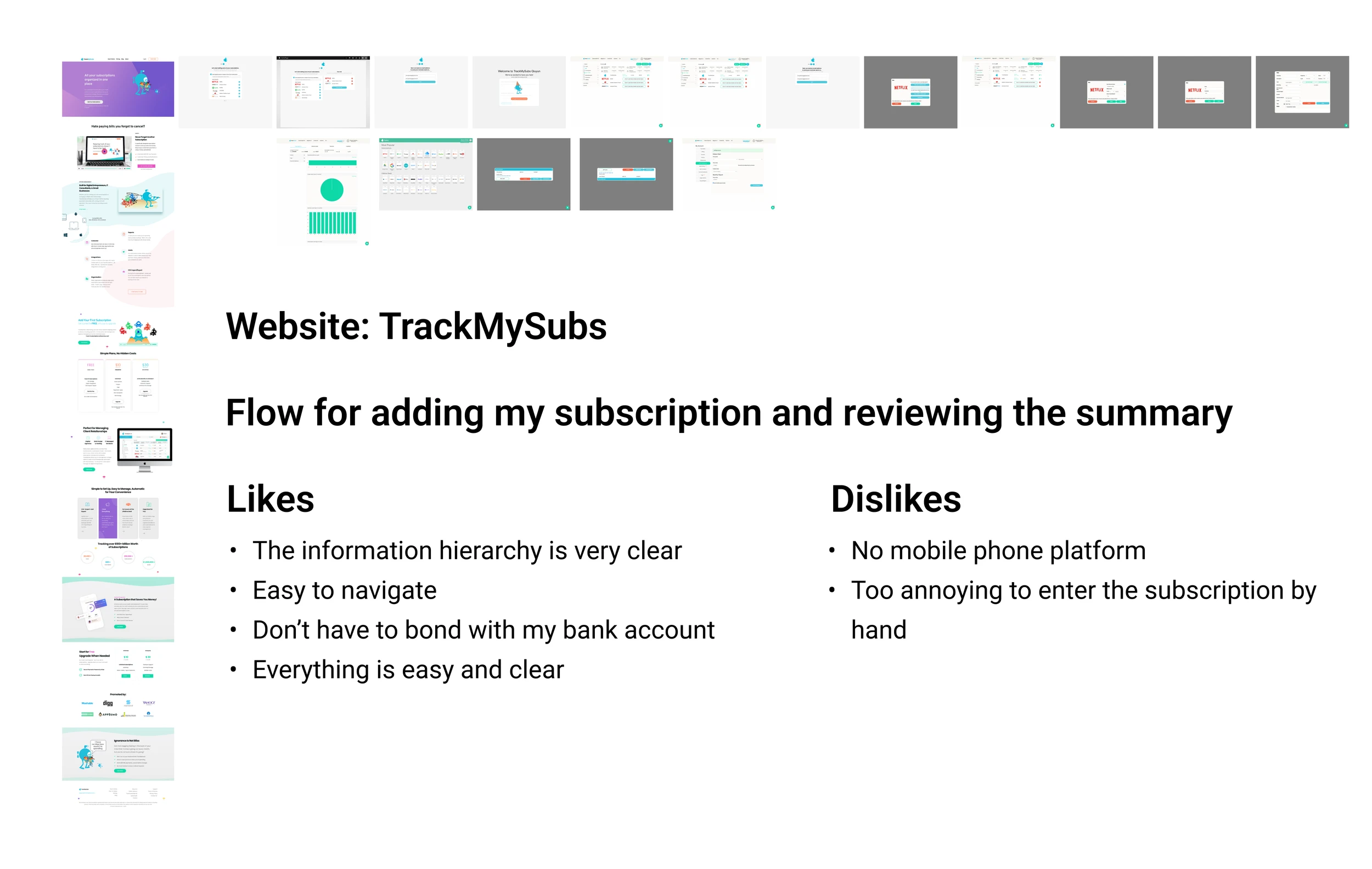
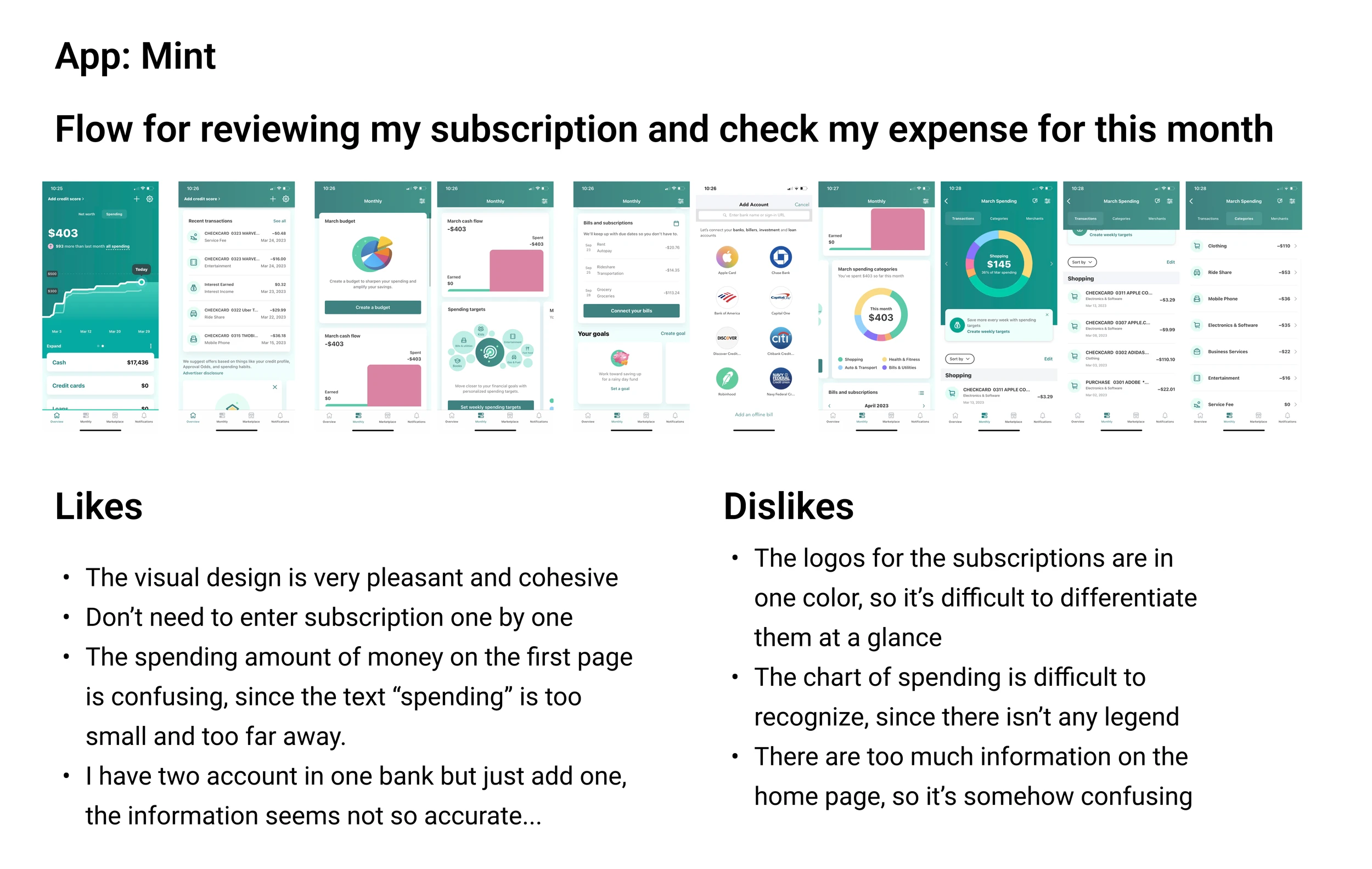
I analyzed apps like:

  • Mint

  • Rocket Money

  • TrackMySubs

Most competitors focused heavily on:

  • Credit card linking

  • Transaction tracking

  • Financial dashboards

However, I identified an opportunity:

Shift from transaction tracking to subscription-specific clarity.

SubsEase would focus on intentional control, not just passive monitoring.

Framing the opportunity

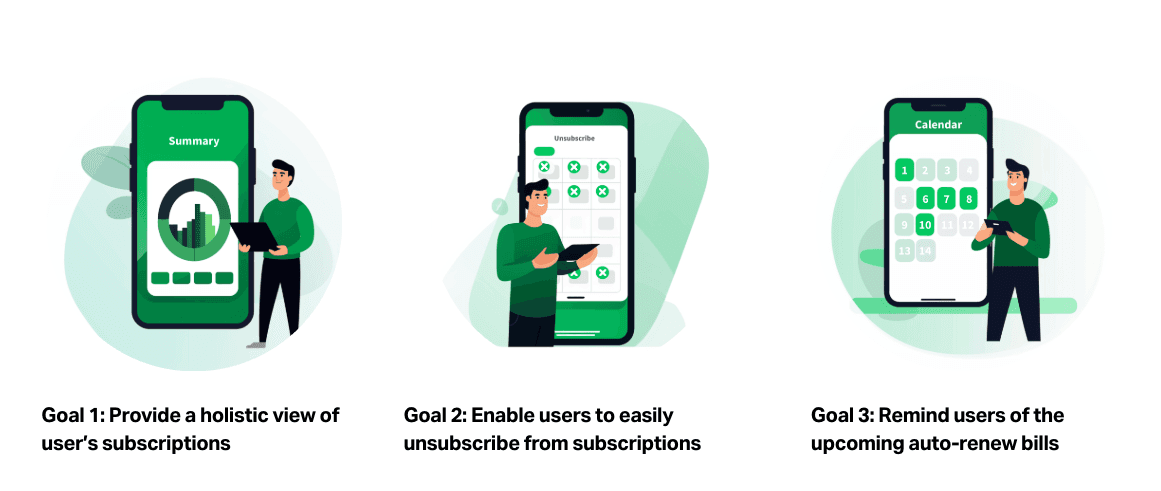
Rather than adding more features, I structured the solution around three high-impact pillars:

  1. See everything

  2. Cancel confidently

  3. Never be surprised again

Key function 1:
Holistic Subscription View

Key function 1
Holistic Subscription View

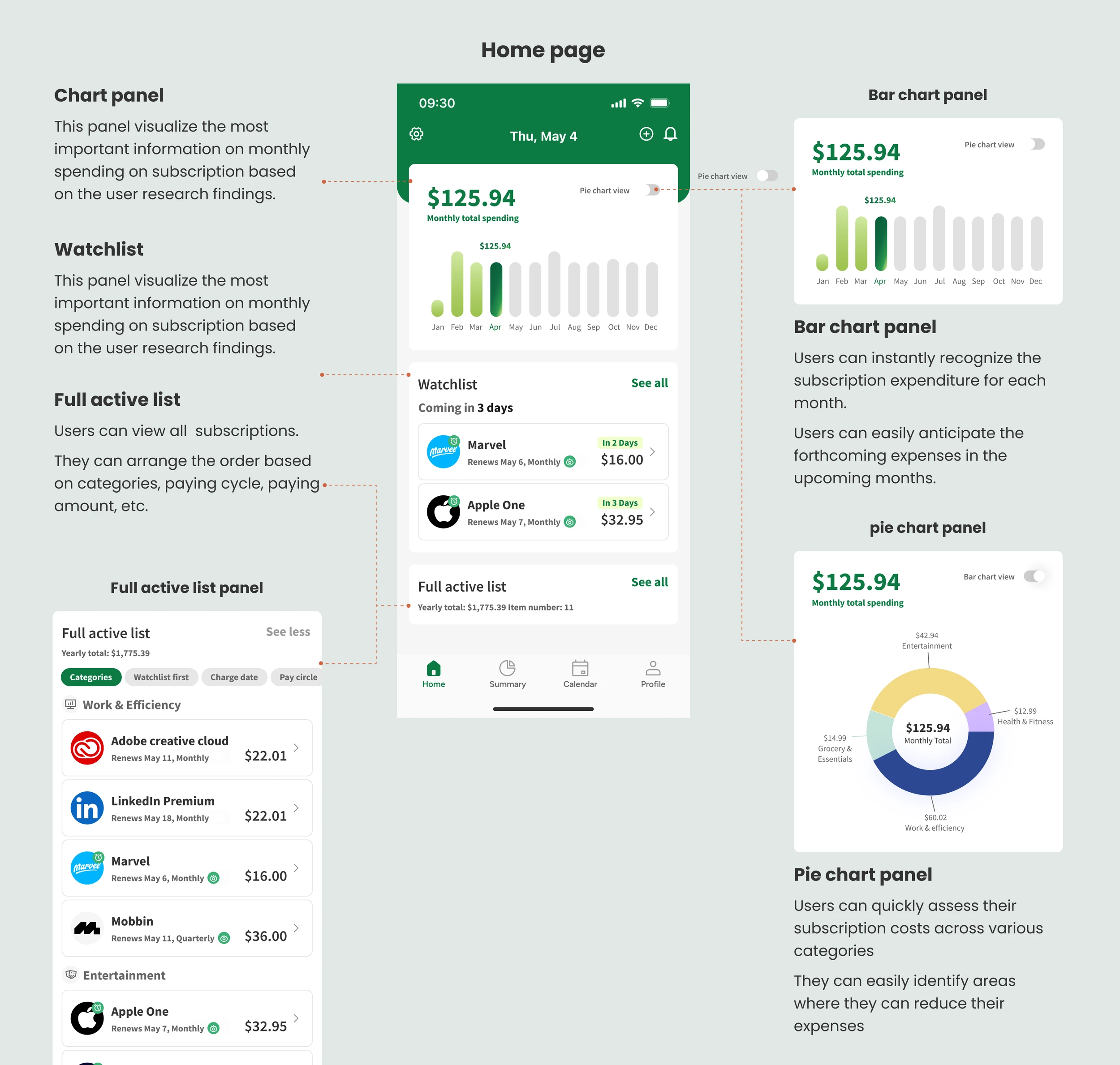
A structured overview, the moment you open the app

The moment users open the app, they land on a home screen designed for instant clarity — not clutter.

Three focused panels work together:

  • Chart panel for a visual snapshot of spending

  • Watchlist panel for upcoming renewals that need attention

  • Full subscription list for complete visibility

This layered layout lets users scan, prioritize, and act within seconds.

Instead of digging through data, they see what matters immediately.

A clear snapshot of monthly and yearly spending

The Summary view gives users an immediate understanding of their subscription expenses for the current month, including category breakdowns and spending trends.

By tapping the arrow next to “Monthly,” users can seamlessly switch to a Yearly view to see the broader financial impact of their subscriptions.

Each category panel is interactive. With a single tap, users can expand it to reveal detailed subscription information — using progressive disclosure to maintain clarity without overwhelming the screen.

Key function 2:
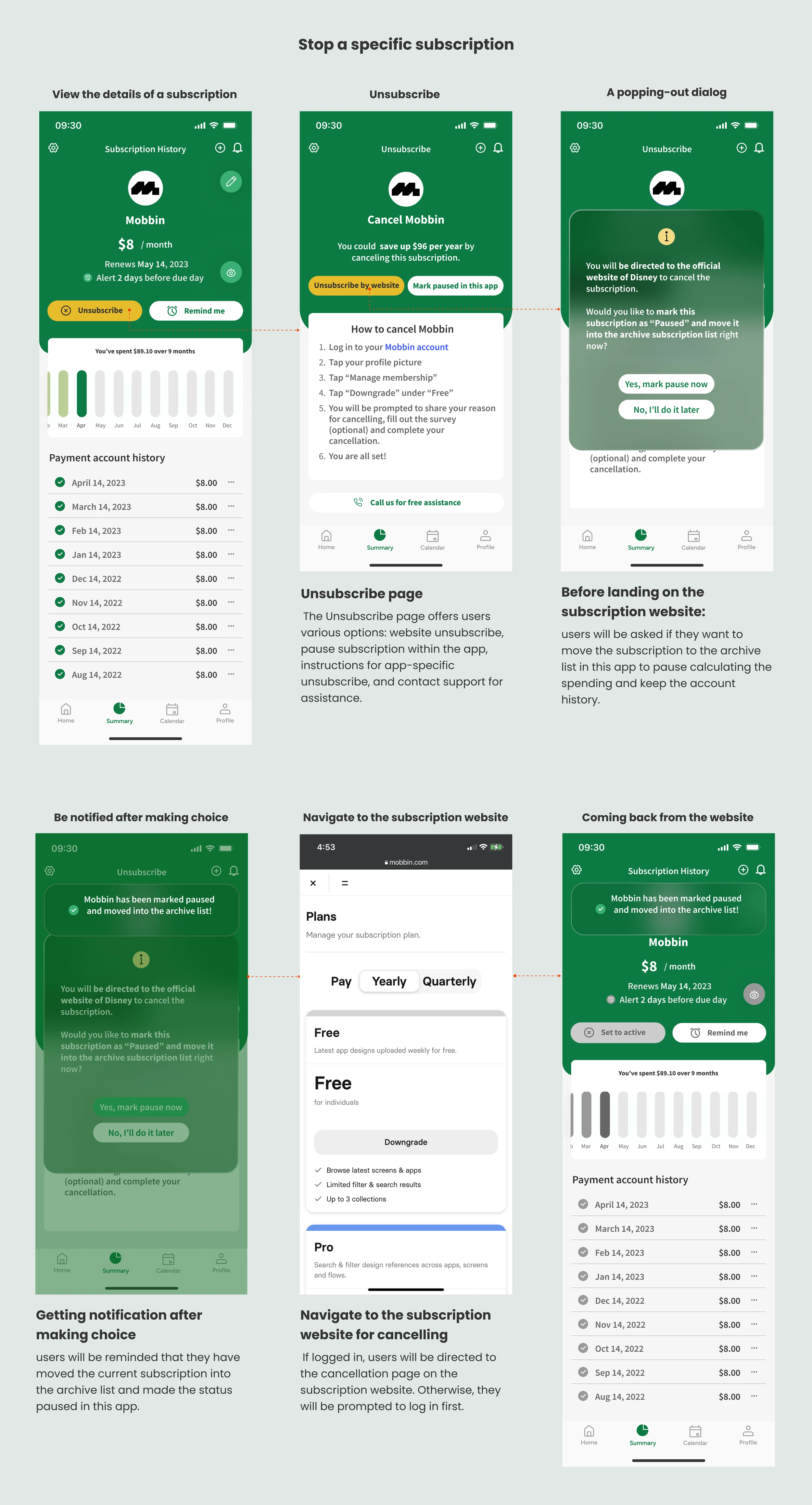
Streamlining the unsubscribing experience
Key function 3:
Proactive reminders before auto-renewals

Enable an effortless unsubscribing experience without credit card tracking

To prioritize user privacy and flexibility, SubsEase allows users to manage and cancel subscriptions without requiring credit card linking. This removes unnecessary friction while supporting subscriptions tied to multiple payment methods.

When users tap “Unsubscribe,” they are taken to a dedicated cancellation screen with clear next steps. From there, they can:

  • Select “Unsubscribe via website” for direct redirection

  • Follow step-by-step cancellation instructions

  • Tap “Call us for help” to receive free assistance

The experience is designed to eliminate confusion and restore a sense of control, transforming cancellation from a frustrating task into a simple, guided action.

Key function 3:
Proactive reminders before auto-renewals

Make upcoming bills visible at a glance

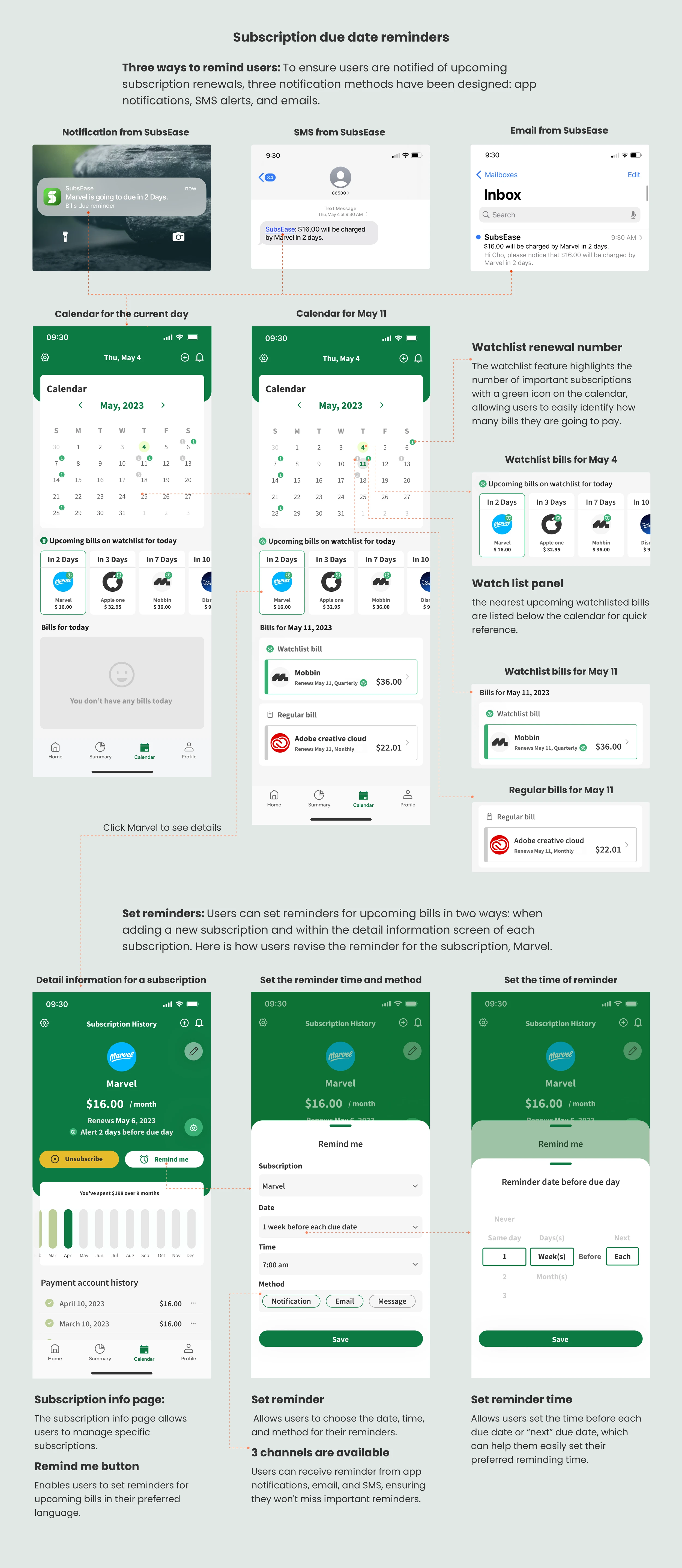
SubsEase ensures users are notified before any subscription auto-renews, helping them stay in control of their spending.

Users can customize reminder preferences across multiple channels — including in-app notifications, email, and SMS — based on how they prefer to stay informed.

On the home screen, the Watchlist visually prioritizes time-sensitive subscriptions:

  • Important renewals are marked with a green icon

  • Regular subscriptions appear with a gray icon

These clear visual cues reduce cognitive load and allow users to instantly identify what requires attention — turning potential surprises into informed decisions.

What I learned

Impact

1 .Clarity reduce emotional

Financial information carries psychological weight. Designing clarity reduces stress, not just confusion.

  1. Hierarchy drives behavior

Strong visual hierarchy directly influences confidence and decision-making speed.

  1. Simplicity is structured, not reduced

Intuitive design isn’t about removing complexity. It’s about organizing it intentionally.

  • 100% of participants successfully located their total monthly subscription cost

  • 100% identified upcoming renewals without assistance

  • Users completed subscription management tasks with minimal hesitation

  • Average satisfaction score: 9.4/10

  • Participants described the experience as “clear,” “calming,” and “helpful”

What I learned

1 .Clarity reduce emotional

Financial information carries psychological weight. Designing clarity reduces stress, not just confusion.

  1. Hierarchy drives behavior

Strong visual hierarchy directly influences confidence and decision-making speed.

  1. Simplicity is structured, not reduced

Intuitive design isn’t about removing complexity. It’s about organizing it intentionally.

Impact

  • 100% of participants successfully located their total monthly subscription cost

  • 100% identified upcoming renewals without assistance

  • Users completed subscription management tasks with minimal hesitation

  • Average satisfaction score: 9.4/10

  • Participants described the experience as “clear,” “calming,” and “helpful”

Impact

When users tap 'Summary', they will see their current month's spending summary with categories and trends.

Tapping the 'Monthly' title with the arrow, users will switch to the 'Yearly' subscription summary.

Users can also tap on a category panel for detailed subscription information in a drop-down menu.

A structured overview, the moment you open the app

The moment users open the app, they land on a home screen designed for instant clarity — not clutter.

Three focused panels work together:

  • Chart panel for a visual snapshot of spending

  • Watchlist panel for upcoming renewals that need attention

  • Full subscription list for complete visibility

This layered layout lets users scan, prioritize, and act within seconds.

Instead of digging through data, they see what matters immediately.

Enable an effortless unsubscribing experience without credit card tracking

To prioritize user privacy and flexibility, SubsEase allows users to manage and cancel subscriptions without requiring credit card linking. This removes unnecessary friction while supporting subscriptions tied to multiple payment methods.

When users tap “Unsubscribe,” they are taken to a dedicated cancellation screen with clear next steps. From there, they can:

  • Select “Unsubscribe via website” for direct redirection

  • Follow step-by-step cancellation instructions

  • Tap “Call us for help” to receive free assistance

The experience is designed to eliminate confusion and restore a sense of control, transforming cancellation from a frustrating task into a simple, guided action.

Make upcoming bills visible at a glance

SubsEase ensures users are notified before any subscription auto-renews, helping them stay in control of their spending.

Users can customize reminder preferences across multiple channels — including in-app notifications, email, and SMS — based on how they prefer to stay informed.

On the home screen, the Watchlist visually prioritizes time-sensitive subscriptions:

  • Important renewals are marked with a green icon

  • Regular subscriptions appear with a gray icon

These clear visual cues reduce cognitive load and allow users to instantly identify what requires attention — turning potential surprises into informed decisions.

Create a free website with Framer, the website builder loved by startups, designers and agencies.